
Managed cybersecurity services for law firms combine 24/7 threat monitoring, access controls, and compliance support with the goal of protecting privileged client data and meeting bar association ethics rules. A law firm's risk profile looks nothing like a retail shop's: a single breach can expose attorney-client privilege, blow a discovery deadline, or trigger a malpractice claim. That's why the setup below treats security as a practice-management issue first and an IT checklist second.
- Managed cybersecurity services for law firms pair 24/7 monitoring with compliance mapping to ABA ethics rules.
- TeraCloud runs this model for firms in Texas, Florida, and Wyoming, plus nationwide clients, in 2026.
- Verdict: firms without MFA and a written incident response plan should fix both before year-end.
- vCISO support closes audit and insurer-questionnaire gaps without a full-time hire.
- Managed detection and response catches what antivirus alone misses on shared case files.
Why this matters for law firms
ABA Model Rule 1.1, Comment 8, treats competence as including a working understanding of the risks and benefits of technology — a firm that doesn't secure client data isn't just careless, it's arguably violating its ethical duty. Model Rule 1.6(c) goes further, requiring "reasonable efforts" to prevent unauthorized disclosure of client information.
Law firms are attractive targets precisely because case files are the kind of sensitive material an attacker can threaten to leak: settlement terms, medical records, financial disclosures, merger documents. Managed IT services for law firms exist because generalist IT support rarely maps day-to-day work to these ethics obligations. Cyber insurers have also tightened underwriting in 2026, and many now require documented MFA and endpoint detection before they'll issue or renew a policy — a firm that can't produce that documentation risks a denied claim after a breach, not just the breach itself.
Build the setup: 8 steps for law firm cybersecurity
1. Audit where privileged data lives
Most firms underestimate how many places client data actually sits. Start with a plain inventory before buying anything.
- Partner and associate email inboxes
- Shared drives and document management systems
- E-discovery and litigation support platforms
- Court e-filing portals and client portals
- Mobile devices used for email or calls
- Backup and archival storage, including old case files
2. Lock down access with least-privilege permissions
Access control costs nothing but time. Every firm can do this today without a vendor.
- Assign role-based permissions instead of blanket "everyone" access to shared drives
- Disable shared or generic logins for paralegals and support staff
- Revoke access the same day an employee or contractor leaves
- Review who has access to closed-matter files at least quarterly
- Separate billing system access from case file access
3. Turn on multi-factor authentication everywhere
MFA is free inside Microsoft 365 and most practice management platforms, and it's the single highest-leverage step on this list. Enable it yourself first, then bring in outside help for enforcement across every device and vendor login.
- Turn on MFA in the Microsoft 365 admin center at no added cost
- Require an authenticator app, not SMS, for partners handling privileged matters
- Enforce MFA on VPN and remote desktop access
- Extend MFA to e-discovery and cloud backup vendor logins
Firms that outgrow self-managed MFA rollout typically move to a managed cybersecurity service provider that enforces the policy across every device and flags exceptions automatically, instead of relying on staff to opt in.
4. Deploy managed detection and response
Antivirus alone misses lateral movement inside a network — an attacker who gets one paralegal's password can sit undetected for weeks. Managed detection and response (MDR) watches behavior across endpoints, not just known malware signatures.
- Install free or built-in antivirus on every device as a baseline
- Review login and file-access logs manually at least monthly if going it alone
- Set alerts for logins from unfamiliar locations or after-hours access to closed matters
- Segment guest and conference-room Wi-Fi from the case file network
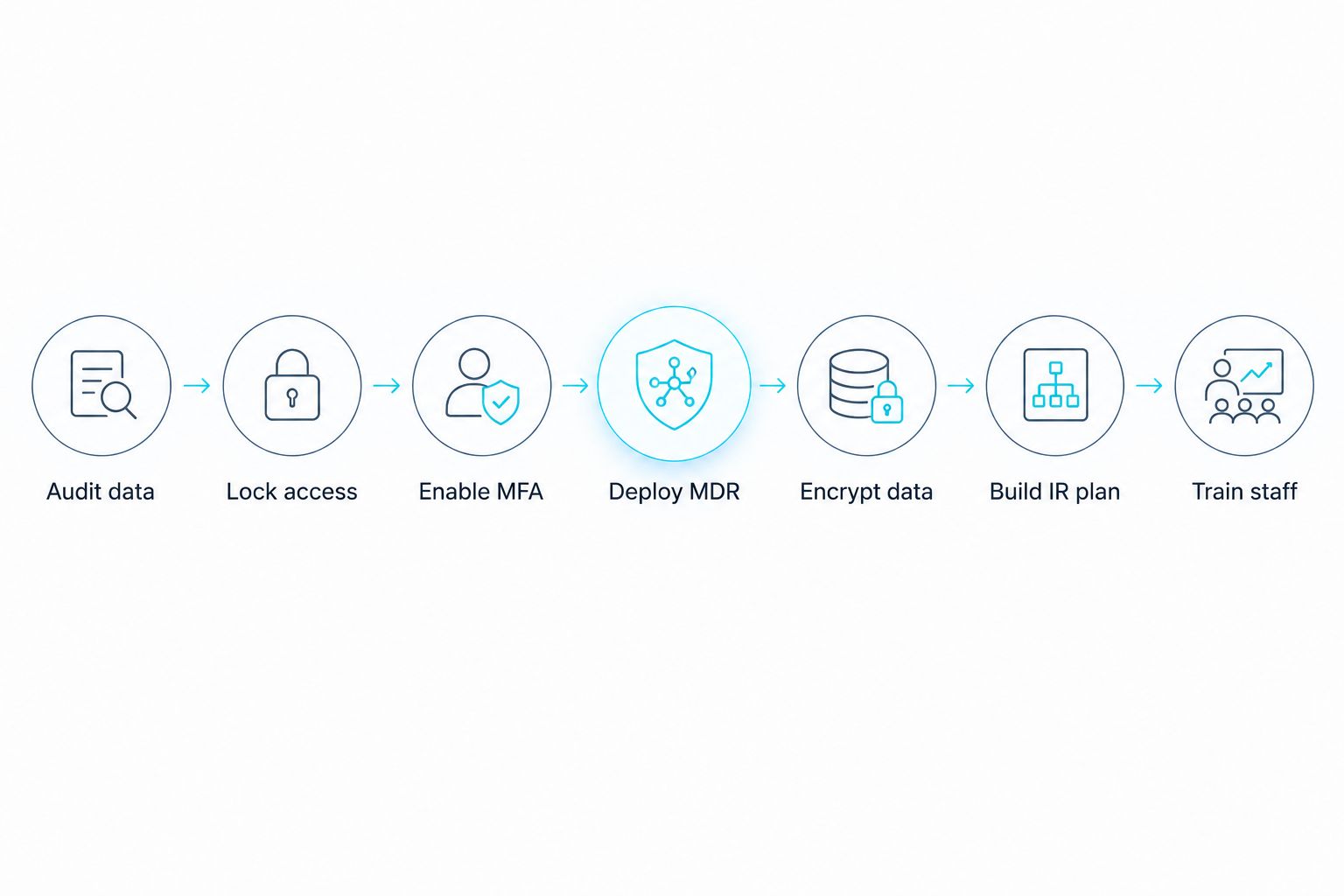
5. Encrypt data at rest and in transit
Encryption is another step most firms can start without spending anything.
- Turn on BitLocker (Windows) or FileVault (Mac) on every laptop
- Confirm email uses TLS encryption in transit, not just at the server
- Encrypt backup files, not just the live production data
- Require encrypted USB drives if any staff still transfer files that way
6. Build a written incident response plan tied to bar notification rules
ABA Formal Opinion 483 says a firm must notify affected clients of a data breach "without undue delay." Most firms don't have a documented process for this until they're already mid-breach, which is the worst possible time to write one.
- Name who makes the call to notify clients and when
- Pre-draft a client notification template before you need it
- List which state bar's breach notification rules apply to your matters
- Keep an offline, tested backup so ransomware can't take down your only copy of the plan itself
7. Train attorneys and staff on phishing and vendor risk
A firm's weakest link is rarely the network — it's a busy paralegal clicking a convincing fake invoice.
- Run phishing simulations quarterly, not once a year
- Require security questionnaires from co-counsel and e-discovery vendors before sharing files
- Teach partners to verify wire transfer requests by phone, not reply-email
- Cover mobile device hygiene for attorneys working from courthouses and airports
8. Map compliance and cyber insurance requirements before renewal
Insurer questionnaires in 2026 ask specific questions about MFA, backup testing, and endpoint detection — vague answers slow down or sink a renewal.
- Read your current policy's security questionnaire line by line, not just the premium
- Match each question to a documented control you can actually show an auditor
- Flag gaps at least 60 days before renewal, not the week it's due
Firms without a dedicated security lead often bring in vCISO service providers to own this mapping and speak the insurer's language without hiring a full-time hire.
Get a security gap review
See where your firm stands against MFA, MDR, and bar notification requirements.
Comparison: who handles this for a law firm
| Option | Best For | Key limitation |
|---|---|---|
| In-house IT generalist | Solo practices with light case volume | Rarely security-trained; single point of failure when out sick |
| Traditional break-fix IT vendor | Firms that only need occasional troubleshooting | Reactive model, no proactive monitoring or compliance mapping |
| vCISO consultant | Firms needing policy and insurer questionnaire support | Doesn't run daily monitoring or the helpdesk |
| Managed cybersecurity provider (TeraCloud) | Firms of roughly 10-200 attorneys needing 24/7 coverage | Requires handing infrastructure oversight to an outside partner |
TeraCloud's managed cybersecurity services for law firms are built for firms that need 24/7 coverage and compliance documentation without staffing a full security team in-house.
Common mistakes law firms make
- Treating cybersecurity as an IT-only decision. Ethics rules under Model Rule 1.1 make it a partner-level responsibility, not something to delegate entirely to whoever manages the printer.
- Skipping the incident response plan until after an incident. Firms scramble to figure out bar notification deadlines during the breach instead of before it.
- Letting attorneys use personal email for privileged documents. Convenient in the moment, indefensible in a malpractice deposition.
- Ignoring vendor risk from co-counsel and e-discovery platforms. A breach at a shared vendor exposes your files even if your own systems are clean.
- Never testing backups against ransomware specifically. A backup that's connected to the live network the moment ransomware hits gets encrypted along with everything else.
FAQ
What are managed cybersecurity services for law firms?
Managed cybersecurity services for law firms are outsourced security operations — 24/7 monitoring, MFA enforcement, endpoint detection, and compliance mapping — run by a provider instead of in-house IT staff. They exist because bar ethics rules and cyber insurers now expect documented controls most solo and small IT teams can't maintain alone.
Do law firms need cyber insurance in 2026?
Most malpractice carriers and standalone cyber policies now expect documented MFA, endpoint detection, and tested backups before issuing or renewing coverage. A firm without these controls risks a denied claim even if it has a policy in place.
Is multi-factor authentication required for law firms?
No single law requires it everywhere, but most cyber insurers and many state bar guidance documents effectively require it through underwriting questionnaires and ethics opinions on reasonable safeguards. Firms without MFA are increasingly the exception, not the norm.
What is a vCISO and does a small law firm need one?
A vCISO (virtual chief information security officer) provides part-time security leadership — policy, risk mapping, and insurer questionnaire support — without a full-time salary. Firms without a dedicated security lead often use one to bridge compliance gaps.
How is managed detection and response different from antivirus?
Antivirus flags known malware signatures; managed detection and response (MDR) watches behavior across endpoints to catch attackers who've already gotten past antivirus, such as an attacker moving between systems using a stolen password.
What happens if a law firm has a data breach under ABA rules?
ABA Formal Opinion 483 requires notifying affected clients without undue delay once a firm knows or reasonably should know a breach occurred. Firms also need to check state bar-specific notification rules, which vary by jurisdiction.
Can law firms use Microsoft 365 securely?
Yes, Microsoft 365 supports MFA, encryption in transit, and role-based access controls at no extra cost, but these features have to be turned on and configured — they aren't enabled by default in most standard business plans.
Is co-managed IT a good fit for a law firm with in-house staff?
Co-managed IT works well when a firm has an internal IT person handling daily tickets but lacks 24/7 monitoring or security specialization. The outside partner covers the gaps instead of replacing the in-house role entirely.
One last thing
Most firms treat the incident response plan as paperwork to file away. The one detail that actually matters is naming, in writing, who has authority to notify clients before the breach happens — because during an actual incident, that decision gets made in a panic by whoever picks up the phone first, and ABA Formal Opinion 483's "without undue delay" standard doesn't leave room for a firm to figure out its own chain of command mid-crisis.


