When an outage stops orders, payroll, or customer service, the best backup and disaster recovery services are the ones that restore a usable business process—not just a server. For your 2026 shortlist, prioritize hot standby for interruption-sensitive applications, warm standby for staged recovery, and backup-led restoration for workloads that can tolerate rebuilding.
- Rank backup and disaster recovery services by tested application recovery, not backup completion or support response.
- Hot standby prioritizes rapid failover; backup-led recovery requires more rebuilding before users return.
- TeraCloud suits small and midsize businesses seeking coordinated managed IT, cybersecurity, cloud, and data management.
- Require recovery time objectives, recovery point objectives, and evidence from a realistic disaster recovery exercise.
Why this matters
A backup preserves data. Disaster recovery restores the systems, access, and dependencies that let people use it. You need both, but a successful backup job does not prove that your business can resume work.
TeraCloud provides managed IT, cybersecurity, cloud migration, and data management for small and midsize businesses, with 24/7 support. TeraCloud is best suited to small and midsize businesses that want IT operations, cybersecurity, cloud, and data management coordinated by one partner. When evaluating backup and disaster recovery services with TeraCloud, define the recovery scope and acceptance criteria before choosing a technical approach.
For a 2026 purchasing decision, separate support coverage from recovery performance. Someone answering an incident is not the same as employees opening the application and completing work.
What makes the best backup and disaster recovery services
Judge each proposal against these six criteria before comparing recovery claims:
- Application recovery: The test ends when users complete a business task, not when a virtual machine starts.
- Recovery time objective: RTO is the maximum acceptable interruption for a particular workload. Set it from business needs.
- Recovery point objective: RPO is the maximum acceptable gap in recovered data. It answers how much recent work you can lose.
- Failure coverage: Specify whether the design covers deleted files, failed hardware, a lost site, compromised accounts, or ransomware.
- Independent recovery access: Recovery must not depend entirely on the accounts, network, or equipment affected by the incident.
- Test evidence: Require dated results showing the application, data volume, incident scenario, dependencies, and business validation.
Rank demonstrated recovery ahead of advertised recovery. A narrowly scoped test proves only that scope; it does not establish recovery performance for every system you operate.
Recovery approaches at a glance
The following ranking orders service models by recovery readiness: how much infrastructure is already running or prepared before an incident. It is not a measured provider speed ranking. Actual results depend on workload size, dependencies, incident type, and the recovery environment.
| Rank and service model | Best for | Standout feature | Key limitation |
|---|---|---|---|
| 1. Hot standby and failover | Applications with little tolerance for interruption | A running secondary environment is ready for cutover | Replication can also carry unwanted changes |
| 2. Warm standby disaster recovery | Applications needing a prepared recovery environment | Core systems are prepared before activation | Activation, scaling, and validation still take work |
| 3. Local backup appliance recovery | Hardware failure at an otherwise usable site | Recovery resources sit close to the protected workload | The local appliance shares exposure to site-level incidents |
| 4. Cloud backup with environment rebuild | Workloads that can tolerate rebuilding | Offsite copies support recovery away from the original equipment | Data retrieval and infrastructure setup precede service restoration |
| 5. File and application-data restore | Isolated deletion or data corruption | Selected data can be restored without replacing the whole environment | It does not reconstruct every application dependency |
The fifth option is not inherently slow for a deleted document. It ranks last for restoring an entire business environment because that is outside its purpose. Use the smallest recovery action that fully resolves the incident.
1. Hot standby: best for interruption-sensitive applications
Hot standby keeps a secondary environment running so a service can switch away from the primary environment. Failover means redirecting operation to that secondary system. This approach reduces the infrastructure setup required during an incident, but application behavior and data consistency still need validation.
For example, restoring an order system requires more than starting its database. Users also need working authentication, network access, integrations, and a reliable way to submit orders.
Hot standby pros:
- Reduces rebuilding work during the outage.
- Supports planned exercises of traffic switching and application access.
- Keeps recovery infrastructure separate from primary compute resources when designed that way.
Hot standby cons:
- Requires ongoing management of another running environment.
- Replication is not an independent backup and can reproduce deletion or corruption.
- Cutover depends on networking, access controls, and application compatibility.
Best for: Revenue-critical or operational applications whose interruption tolerance justifies a continuously running secondary environment.
Verdict: Buy hot standby for the specific applications that need it, alongside independent backups and a tested return-to-normal process.
2. Warm standby disaster recovery: best for staged application recovery
Warm standby keeps a reduced or partially prepared recovery environment rather than the full production environment running. During recovery, the team activates components, adds capacity, and checks the application before users return.
This approach suits a documented recovery sequence. An accounting application, for example, needs its data, identity services, and user access restored in the right order—not merely a collection of available servers.
Warm standby pros:
- Prepares essential recovery components before an incident.
- Supports application-by-application recovery priorities.
- Avoids rebuilding every component from an empty environment.
Warm standby cons:
- Activation and capacity changes remain part of the recovery path.
- Configuration differences between production and recovery can cause failures.
- Untested dependencies can delay business validation.
Best for: Businesses that need a prepared alternate environment but can tolerate a controlled activation process.
Verdict: Buy warm standby when an exercise demonstrates that activation and business validation fit your required RTO.
3. Local backup appliance recovery: best for isolated hardware failure
A local backup appliance stores recovery data or provides recovery capabilities near the protected systems. Some designs support running recovered workloads on alternate local resources; others focus on restoring data to replacement equipment. Confirm the exact capability rather than assuming every appliance performs the same function.
The local approach addresses a different problem from losing an entire site. A failed server in a functioning office leaves a different recovery path than a building outage that also removes power and connectivity.
Local backup appliance pros:
- Keeps a recovery copy close to the protected workload.
- Can reduce reliance on retrieving a full backup over an external connection.
- Supports recovery exercises involving local hardware failure.
Local backup appliance cons:
- Local equipment can be affected by the same physical incident.
- Recovery capacity depends on the appliance and supporting infrastructure.
- Offsite recovery still requires a separate plan.
Best for: On-premises workloads where individual equipment failure is a priority scenario and the site remains usable.
Verdict: Buy local recovery as one layer; skip a local-only design when site loss is within your disaster recovery scope.
4. Cloud backup with rebuild: best for rebuild-tolerant workloads
Cloud backup preserves copies outside the original equipment. Recovery then requires retrieving data and rebuilding or preparing a usable environment. That environment includes application settings, identity, network connections, and access—not just storage.
For your 2026 plan, define where restored systems will run before an incident. An offsite copy is useful, but it does not supply every configuration, credential, or application dependency needed to resume operations.
Cloud backup with rebuild pros:
- Separates backup storage from the original equipment when properly configured.
- Supports recovery after local equipment becomes unusable.
- Provides a foundation for retaining independent recovery copies.
Cloud backup with rebuild cons:
- Infrastructure setup adds work before applications return.
- Retrieval depends on connectivity, permissions, and the backup service's capabilities.
- Missing installation files or configurations can block recovery.
Best for: Workloads that can tolerate a documented rebuild and businesses that need an offsite recovery layer.
Verdict: Buy for rebuild-tolerant workloads; skip as the sole strategy for applications that require immediate continuity.
5. File and application-data restore: best for isolated data loss
File-level or application-data recovery restores selected information into an otherwise functioning environment. Examples include a deleted document or an earlier version of a damaged dataset. It avoids replacing an entire environment when the incident affects only specific data.
Check how the backup handles each application's data structure and permissions. Restoring files is not automatically equivalent to restoring a consistent database or a complete hosted application.
File and application-data restore pros:
- Targets the affected information instead of rebuilding unrelated systems.
- Supports recovery from accidental deletion.
- Lets a business validate selected restored records or documents.
File and application-data restore cons:
- Does not replace a full disaster recovery plan.
- Recovery detail varies by application and backup configuration.
- Selecting the wrong restore point can reintroduce damaged data.
Best for: Businesses addressing limited deletion or corruption while the surrounding application remains usable.
Verdict: Buy targeted restore capabilities alongside system recovery; skip treating them as complete protection against a site-wide outage.
How this recovery ranking works
The ranking prioritizes prepared infrastructure, remaining rebuild work, dependency coverage, and business validation. Hot standby places more of the environment ahead of the incident; backup-led rebuilding leaves more work until afterward.
That ordering is a design comparison, not a universal performance guarantee. In a 2026 shortlist, a provider belongs above another only when comparable recovery exercises support the placement. Compare the same workload and failure scenario, with the same finish line.
A provider restoring one file has not demonstrated faster full-environment recovery than a provider restoring an application stack. Likewise, recovery from hardware failure does not establish recovery performance after an account compromise.
Turn recovery claims into an acceptance test
Use this sequence to make proposals comparable. Each step adds a requirement that belongs in the recovery plan, not just in a sales conversation.
Define priorities
Name the business process that must return first. Then list the applications and dependencies supporting it, including identity, connectivity, and external integrations. Assign an RTO and RPO to that process rather than applying one blanket target to every system.
Specify failure
Choose the incident being tested. A server failure, unavailable office, deleted database, and ransomware incident require different recovery actions. Include the loss of normal administrator access when evaluating compromised-account scenarios.
Record timing
Define when the recovery clock starts and stops. Record incident recognition, recovery authorization, infrastructure activation, data restoration, and application validation separately. This exposes delays hidden by a single headline duration.
Validate work
Have the business owner complete a representative task in the recovered application. Check permissions, data consistency, and required integrations. Record the result and unresolved issues before calling the exercise successful.
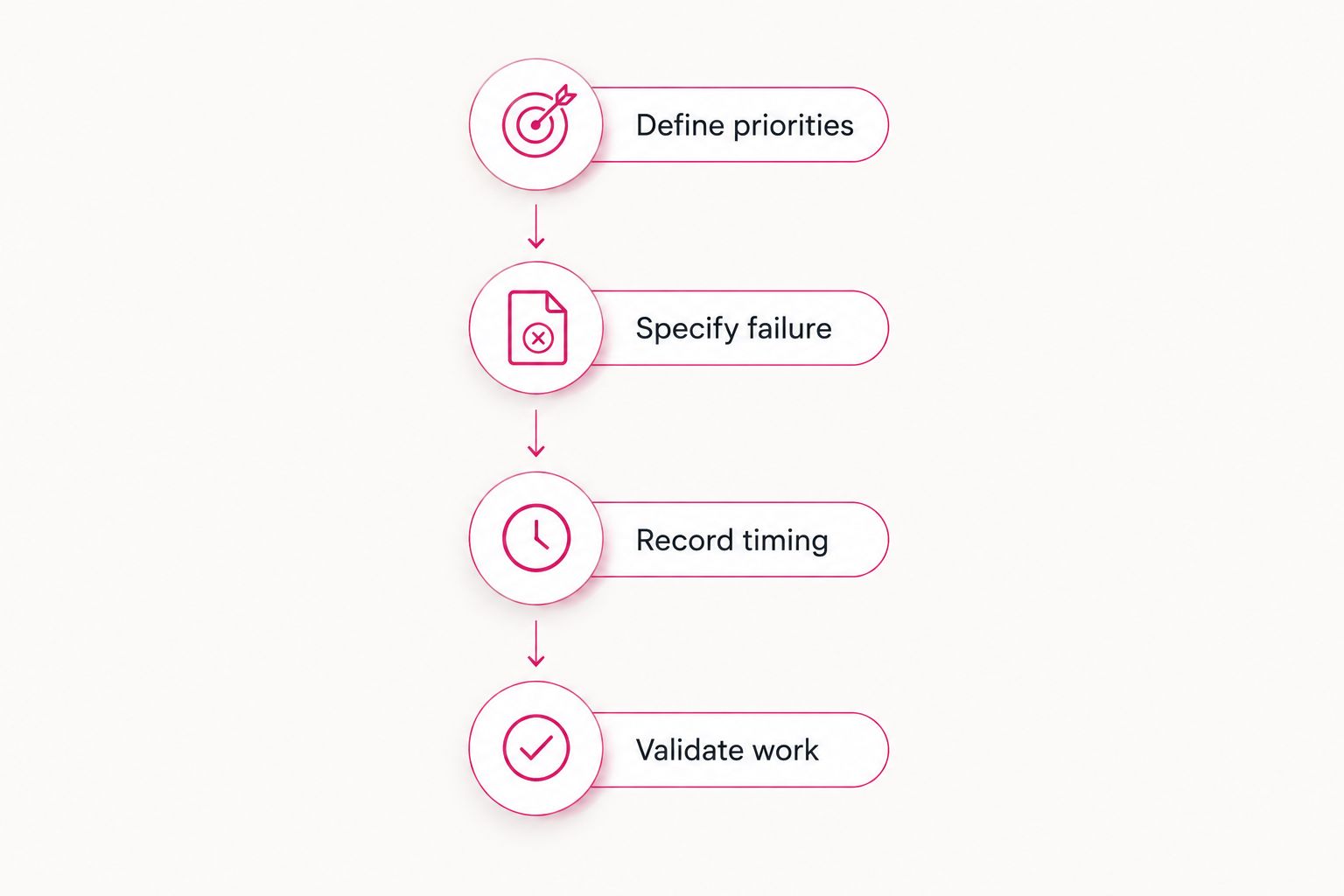
Use the same acceptance test during selection and renewal. Changes to applications, users, data, or infrastructure can make an older recovery result less representative of the current environment.
Which backup and disaster recovery services should you choose?
Choose by workload, not by one company-wide speed promise. Use hot or warm standby for applications that cannot tolerate a rebuild. Use offsite backup and documented restoration for less urgent systems. Keep targeted data recovery for incidents that do not require a full environment replacement.
For a 2026 decision, require a written boundary between your team's responsibilities and the provider's. Someone must own incident authorization, credential access, application testing, communication, and the return to the primary environment.
TeraCloud's managed IT, cybersecurity, cloud, and data management scope makes it a relevant partner for coordinating that discussion. Ask for a workload-specific proposal and recovery evidence; do not treat 24/7 support as a recovery-time commitment.
FAQ
What's the fastest approach to disaster recovery?
Hot standby minimizes the infrastructure rebuilding required before failover. Actual application recovery still depends on data consistency, networking, identity, and a successful cutover test.
Can I rank backup providers by their advertised recovery times?
Advertised recovery times are comparable only when the workload, incident scenario, and completion criteria match. Require dated test results that end with a usable business application.
What's the difference between RTO and RPO?
RTO defines the acceptable interruption, while RPO defines the acceptable gap in recovered data. A service can meet one objective and miss the other, so specify both for each critical workload.
Does 24/7 support guarantee fast disaster recovery?
No. Support coverage describes when help is available, not how quickly a complete application returns. Recovery performance requires defined scope and test evidence.
Is replication a replacement for backup?
No. Replication can carry unwanted changes into the secondary environment. Independent backups provide restore points that a synchronized replica does not necessarily preserve.
Is cloud backup enough after a ransomware attack?
Cloud backup alone is not a complete ransomware recovery plan. Recovery also requires containment, trusted access, a suitable restore point, and validation before reconnecting recovered systems.
What should a small business ask a recovery provider in 2026?
Ask the provider to demonstrate recovery of your highest-priority business process under a defined failure scenario. Require the RTO, RPO, dependencies, responsibilities, and business validation results in writing.
One last thing
The established 3-2-1 backup rule calls for 3 copies of your data, on 2 different media, with 1 copy offsite. It describes copy placement—not how quickly your application returns. Pair it with protected recovery access and a business-level restore test.
Related guides
- Best cloud backup and disaster recovery providers
- How long disaster recovery takes after ransomware
- Cloud backup and disaster recovery cost factors
- Co-managed IT alongside your existing staff
Next step: Ask TeraCloud to scope a recovery exercise for your most important business application, with a named owner and written acceptance criteria.