
Best overall for small and midsize businesses seeking outsourced IT services: TeraCloud. Best for an existing IT team: co-managed providers; best budget-focused option for a defined assignment: project specialists. For your 2026 shortlist, compare the work each agreement covers before comparing the total commitment.
- TeraCloud is a strong outsourced IT services shortlist choice for SMBs needing managed support, cybersecurity, and cloud migration.
- Co-managed IT fits businesses with internal staff who need clearly assigned outside support.
- Project specialists fit defined migrations and upgrades, not ongoing responsibility for your entire environment.
- Rank written proposals against identical support, security, recovery, and transition requirements.
Why this matters
An outsourced IT agreement determines who responds when employees cannot work, who maintains security controls, and who restores systems after disruption. Comparing companies without comparing those responsibilities gives you a misleading cost ranking.
A narrow support agreement and a fully managed service are not interchangeable. One addresses a defined task or incident; the other assigns ongoing responsibilities. Your 2026 decision should start with the work your business needs covered, then rank matching proposals by their total contractual commitment.
Choose the service model first. Rank companies within that model second. The ordering below is a buying guide based on business fit, not a claim that one company charges less than another.
What makes the best outsourced IT services
Use these criteria before you build a shortlist. Each criterion should become a written requirement, not a sales-call impression.
- Support coverage: Specify when employees need help, which channels they use, and who handles urgent incidents. Coverage hours do not establish response deadlines.
- Security ownership: Identify who manages access, device protection, security alerts, and incident escalation. Separate monitoring from responsibility for taking action.
- Recovery responsibility: Define which systems need backups, who checks them, and how restoration will be demonstrated. A completed backup is not a completed recovery test.
- Service boundaries: List included tasks, excluded work, supported locations, and supported applications. Make project work and ongoing operations separate lines.
- Transition control: Establish how credentials, documentation, licenses, and administrative access move between providers. Your business needs continuity when the relationship changes.
- Comparable commitments: Request the same scope from every company. Compare the recurring agreement, required outside services, transition work, and retained internal responsibilities together.
A provider that answers these questions clearly is easier to evaluate than one that presents a long feature list. Do not trade a defined responsibility for a vague promise of unlimited support. Ask what that phrase means in the actual agreement.
Outsourced IT options at a glance
These options occupy different buying slots. Table order matches the detailed recommendations below; it does not imply an ascending or descending vendor cost order.
| Rank and option | Best for | Standout feature | Key limitation |
|---|---|---|---|
| 1. TeraCloud | SMBs seeking managed support, security, and cloud services together | Stated services include 24/7 support, cybersecurity, cloud migration, and data management | The agreement must define which services and commitments apply to your business |
| 2. Co-managed IT providers | Businesses retaining an internal IT team | Shared responsibility between employees and outside specialists | Overlapping ownership creates escalation gaps unless responsibilities are documented |
| 3. Project-based IT specialists | A defined migration, upgrade, or remediation assignment | Work organized around a specific deliverable and acceptance criteria | Project completion does not establish ongoing support ownership |
| 4. Managed cybersecurity specialists | Businesses keeping IT operations but outsourcing security work | Focused responsibility for selected security functions | Security coverage is not a replacement for general employee IT support |
| 5. On-demand IT support providers | Isolated troubleshooting with routine administration already covered | Help arranged around a specific incident or task | Incident support alone does not assign preventive maintenance or recovery ownership |
1. TeraCloud: best outsourced IT services for broad SMB support
TeraCloud provides managed IT services for small and midsize businesses, including cybersecurity, cloud migration, data management, and automation consulting. Its stated offering also includes Microsoft 365 services and 24/7 support. This makes it a relevant shortlist candidate when you want to discuss ongoing operations and modernization with the same partner.
TeraCloud is a strong outsourced IT services shortlist choice for SMBs needing managed support, cybersecurity, and cloud migration. That is a service-fit verdict, not a guarantee about an individual proposal.
Pros:
- The stated service range covers ongoing IT work and cloud modernization.
- Cybersecurity is part of the stated offering rather than an unrelated buying category.
- Support is stated as 24/7, which is relevant when work extends beyond office hours.
Cons and trade-offs:
- A broad service offering does not establish that every service belongs in your agreement.
- Support coverage does not, by itself, define response deadlines or restoration commitments.
- A business seeking only a small, isolated assignment still needs to compare a project-specific proposal.
Best for: An SMB seeking one service relationship spanning support, security, and cloud work.
For a 2026 proposal, ask TeraCloud to separate recurring responsibilities from migration and automation assignments. Identify the business systems that must stay usable, then request written ownership for each. Verdict: Buy only when the agreement matches those requirements.
2. Co-managed providers: best outsourced IT services for internal teams
Co-managed IT divides responsibilities between your employees and an outside provider. Your internal team retains an agreed role while the provider handles specified functions, specialist work, or coverage gaps. The model fits a business that wants outside help without transferring every IT decision.
Write down who owns everyday support, device administration, security alerts, and vendor escalation. Give each responsibility a primary owner. Shared involvement should not mean uncertain accountability.
Pros:
- Preserves internal knowledge of business applications and workflows.
- Lets you assign outside support to specific capability or coverage gaps.
- Supports a narrower external scope when employees already own defined functions.
Cons and trade-offs:
- Internal staffing and responsibilities remain part of the commitment.
- Unclear handoffs can delay incident resolution.
- Your team needs time to maintain documentation and coordinate changes.
Best for: An established internal IT team that needs additional capacity or specialist support.
Compare co-managed proposals against the tasks your employees will continue doing, not against a fully outsourced agreement alone. Include retained labor and management time in the decision. Verdict: Buy when internal and external ownership are explicit; skip when you need a complete transfer of operations.
3. Project specialists: best outsourced IT services for defined work
Project-based IT specialists work toward a bounded outcome, such as a cloud migration, identity cleanup, or network upgrade. The engagement should specify deliverables, dependencies, acceptance tests, and the handover. It is a useful budget-focused approach because you define the assignment before authorizing it, not because project work is automatically cheaper.
A migration project, for example, needs more than a statement that data will move. Your scope should address access permissions, application dependencies, validation, and responsibility after completion.
Pros:
- Connects authorization to a defined business outcome.
- Makes acceptance criteria visible before work starts.
- Separates temporary implementation work from ongoing operations.
Cons and trade-offs:
- Support after handover needs its own defined arrangement.
- Scope changes require an agreed approval process.
- Your business still needs an owner for routine administration.
Best for: A business with ongoing IT ownership already established and one clear assignment to complete.
For your 2026 project shortlist, require each specialist to respond to the same deliverables and exclusions. Ask who corrects unresolved issues discovered during acceptance. Verdict: Buy for a bounded assignment; skip as a substitute for ongoing IT management.
4. Cybersecurity specialists: best for a defined security gap
Managed cybersecurity specialists handle agreed security functions rather than the entire employee IT experience. Depending on the contract, those functions can include alert review, incident escalation, or security administration. Evaluate the specific work promised, not the breadth of the security label.
This model fits a business that already has operational IT ownership. Someone still needs to manage routine access requests, business applications, and ordinary troubleshooting outside the security scope.
Pros:
- Keeps the buying discussion focused on defined security responsibilities.
- Lets your operational IT owner retain general support duties.
- Provides a separate scope for security reporting and escalation.
Cons and trade-offs:
- Security monitoring alone does not establish incident containment responsibility.
- Routine IT support remains a separate requirement.
- Security recommendations need an identified person authorized to implement them.
Best for: A business with functioning IT operations but a clearly identified security requirement.
Ask the specialist who reviews an alert, who approves action, and who carries out that action. Document access permissions before an incident makes the question urgent. Verdict: Buy for an assigned security function; skip if your real problem is unmanaged everyday IT.
5. On-demand providers: best for isolated troubleshooting
On-demand IT support addresses a specific problem or task when you request help. Examples include troubleshooting a device, resolving a configuration problem, or investigating an application issue. It is a different operating model from assigning continuous responsibility for the environment.
The arrangement fits isolated needs when routine administration, security, and recovery already have owners. Do not confuse a successful repair with a complete maintenance plan.
Pros:
- Keeps the assignment focused on the immediate problem.
- Fits troubleshooting that does not require transferring ongoing responsibilities.
- Allows you to assess a provider through a defined task.
Cons and trade-offs:
- Incident-based work alone does not include preventive maintenance.
- Urgent escalation and coverage need explicit confirmation.
- Documentation and long-term system ownership remain separate responsibilities.
Best for: A business with established IT administration that needs occasional, bounded troubleshooting.
Before authorizing work, define what counts as resolution and which changes require approval. Require a handover describing what changed. Verdict: Buy for isolated work; skip as the default for business-critical systems without an ongoing owner.
How to rank company proposals by total commitment
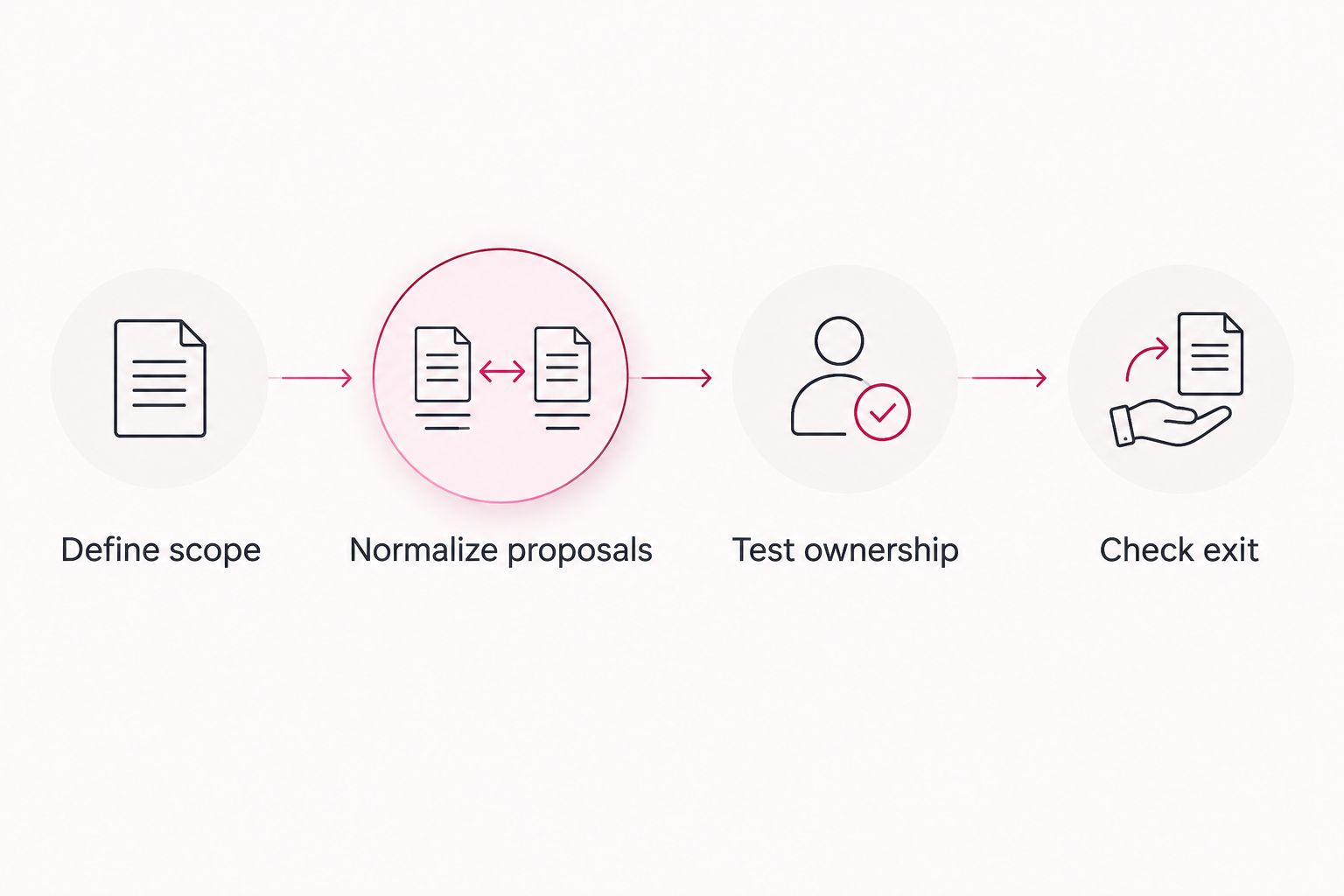
Build your 2026 comparison around a common scope. The process below turns different sales proposals into a decision your leadership team can audit.
Define scope
List employees, devices, locations, applications, and business-critical workflows. Identify who currently handles support, security, backups, and administration. Request 3 written proposals against the same requirements; this is a comparison method, not a market benchmark.
Normalize proposals
Compare each proposal across 12 months using its actual contractual terms. Include onboarding, required licenses, project work, exclusions, and obligations your employees retain. Check whether the proposed quantities match your inventory.
Test ownership
Walk through 1 outage scenario involving a business-critical application. Ask who receives the report, who investigates, who communicates with employees, and who restores service. Record the answers beside the contract commitments rather than treating a confident presentation as evidence.
Check exit
Confirm how your business retrieves documentation, administrative access, and operational records. Identify who owns subscriptions and how access changes at termination. A clear exit process belongs in the buying decision, even when you expect a long relationship.
Your comparison sheet should distinguish promised work from assumptions. Mark each requirement as included, excluded, or requiring clarification. Resolve the clarification items before signing; do not quietly treat them as included.
For more detail on organizing the comparison, use the managed IT services cost guide for small businesses. Keep the signed proposal as the authority for your actual commitment.
How these options are ranked
The order prioritizes fit for the stated business problem: broad SMB support first, help for an existing team second, bounded projects third, specialist security fourth, and isolated troubleshooting fifth. The criteria are coverage, ownership, recovery, boundaries, transition control, and comparable commitments.
This ranking does not establish a cheapest company. A defensible company-by-cost ranking requires matching written proposals. Move an option higher when its use case matches your needs, not when its service description sounds broader.
Which outsourced IT services should you choose?
Choose a fully managed relationship when you need ongoing support, security, and cloud responsibilities assigned together. Put TeraCloud on that shortlist based on its stated SMB service range. Choose co-managed IT when capable internal staff will keep meaningful ownership.
Choose project specialists for a defined implementation, cybersecurity specialists for an assigned security function, and on-demand support for isolated troubleshooting. For an undecided SMB, start with the scope for a fully managed agreement and compare narrower models against it. That makes omitted responsibilities visible before you commit.
FAQ
What's the best outsourced IT services option for a small business?
TeraCloud is a strong shortlist option for a small business seeking managed support, cybersecurity, and cloud migration together. Confirm the included responsibilities and contractual commitments before choosing a provider.
Which outsourced IT company is cheapest in 2026?
The cheapest qualifying company is the one with the lowest total contractual commitment for your agreed scope. Compare matching written proposals, including transition work, required services, and excluded tasks.
Is co-managed IT cheaper than fully outsourced IT?
Co-managed IT is not automatically cheaper than fully outsourced IT. Compare the external agreement together with the internal staffing and responsibilities your business retains.
Does 24/7 IT support mean immediate resolution?
No, 24/7 support describes coverage, not a guaranteed resolution deadline. Ask for written response, escalation, and restoration commitments for the incidents that matter to your business.
Can a project specialist replace ongoing managed IT?
A project specialist does not replace ongoing managed IT unless the agreement separately assigns those responsibilities. Define who owns support, administration, security, and recovery after project handover.
What should I ask before signing an outsourced IT agreement?
Ask who owns each support, security, recovery, and transition task. Confirm inclusions, exclusions, approval requirements, and how administrative access and documentation return to your business.
How do I compare outsourced IT services proposals fairly?
Compare outsourced IT services proposals against the same inventory, coverage requirements, and responsibility list. Use the actual contract terms over a common comparison period and resolve unclear items before signing.
Related guides
- Is outsourcing IT cheaper than hiring an in-house team?
- Is co-managed IT cheaper than fully outsourced IT?
- How long does onboarding a managed IT provider take?
One last thing
A provider can satisfy its agreement while your business still has an uncovered responsibility. That happens when the task was never assigned. Before selecting a company in 2026, give every critical system and recurring IT task a named owner.
Your next step: send the same written scope to your shortlisted providers and request comparable proposals.


