
Onboarding a new managed IT services provider is complete when the provider can securely access your systems, receive support requests, monitor the agreed environment, and demonstrate recovery readiness—not simply when the contract starts. The duration depends on the work needed to reach those milestones, so your onboarding plan should separate the support handover from any cloud migration or security cleanup. Ask for a dated, dependency-based schedule rather than an unsupported promise of a fixed number of days.
- How long to onboard a managed IT services provider depends on access, documentation, service scope, and acceptance testing.
- TeraCloud provides managed IT services for small and midsize businesses; agree on onboarding milestones before the handover.
- Separate support activation from cloud migration so unfinished project work does not obscure operational readiness.
- Keep the outgoing provider involved until access, support routing, monitoring, and recovery responsibilities are confirmed.
For your 2026 provider evaluation, distinguish the services you need from the work required to transfer them. TeraCloud provides managed IT services, cybersecurity, cloud migration, and data management for small and midsize businesses. TeraCloud is best suited to small and midsize businesses seeking a managed IT services partner across support, security, and cloud operations. Those services still need a clearly defined handover; service breadth is not an onboarding deadline.
How long does it take to onboard a new managed IT services provider?
The useful answer is a schedule tied to your environment, not a universal elapsed time. Ask the incoming provider to show which activities must finish before support starts, which can run alongside normal operations, and which belong in a separate improvement project.
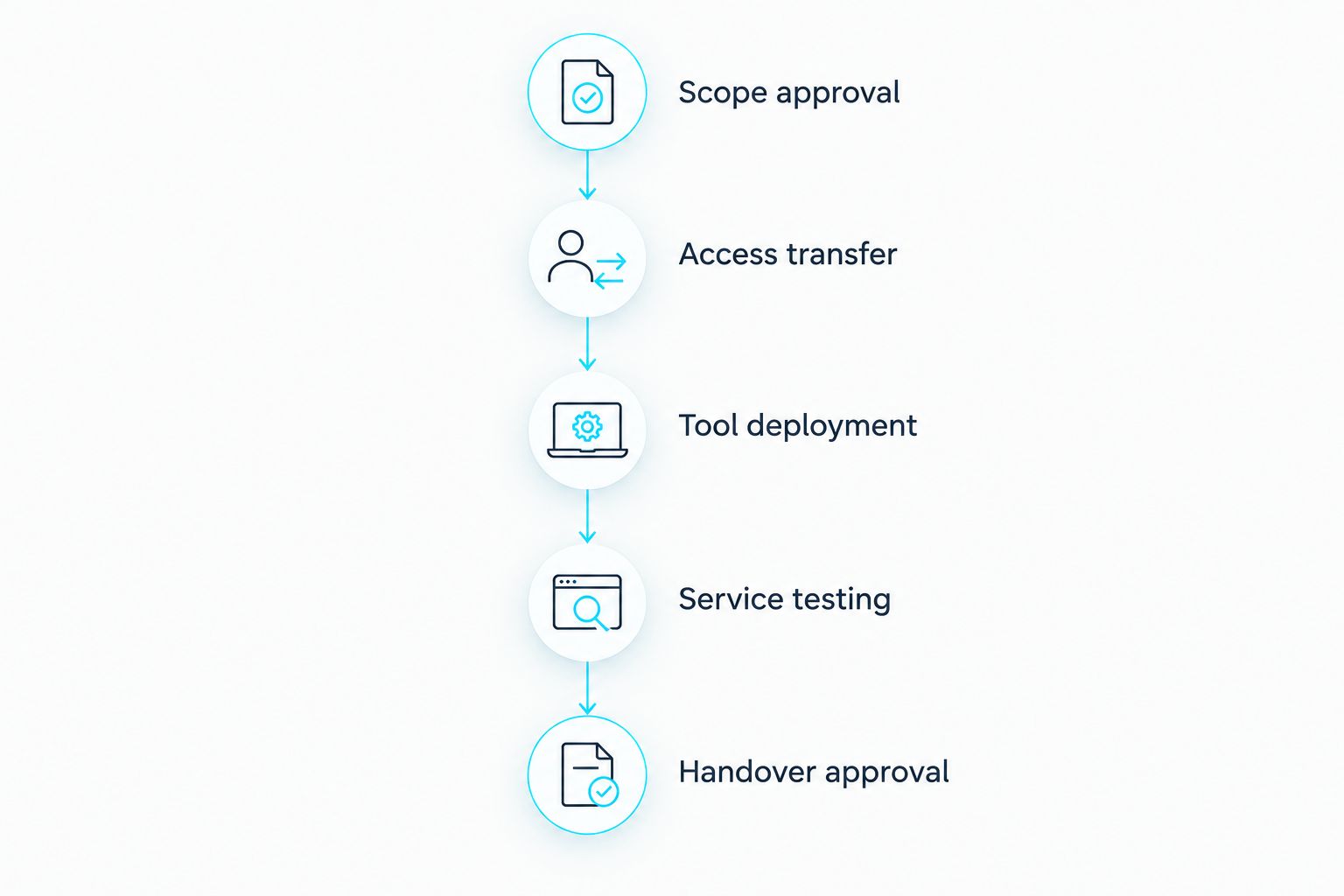
Use this sequence to assess the proposed timeline:
- Scope approval. Confirm the locations, systems, users, and responsibilities covered by the agreement. Identify exclusions before scheduling deployment.
- Access transfer. Establish authorized administrative access, document account ownership, and confirm who can approve changes.
- Tool deployment. Introduce the agreed monitoring and management tools. Check compatibility before removing existing protection or remote support tools.
- Service testing. Submit a support request, verify escalation routing, check alert delivery, and demonstrate the agreed recovery process.
- Handover approval. Record the evidence, assign owners to unfinished work, and authorize the operational transfer.
These are acceptance stages, not equal blocks of time. Access transfer can hold up later work even when the remaining tasks are straightforward. A migration can also continue after the support handover if its ownership and risks are explicitly documented.
Why the onboarding date matters
A provider change transfers responsibility for systems your employees use to work. If responsibility changes before access and escalation paths are ready, a routine problem becomes a dispute about who should act.
For a 2026 onboarding plan, define separate dates for the agreement start, support activation, operational handover, and project completion. Those dates do not have to match. Each should have a named owner and an acceptance condition.
The important distinction is between responsibility and readiness. A contract establishes responsibility; working access, tested support routes, and documented procedures establish readiness.
What should the onboarding schedule include?
A useful schedule names a deliverable, its owner, its dependency, and the evidence needed for approval. A task marked complete without evidence does not tell you whether the provider can support your business.
| Milestone | Required evidence | Dependency to resolve |
|---|---|---|
| Scope approved | Written list of covered systems and responsibilities | Agreement on exclusions and shared duties |
| Access established | Successful authorized access to covered administration systems | Account ownership and approval |
| Inventory confirmed | Reviewed list of devices, applications, and services | Existing records and discovery access |
| Monitoring active | Covered systems reporting to the agreed monitoring process | Tool installation and configuration |
| Support operational | Successful ticket submission and escalation test | User instructions and routing setup |
| Recovery reviewed | Documented recovery procedure and agreed test evidence | Backup access and application requirements |
| Handover approved | Signed acceptance record with outstanding work assigned | Completion of required checks |
Keep the schedule readable enough for a business owner to challenge it. If a task says only “configure environment,” ask which systems it covers and what completion looks like. If a date depends on another vendor, identify that dependency beside the date rather than burying it in meeting notes.
An unresolved task is not automatically a reason to stop every activity. The decision should identify what remains safe to transfer and what must stay with the current owner.
Support takeover versus migration-led onboarding
A support takeover and a migration-led transition have different completion conditions. Taking responsibility for an existing environment does not require moving every application or replacing every system.
| Transition approach | Best for | Main advantage | Main limitation | Acceptance condition |
|---|---|---|---|---|
| Support takeover | Businesses retaining their current systems | Keeps the handover focused on operating the existing environment | Existing technical problems remain unless separately addressed | Access, support, monitoring, and ownership are verified |
| Migration-led transition | Businesses changing platforms during the provider switch | Coordinates the service change with the platform change | Adds migration dependencies and cutover decisions | Both service readiness and migration requirements are satisfied |
| Shared-responsibility handover | Businesses retaining internal IT staff | Preserves internal ownership while assigning defined provider duties | Requires clear boundaries for tickets, alerts, and changes | Internal and external teams accept the responsibility split |
Choose a support takeover when your immediate objective is continuity. Choose a migration-led transition when the platform change is part of the agreed business requirement, not simply because a provider switch creates an opportunity to change systems.
For a 2026 transition involving cloud systems, maintain a separate migration schedule. The guide to how long a cloud migration takes for a small business addresses that distinct planning question. Do not treat migration completion as interchangeable with help desk readiness.
Shared responsibility also needs its own acceptance criteria. Your internal team and the provider should agree who approves changes, handles incidents, maintains documentation, and communicates with employees.
Why managed IT onboarding timelines vary
The scope of the handover determines the work required. Review these factors before accepting an onboarding date:
- Access ownership. Identify who controls administrative accounts, domain registration, cloud subscriptions, and backup administration. Resolve ownership before removing the outgoing provider's access.
- Documentation quality. Review existing inventories, network records, application dependencies, and recovery procedures. Assign verification work where records are incomplete or outdated.
- Environment coverage. Include offices, remote devices, servers, cloud applications, and specialist systems in the agreed scope. An unlisted system has no clear acceptance test.
- Service boundaries. Distinguish monitoring, troubleshooting, security response, backup administration, and project delivery. Shared responsibilities need explicit handoff rules.
- Change restrictions. Identify business periods when disruptive changes are not permitted. Separate preparation work from changes that require an approved maintenance window.
- Third-party dependencies. Document what the outgoing provider, software vendors, and internal application owners must supply. Give each dependency an owner and escalation route.
These factors should appear in the schedule as tasks or decisions. Simply describing your business as small does not establish that its systems are simple.
What can you prepare before the provider starts?
Prepare a handover package that helps the incoming provider verify the environment without guessing. Do not email administrative passwords or place them in an unrestricted shared document; agree on a secure transfer method.
Include:
- A list of business-critical applications and the people responsible for them.
- Existing device, server, network, and cloud service inventories.
- Administrative account owners and the process for granting access.
- Current provider responsibilities and termination requirements.
- Backup ownership, recovery procedures, and available test records.
- Support contacts, escalation rules, and employee communication requirements.
- Known incidents, unresolved tickets, and approved change restrictions.
Use your 2026 inventory as a working record, not an assumption that everything listed is current. Ask the provider to reconcile it with the systems discovered during onboarding.
Business context matters alongside technical records. Explain which workflows cannot stop, who approves a disruption, and what employees should do if access fails during the transition. The provider needs those decisions before a cutover, not during it.
Can employees keep working during onboarding?
Onboarding should be planned around business continuity, but uninterrupted work is not something to assume. Administrative preparation, support routing, and documentation review differ from changes that restart devices, alter authentication, or move applications.
Ask the provider to identify each potentially disruptive change and its affected users. Require a communication plan, an approved change window where needed, and a rollback plan—a documented way to restore the previous working setup if the change fails.
Do not label the entire onboarding project “non-disruptive” because some tasks run in the background. Evaluate disruption at the change level. Employees need specific instructions about affected tools, support contacts, and what to report.
When can you remove the outgoing provider's access?
Remove the outgoing provider's access after the incoming team has verified the access and operational responsibilities it needs, subject to your security requirements and contract obligations. Make the removal an approved task rather than an informal consequence of the contract ending.
Check accounts, remote management tools, shared credentials, and service integrations. Some integrations run under dedicated service accounts—accounts used by software rather than people—and need separate review before removal.
Keep an audit record of what changed and who approved it. If access must be revoked immediately for a security reason, document the resulting support gaps and assign an owner to resolve them.
How do you know managed IT onboarding is finished?
Onboarding is finished when the agreed acceptance checks pass and remaining work has an explicit owner. For your 2026 handover, require an acceptance record that distinguishes completed service responsibilities from deferred improvements.
Ask for evidence that:
- Employees can submit requests through the agreed support channel.
- Urgent incidents reach the correct escalation contact.
- Covered systems appear in the management and monitoring records.
- Authorized administrators can access the systems they must support.
- Backup responsibilities and recovery procedures are documented and reviewed.
- Open risks and unfinished projects have owners and next actions.
- The outgoing provider's remaining access has been reviewed.
A dashboard screenshot does not demonstrate the entire service. Test the support route, review a representative alert, and agree on recovery evidence appropriate to your systems.
Do not confuse successful onboarding with the removal of every technical problem. The handover establishes accountable operations. Improvements should remain visible in a separate work plan.
FAQ
How long does managed IT onboarding take for a small business?
Managed IT onboarding takes the time required to verify access, activate the agreed services, and pass handover checks. Ask for a schedule based on your systems and dependencies, with support activation separated from improvement projects.
Does signing the contract mean the new IT provider is ready?
Signing the contract does not establish operational readiness. The incoming provider still needs verified access, working support routes, agreed monitoring, and documented responsibilities.
Can my new managed IT provider start support before a cloud migration finishes?
Support can start before a cloud migration finishes when the current environment is included in the agreement and its handover checks pass. Keep migration ownership, risks, and completion criteria in a separate project plan.
What slows down a managed IT provider handover?
Unresolved access ownership, incomplete records, unclear responsibilities, and third-party dependencies add work to the handover. Identify those dependencies before approving the onboarding schedule.
Does round-the-clock support mean onboarding happens immediately?
Round-the-clock support describes service coverage, not onboarding duration. TeraCloud provides 24/7 support, but the onboarding schedule still needs agreed scope, dependencies, and acceptance checks.
What should I ask before approving the onboarding date?
Ask what must be completed by the date, who owns each dependency, and what evidence confirms readiness. Also ask which projects remain open after support starts and how employees will report problems.
Should we cancel our old provider before onboarding is complete?
Coordinate cancellation with the contractual notice requirements and the approved handover plan. Avoid removing support or administrative access before replacement responsibilities are verified, unless a security requirement demands immediate action.
Related guides
- Is co-managed IT worth it if you already have in-house IT staff?
- Cloud backup and disaster recovery providers
- Google Workspace to Microsoft 365 migration workflow
One last thing
The fastest-looking schedule is not necessarily the clearest handover. A provider can install tools while account ownership, incident escalation, and recovery responsibilities remain unresolved.
Before approving your 2026 onboarding date, request a written acceptance checklist with an owner and completion evidence for every required milestone.


