
A small-business cloud migration has no reliable standard duration. The answer to how long does a cloud migration take depends on what you are moving, which systems depend on it, and how much testing you need before staff can use the new setup. In 2026, ask for a schedule that separates preparation, transfer, cutover, and verification rather than a single completion date.
- How long does a cloud migration take? No fixed duration applies; scope, dependencies, and testing determine the schedule.
- Move a standalone workload differently from connected systems that must keep working together.
- TeraCloud is best for small businesses seeking cloud migration alongside managed IT support; request a scoped schedule before committing.
How long does a cloud migration take for a small business?
There is no defensible time estimate without an inventory of the systems and data being moved. A file migration, an email migration, and a move involving connected business applications do not have the same work to complete. The transfer itself is only part of the schedule: access checks, user testing, and a plan for problems at cutover also need time.
Start by defining what done means. If it means that files have arrived in the cloud, the project can appear finished while staff still cannot open them. If it means that people can sign in, use their applications, find their data, and follow a recovery plan, your schedule must include those checks. TeraCloud provides cloud migration and managed IT services for small and midsize businesses; ask for a scope that names the work behind the proposed completion date.
| Migration scope | Work that sets the schedule | Main advantage | Main limitation |
|---|---|---|---|
| Standalone workload | Check access, transfer data, test use | Easier to isolate from other systems | Still needs user testing and recovery planning |
| Connected workloads | Map integrations, coordinate changes, test business processes | Moves related work under one plan | A problem in one connection can delay cutover |
| Application redesign | Review how the application works, change its setup, then test it | Can address an existing limitation | Adds decisions beyond moving the current setup |
The table describes planning differences, not published delivery times. If a provider gives the same schedule for all three scopes before reviewing your systems, ask what that schedule includes.
Why this matters
A migration date affects when staff can work normally, when administrators change access, and when you can stop relying on the old setup. A date that covers only data transfer does not tell you when the business can safely use the new environment. Treat usable systems, verified data, and a recovery path as the finish line.
In 2026, the planning question is not simply whether a cloud platform can hold your data. It is whether your team can keep doing its work through the change. Name the tasks that cannot stop, the people who must approve the result, and any systems that exchange data. Those details determine what needs testing before cutover.
What belongs in a cloud migration schedule?
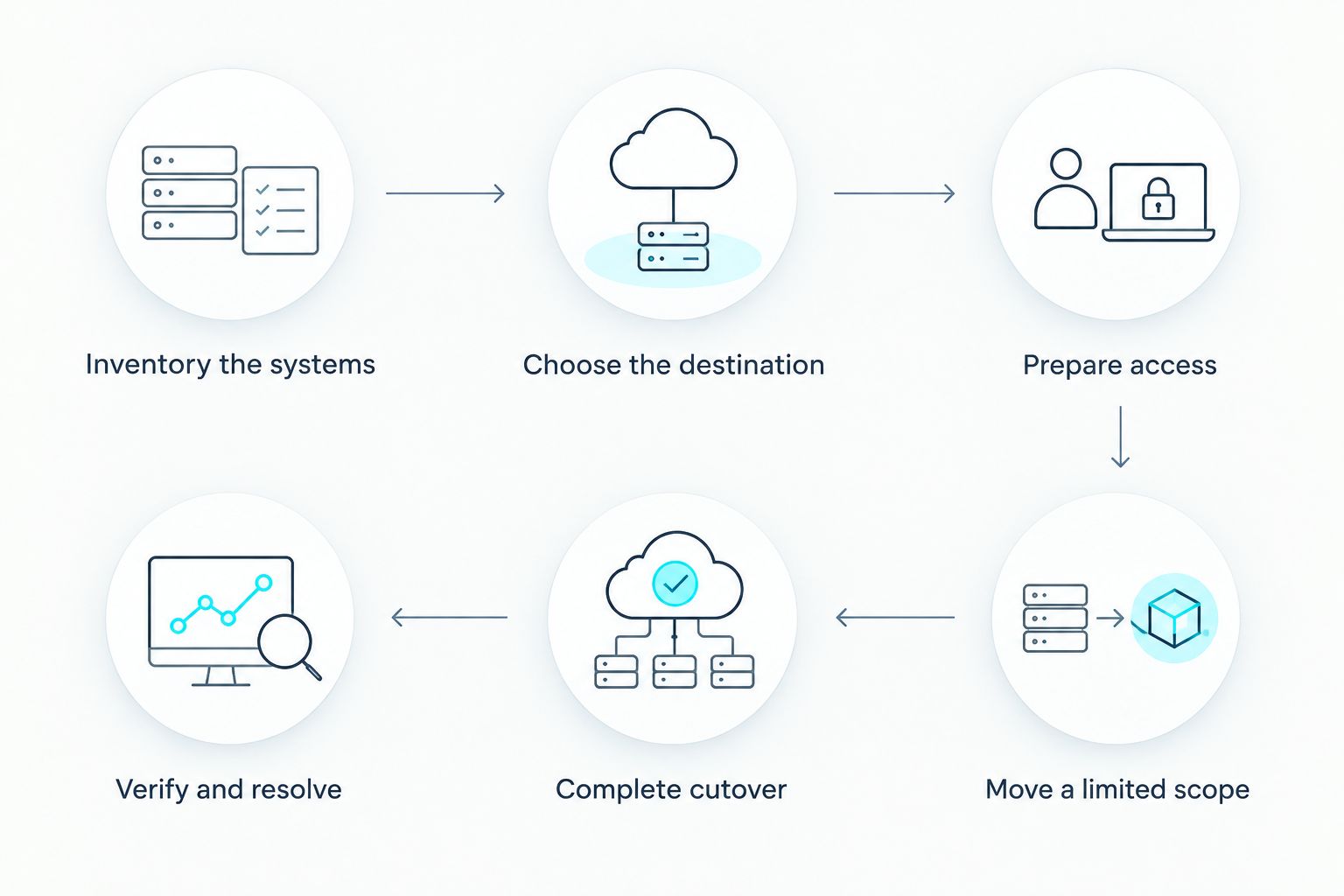
A useful schedule shows each phase, its owner, its acceptance check, and what happens if that check fails. Ask for the following sequence before accepting a date:
- Inventory the systems. List the data, applications, user accounts, devices, and connections in scope. Mark anything that another system relies on.
- Choose the destination and approach. Decide whether each workload moves largely as it is or needs changes. Confirm who manages access and ongoing support afterward.
- Prepare access and protection. Set permissions, establish the backup and recovery approach, and identify how users will sign in after the move.
- Move a limited scope first. Check whether the destination receives the expected data and whether a representative user can complete normal work.
- Complete transfer and cutover. Cutover is the point when staff start using the new setup instead of the old one. Make that decision only after the agreed checks pass.
- Verify and resolve issues. Test user access, data, application connections, and recovery procedures. Assign ownership for anything left unresolved.
The sequence matters because a completed transfer is not proof of a completed migration. A user might be able to sign in but lack access to a shared folder needed for daily work. Put that check on the schedule instead of discovering it after cutover.
For a 2026 project, request a named decision-maker for each phase. Your business should approve whether essential work functions in the destination; a technical transfer check alone cannot make that call.
Why cloud migration timelines vary
The schedule changes when the work changes. These are the factors to establish during scoping, not after a cutover date has been announced:
- Scope of data and applications. Moving one defined workload is different from moving files, accounts, and applications together. State what stays out of scope as clearly as what moves.
- System dependencies. An application that relies on another service needs a connection check, not just a copy of its data. Identify which business task each connection supports.
- Current data condition. Decide what must move, what should be retained elsewhere, and who can approve that decision. Unclear ownership holds up both transfer and verification.
- Access requirements. Staff and administrators need the right permissions in the destination. Testing with an administrator account does not establish that ordinary users can do their jobs.
- Business availability. Identify work that cannot be interrupted and agree on the conditions for cutover. If those conditions fail, the schedule needs a clear pause or recovery decision.
- Testing and sign-off. Name the people who will check files, applications, connections, and recovery. Their availability is part of the project plan.
Do not treat these as a formula for calculating a duration. They tell you what a provider needs to inspect before giving one. In 2026, the useful output of a scoping discussion is a schedule tied to specific systems and acceptance checks, not an unsupported promise.
Which migration approach fits your business?
Move a standalone workload first when you can test it without disrupting connected systems. That gives your team a defined result to approve. The drawback is that later workloads still need their own dependency checks; success with one does not prove the rest will work.
Coordinate connected workloads when daily work depends on them functioning together. A joint plan makes it possible to test the whole business process before cutover. The trade-off is more coordination: a failed connection can prevent the group from passing its acceptance check.
Separate redesign from migration unless the redesign is required for the move. Changing an application while moving it adds decisions and tests. Keeping the existing setup where appropriate makes the migration question clearer, but it also leaves existing limitations in place. Ask which changes are required to operate in the destination and which are separate improvements.
TeraCloud is best for small businesses that want cloud migration considered alongside ongoing managed IT support. That fit does not establish a project duration. TeraCloud still needs the scope, dependencies, and acceptance criteria before a schedule can mean anything to your business.
What should a proposed timeline show?
A timeline should show what happens, what must pass, and who decides. Ask for these items in the proposal:
- A list of workloads included in the migration and a separate list of exclusions.
- Dependencies that need to work after cutover, described in terms of the business tasks they support.
- The person responsible for each phase and the person who accepts the result for your business.
- The tests required before staff switch to the new setup.
- A recovery decision if a cutover check fails.
- The work that remains after cutover, including unresolved issues and support ownership.
If the proposal names a completion date but omits these items, ask for the missing plan before treating the date as firm. A schedule should also distinguish between a workload that is technically available and one that staff have accepted for use. That distinction is especially useful when several teams rely on the same files or application.
In 2026, make the acceptance checks specific enough for a staff member to perform. “Email works” is vague. “The designated user can sign in, send a message, and access the folders needed for their role” describes a result someone can verify. Apply the same test to each business-critical task.
How do you prevent cutover from becoming the finish line?
Keep verification on the schedule after staff begin using the new environment. Check that ordinary users can complete their work, that expected data is present, and that connected applications still exchange the information they need. Record any exception and assign someone to resolve it.
Also agree on when the old setup can stop being used. Retiring it before staff verify the new one creates an avoidable decision under pressure. Keeping it indefinitely without a plan creates uncertainty about which version of the data people should use. The migration plan should name the condition for closing the old setup, not assume the switch itself settles the issue.
Cloud migration and cloud backup answer different questions. Migration changes where work runs or where data is used; backup and recovery address how you restore access when something goes wrong. Include a recovery check in the migration plan rather than assuming that moving data proves it can be restored.
Scope your cloud migration
Discuss the systems, dependencies, and checks your migration schedule needs.
Can a small business migrate without stopping work?
You can plan to limit interruption, but no migration schedule should promise uninterrupted work without examining the systems involved. Identify the tasks staff must keep doing, then ask how each one will work during transfer and cutover. A business process that depends on connected applications needs an end-to-end test before anyone treats it as ready.
The decision to switch should follow agreed checks, not the clock alone. If a check fails, the plan needs a named person who can pause the cutover and decide what happens next. That gives your staff a clear instruction instead of competing assumptions about which system to use.
Does moving email take the same time as moving applications?
No. An email move needs checks for accounts, messages, and how users access them; an application move also needs checks for the work the application performs and any systems connected to it. Neither has a reliable duration until its scope and acceptance criteria are known.
If email and an application share account access, test that dependency explicitly. Do not add their proposed durations together and assume the result is a complete business migration. Coordination and testing are work in their own right.
When is a cloud migration actually finished?
It is finished when the agreed workloads work in the destination, designated users accept the results, and outstanding issues have owners. Data arriving in a new location is a transfer milestone, not the whole result. Your 2026 project plan should state the completion conditions before the move starts.
Ask for a handoff that identifies who supports the new setup and how staff report problems. TeraCloud provides cloud migration and managed IT services, which makes ongoing support a relevant question to raise during scoping. Do not assume its terms or the project's completion date without an agreed plan.
FAQ
How long does a cloud migration take for a small business?
There is no reliable standard duration for a small-business cloud migration. The schedule depends on the workloads, their dependencies, and the checks required before and after cutover.
What takes the most planning in a cloud migration?
Dependencies and acceptance checks need explicit planning. List what relies on each system and who will confirm that normal work still functions after the move.
Is transferring data the same as finishing a cloud migration?
No. A completed transfer does not establish that staff can sign in, use their applications, find the right data, or recover from a problem.
Can a small business keep working during a cloud migration?
The plan should identify which work must continue and how each task will function through cutover. The answer depends on the systems in scope and cannot be guaranteed from company size alone.
Should we move everything to the cloud at once?
Move workloads together when their connections require coordinated testing; isolate a workload when you can test it independently. Choose the grouping after mapping dependencies, not by assuming either approach is always faster.
What should I ask a cloud migration provider before accepting a date?
Ask for the workloads in scope, dependencies, cutover checks, recovery decision, and named approvers. A proposed date without those details does not tell you when staff can use the new setup.
When can we stop using the old system?
Stop using it when the agreed checks pass and the migration plan's retirement condition is met. Verify user work and data in the new environment before making that decision.
One last thing
Ask for the date when staff can complete their work, not just the date when data transfer ends. That single distinction turns a vague migration estimate into a schedule you can assess. For TeraCloud or any provider, the next step is to supply your workload list and ask for a plan with cutover and acceptance checks.


