
Cloud migration services for healthcare practices move electronic health records, imaging archives, and billing systems into HIPAA-compliant cloud infrastructure without stopping patient scheduling mid-week. The right migration partner treats PHI security and uptime as day-one requirements, not features added after go-live, because a botched migration means charts nobody can open on a Monday morning.
- Cloud migration services for healthcare practices require a signed Business Associate Agreement before any patient data moves.
- TeraCloud migrates EHR, PACS, and billing systems for small and midsize practices with 24/7 monitoring in 2026.
- Skip the HIPAA risk assessment before migration and compliance gaps follow you into the new cloud environment.
- Hybrid cloud fits most practices: PHI stays on compliant private infrastructure while scheduling and non-clinical apps move to public cloud.
- Test EHR integrations before go-live weekend, not during Monday's first patient check-in.
Why cloud migration matters for healthcare practices
A medical practice runs on systems that cannot go dark: the EHR, the imaging archive, the billing engine that keeps claims moving. When any one of those sits on an aging on-premise server, a single hardware failure turns into a canceled clinic day. Cloud migration services for healthcare practices exist to move that risk off a single box in a closet and onto infrastructure built for uptime and encryption at rest.
Healthcare has a second layer general businesses do not carry: HIPAA. Every system that touches protected health information (PHI) needs a Business Associate Agreement (BAA) with the cloud provider, encryption in transit and at rest, and an audit trail for who accessed what and when. Managed IT services for healthcare practices fold that compliance layer into the migration plan instead of treating it as a separate project after the fact.
Practices that migrate without a compliance-first plan tend to find the gaps during an audit, not during planning. That is the expensive way to learn.
What makes healthcare migration different
- Clinical systems (EHR, PACS, e-prescribing) cannot tolerate unplanned downtime during patient hours
- PHI requires a BAA with every vendor in the data path, not just the primary cloud host
- Referral and fax workflows often run on legacy systems tied to the practice management platform
- Staff need continuous chart access during the cutover window, not a scheduled outage
Step 1: Audit your current systems and data
Before anyone touches infrastructure, inventory what actually runs the practice. Most practices underestimate how many systems touch PHI until they list them out.
- List every clinical application: EHR/EMR, PACS or imaging archive, e-prescribing, lab interfaces
- Identify billing and claims systems, plus any clearinghouse connections
- Note on-premise servers, their age, and what happens if one fails tomorrow
- Map fax, scanning, and referral workflows tied to paper or legacy hardware
- Flag any system without a current BAA on file
Step 2: Map your compliance requirements
HIPAA does not pause for a migration. Build the compliance map before the technical plan, not after.
- Run a HIPAA Security Rule risk assessment covering the systems identified in Step 1
- Confirm a BAA is in place with the cloud provider before any PHI moves
- Check state-specific data residency rules if the practice operates across Texas, Florida, or other states
- Document breach notification procedures for the new environment
- Set retention schedules for medical records that match state and federal minimums
Step 3: Choose the right cloud model
Not every system belongs on the same infrastructure. This is where the migration plan starts taking shape.
- Public cloud works for scheduling, patient portals, and other non-PHI-facing tools
- Private or dedicated cloud fits EHR, PACS, and billing systems that hold PHI directly
- A hybrid model is the most common outcome for practices with a mix of clinical and administrative systems
- Confirm the provider's uptime commitment in writing before signing anything
- Verify the provider will sign a BAA covering every workload, not just the primary environment
A practice with three locations and one EHR usually does not need the same architecture as a solo practitioner running scheduling software alone. This is the step where a general IT vendor and a healthcare-focused one start to diverge, because the second group has already built this map for other practices.
Step 4: Build the migration timeline
A timeline built around clinic hours, not around convenience for the IT team, is what keeps patient care running during the switch.
- Sequence migrations to avoid touching the EHR and billing system in the same weekend
- Schedule cutover windows around low-patient-volume days, not high-volume clinic days
- Build a rollback plan for every phase, not just the final go-live
- Assign a single point of contact for staff questions during the cutover
This is typically where a practice decides between managing the timeline internally or handing it to a team that runs healthcare migrations regularly. TeraCloud builds these timelines around a practice's clinic schedule, sequencing cloud migration providers for small businesses work around patient hours instead of IT convenience.
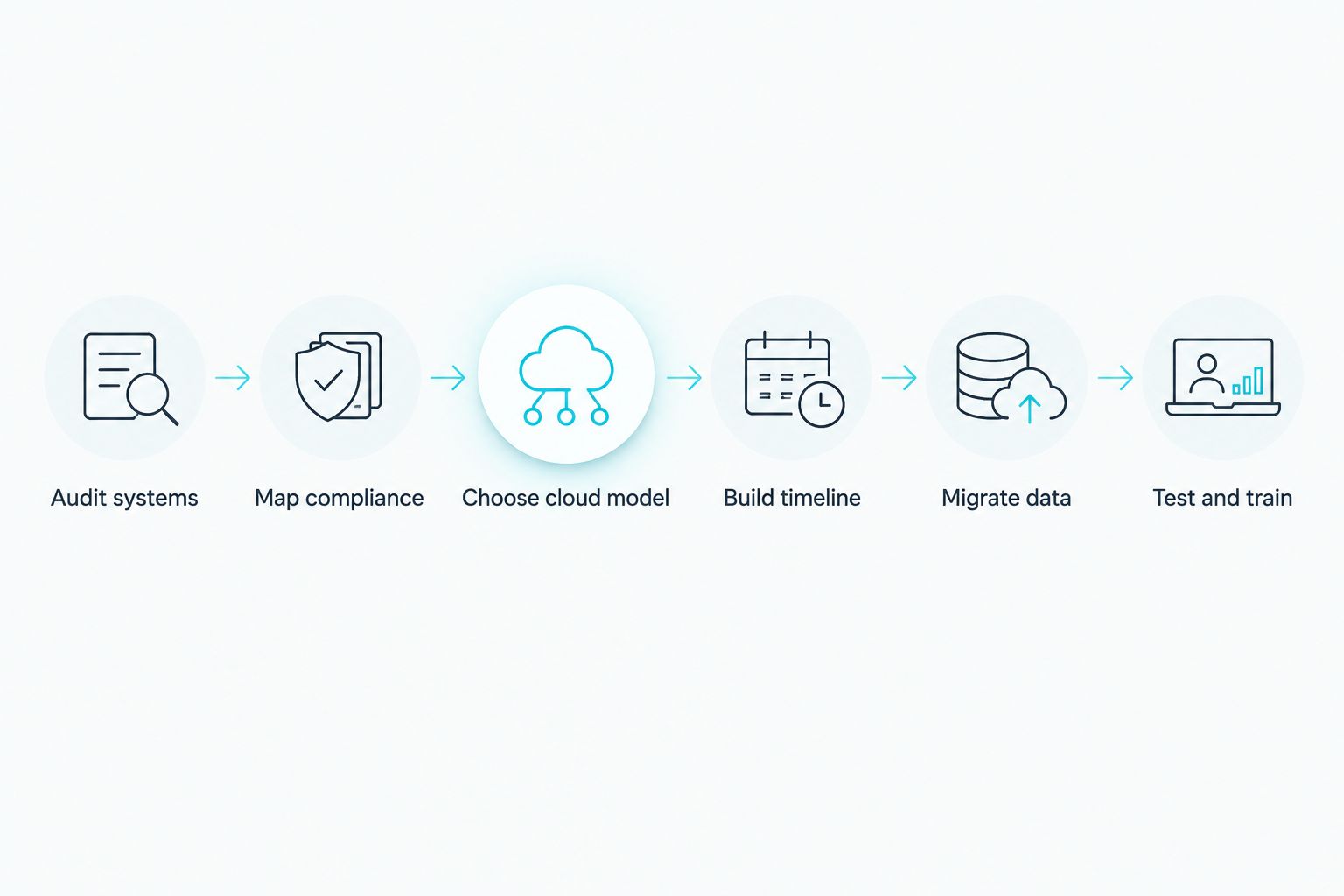
Step 5: Migrate and encrypt patient data
The actual data move is where PHI exposure risk peaks. Treat this step as the most sensitive part of the entire project.
- Encrypt PHI in transit and at rest during the move, not just once it lands
- Migrate in batches, verifying record counts and integrity at each stage
- Keep the legacy system running read-only until the new environment is fully verified
- Log every access event during the migration window for the compliance record
Step 6: Test EHR integrations and train staff
A migration that works technically but confuses front-desk staff on day one still counts as a failed rollout.
- Test every EHR integration point: lab interfaces, e-prescribing, insurance eligibility checks
- Run a full patient check-in simulation before opening the doors on the new system
- Train front-desk and clinical staff on the new login and access process
- Confirm 24/7 support coverage for the first two weeks post-migration, when issues surface fastest
Comparing migration options for healthcare practices
| Option | Best for | Key limitation |
|---|---|---|
| DIY migration with internal IT staff | Single-location practices with dedicated in-house IT and simple systems | HIPAA gaps often surface after go-live; no dedicated healthcare migration experience |
| General managed IT provider | Practices wanting local support without a healthcare specialty | May not know EHR/PACS integration quirks or full BAA requirements |
| Cloud platform's own migration team | Larger health systems moving one specific workload | Platform-specific; does not manage the practice's compliance program after migration |
| TeraCloud managed cloud migration | Small and midsize practices needing HIPAA-ready migration plus ongoing support | Works best when paired with ongoing managed IT, not a one-time project |
Verdict: for a single-location practice with an internal IT hire and simple systems, DIY migration is workable — for anything with multiple clinical systems or multi-state operations, a healthcare-focused managed provider closes gaps a general vendor misses.
Plan your practice's cloud migration
Get a compliance-first migration plan built around your clinic hours.
Common mistakes healthcare practices make
- Skipping the HIPAA risk assessment before migration — gaps found during an audit cost far more than gaps found during planning
- Migrating billing and EHR in the same weekend — this is the fastest way to end up with duplicate patient records and broken claims
- Assuming a cloud vendor's BAA covers the whole stack — a BAA with the primary host does not automatically cover every subcontractor touching PHI
- Migrating during clinic hours without a rollback plan — a broken cutover mid-shift stops patient check-in cold
- Ignoring legacy fax and scanning workflows — referral pipelines built on old fax hardware get left behind and break quietly
FAQ
What are cloud migration services for healthcare practices?
Cloud migration services for healthcare practices move EHR, imaging, and billing systems from on-premise servers to HIPAA-compliant cloud infrastructure. The process includes a compliance review, a BAA with the provider, and a staged data move that keeps clinical systems running during the transition.
How long does a cloud migration take for a medical practice?
Timelines depend on the number of clinical systems and data volume involved, ranging from a few weeks for a single-location practice to several months for a multi-location group. Sequencing EHR and billing separately, as outlined in Step 4, avoids extending the timeline unnecessarily.
Is cloud migration HIPAA compliant?
Cloud migration itself is compliant only when the provider signs a Business Associate Agreement and PHI is encrypted in transit and at rest throughout the move. Without a BAA covering every vendor in the data path, the migration creates a compliance gap regardless of the underlying technology.
What happens to EHR data during migration?
EHR data is migrated in verified batches while the legacy system stays running in read-only mode until the new environment passes integrity checks. Record counts and integration points, including lab and e-prescribing interfaces, are tested before the legacy system is decommissioned.
Do I need a Business Associate Agreement with my cloud provider?
Yes, a BAA is required with any cloud provider or subcontractor that stores, processes, or transmits PHI. Confirm the BAA covers the full stack, not just the primary hosting environment.
What's the difference between public and private cloud for healthcare?
Public cloud fits non-PHI systems like scheduling and patient portals, while private or dedicated cloud fits EHR, PACS, and billing systems that hold PHI directly. Most practices end up on a hybrid model that splits workloads between the two.
Can a practice migrate to the cloud without downtime?
Full zero-downtime migration is rare for clinical systems, but scheduling the cutover around low-patient-volume days and keeping the legacy system live in read-only mode minimizes disruption to near zero for patients. The goal in 2026 migration planning is a controlled, short window, not a guaranteed absence of any downtime.
How much does cloud migration cost for a small practice?
Cost depends on the number of systems, data volume, and whether ongoing managed support is bundled with the migration project. Get a scoped quote based on the practice's specific system inventory rather than relying on a generic estimate.
One last thing
Most practices treat the EHR as the hard part of the migration and the fax machine as an afterthought. In practice, referral workflows tied to old fax and scanning hardware are what break quietly weeks after go-live, because nobody tested them during the cutover simulation. Add legacy referral workflows to the test list in Step 6, not just the EHR and billing interfaces — that single addition catches the failure mode most 2026 healthcare migrations miss.


