
Yes, co-managed IT can work alongside your existing IT staff while your internal team keeps control of business priorities and agreed technical decisions. The arrangement works when you assign ownership, share support records, and define escalation before outside technicians receive access; adding a provider without those rules adds coordination work instead of removing it.
- Can co-managed IT work alongside existing IT staff? Yes, with written ownership, shared tickets, and agreed escalation.
- Keep business priorities and approval authority with your internal IT leadership.
- Microsoft 365 administration and cybersecurity support need explicit access boundaries, not overlapping administrator responsibilities.
- TeraCloud serves small and midsize businesses seeking managed IT, cybersecurity, and cloud support.
Why this matters
Your IT employees know how the business operates. They understand which application blocks invoicing, which department needs hands-on support, and which changes require a manager's approval. Outside support should extend that knowledge, not bypass it.
The business problem is capacity: routine requests, security maintenance, and cloud projects compete for the same team's attention. A co-managed arrangement lets you assign selected responsibilities externally while keeping internal accountability. The trade-off is coordination; someone still needs to manage the relationship and approve the work.
For your 2026 support plan, start with the work that stalls when an employee is unavailable. A coverage gap is a clearer buying requirement than a general request for more support.
Can co-managed IT work alongside our existing IT staff?
Yes. Co-managed IT works alongside existing staff by dividing responsibilities rather than replacing the department. Your agreement should identify who performs each task, who approves changes, and who takes over when the first owner cannot resolve an issue.
Use a responsibility table before choosing the service scope. The example below is a proposed division of work, not a provider's standard package.
| Responsibility | Internal IT role | External provider role | Required boundary |
|---|---|---|---|
| Business priorities | Set priorities and identify critical systems | Plan assigned work around those priorities | Internal leadership approves competing priorities |
| Employee support | Handle business-specific issues | Handle assigned requests or overflow | Every ticket has a named owner |
| System changes | Approve changes affecting operations | Execute approved technical work | Record approval and rollback instructions |
| Cybersecurity | Set business requirements and approve exceptions | Perform contracted monitoring or remediation | Define emergency authority in advance |
| Cloud projects | Explain application dependencies | Deliver the agreed project tasks | Internal IT accepts the completed work |
| Documentation | Maintain business context | Record systems and work within scope | Both teams use an agreed source of truth |
The advantage is access to additional help without discarding internal knowledge. The limitation is divided execution: unclear boundaries create duplicated effort, conflicting changes, and unresolved tickets.
Do not treat the table as a handoff of accountability. Your business still needs an internal decision-maker, even when an outside technician performs the work.
Coverage support: best for gaps in staff availability
Coverage support fits an internal team that handles normal operations but needs help during absences, busy periods, or agreed support hours. Define which requests the provider accepts and which require internal knowledge.
The benefit is continuity without transferring every daily responsibility. The limitation is that a substitute technician needs current documentation and appropriate access to be useful.
For example, an outside technician can follow a documented account-access procedure. A request involving an undocumented business application should return to the internal owner rather than trigger an improvised change.
Choose coverage support when availability is the problem, not unclear internal processes.
Specialist support: best for a defined technical gap
Specialist support fits a team that needs assistance with a specific area, such as cybersecurity or cloud migration. Internal IT supplies business context while the external specialist handles assigned technical work.
The benefit is focused expertise without moving unrelated responsibilities outside the business. The limitation is scope: an engagement for security monitoring does not automatically include employee support or application administration.
In a 2026 security plan, distinguish detecting an issue from resolving it. Name the person authorized to approve account restrictions, device isolation, or other actions that interrupt work.
Choose specialist support when the missing capability is clear and bounded.
Project support: best for work beyond daily operations
Project support fits a team that must deliver a migration or other defined change while continuing to support employees. Separate project tasks from the normal support queue.
The benefit is a dedicated scope and an identifiable finish. The limitation is the handoff: a completed project still needs documentation, acceptance, and an operational owner.
Require the project record to explain what changed, how the system is supported, and what happens if the change fails. A migration is not operationally complete just because data has moved.
Choose project support when the workload has a defined outcome and acceptance criteria.
Why the right co-managed IT arrangement varies
The right division of work depends on your systems and your staff's responsibilities. Use these factors to set the scope rather than buying the broadest service description.
- Staff availability: Identify the work that needs coverage when your internal owner is unavailable.
- Technical responsibilities: Separate tasks your team handles confidently from tasks requiring specialist assistance.
- Business dependencies: Document systems whose interruption affects customer service, billing, or other essential operations.
- Approval authority: Specify which changes require internal permission and which emergency actions are preauthorized.
- Existing tools: Decide where tickets, asset records, and change history will live so neither team works from incomplete information.
- Service boundaries: List exclusions alongside included tasks, particularly for business applications and project work.
These factors determine the operating model. They do not justify giving every external technician unrestricted access.
How do we make co-managed IT work without confusion?
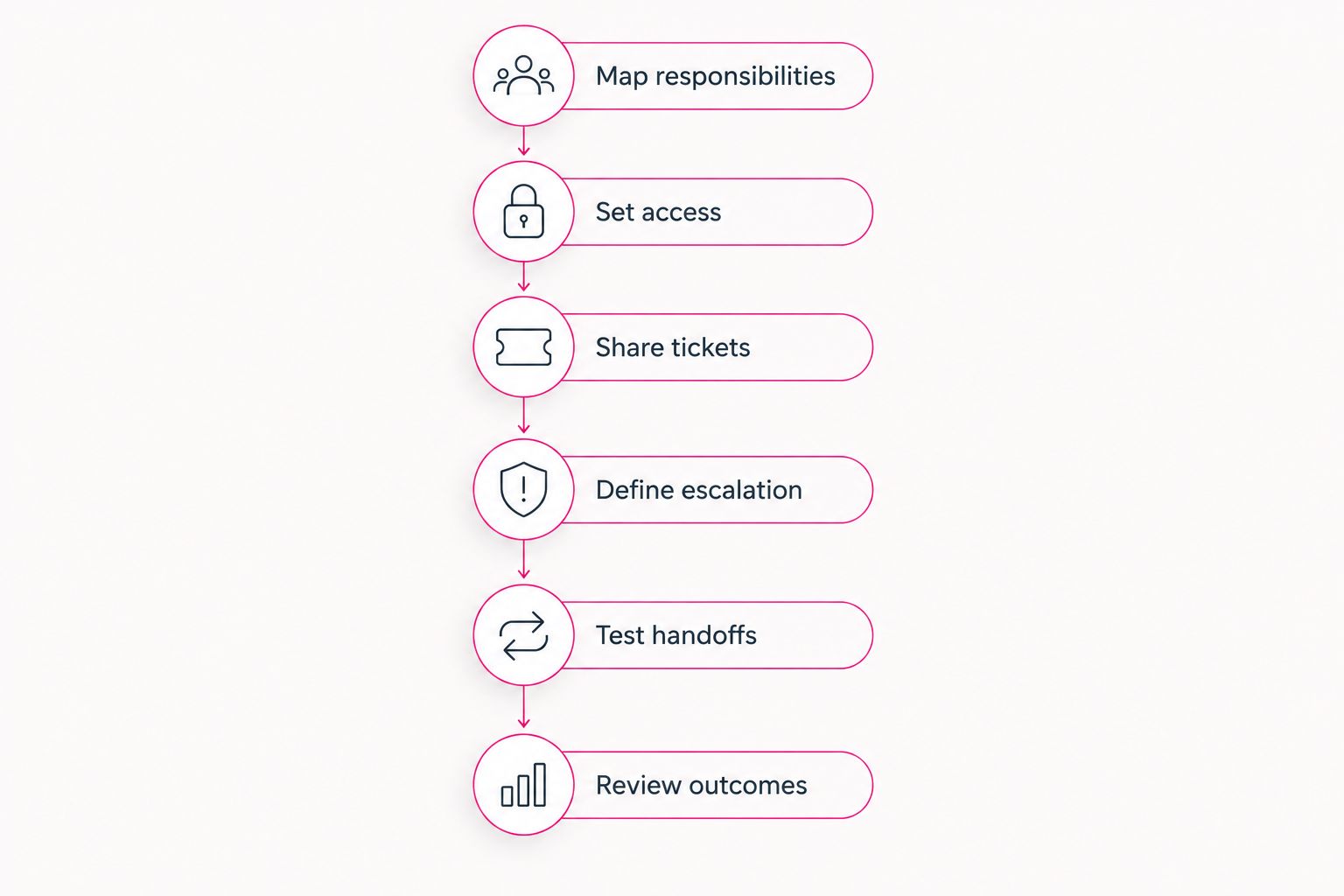
Use the following 6 steps as an implementation checklist. Complete the decisions before assigning production work, then test whether the arrangement operates as written.
1. Map responsibilities
List recurring tasks, important systems, and unresolved work. Assign an owner to each responsibility rather than assigning vague categories such as everything technical.
For every task, record 3 fields: the person who performs it, the person who approves it, and the escalation contact. The same person can hold more than one role, but each role must be explicit.
Ask your existing staff to identify handoffs that currently fail. Their operational knowledge should shape the scope before a service agreement fixes it.
2. Set access
Give external technicians access appropriate to their assigned duties. Use named accounts rather than sharing an employee's credentials, and require multifactor authentication, which adds a separate verification step to signing in.
Apply least privilege: grant only the permissions needed for the task. Record who can approve additional permissions and who removes access when the engagement ends.
In your 2026 access review, distinguish ordinary support access from administrative access. Permission to investigate a ticket is not automatic permission to change the entire environment.
3. Share tickets
Choose an agreed ticket record that both teams can use or exchange reliably. It should show the owner, current status, actions taken, and next step.
An employee should not need to diagnose the issue before knowing where to request help. Publish a clear intake route, then let the support teams route work behind it.
Avoid running separate queues with no reconciliation. A ticket marked resolved by the provider should also have a recorded outcome that internal IT can review.
4. Define escalation
Set the conditions for transferring a ticket, including unresolved technical issues, missing permissions, and business-impact decisions. Name the receiving contact instead of relying on a general instruction to notify IT.
Separate technical escalation from approval escalation. A specialist can identify a fix while still needing internal authorization to restart a business-critical system.
For emergencies, document permitted actions and notification requirements beforehand. An escalation policy that waits for an unavailable approver does not provide dependable coverage.
5. Test handoffs
Walk through a realistic support request and a simulated urgent incident before treating the arrangement as established. Check whether both teams can find the documentation, identify the owner, and reach the approver.
Keep the exercise controlled. Do not disrupt production systems merely to prove that communication works.
Record where the process breaks, then correct the access, instructions, or ownership. The goal is a working handoff, not a successful presentation.
6. Review outcomes
Review completed work and unresolved responsibilities with your internal IT lead. Use ticket history and documented changes rather than general assurances that service is improving.
Useful review questions include whether tickets changed owners unnecessarily, whether approvals delayed resolution, and whether internal staff had to repeat completed work. These questions expose coordination problems without assuming a particular performance result.
For your 2026 review, compare outcomes against the responsibilities in the agreement. Additional activity is not automatically additional value.
What does a clean handoff look like in practice?
Suppose an employee cannot access a cloud application. The initial support owner checks the ticket history and follows the approved account-access procedure. If the problem requires changing a business rule or application configuration, the owner escalates it rather than exceeding the agreed permissions.
Internal IT supplies the business context and approves the change. The assigned technician completes the work, records the action, and confirms the outcome with the employee. Both teams can then see what happened without reconstructing the incident from private messages.
The opposite arrangement has no clear owner. Internal IT assumes the provider is investigating, the provider waits for approval, and the employee submits another request.
A clean handoff transfers responsibility with enough information to act. Forwarding an email without ownership, permissions, or a next step does not meet that standard.
Will co-managed IT replace our existing IT employees?
Co-managed IT does not require replacing your existing IT employees. Its purpose is to divide work between an internal team and an external provider; staffing decisions remain separate business decisions.
Make that distinction explicit when introducing the arrangement. Tell employees which responsibilities stay internal, which move outside, and who retains approval authority. Avoid promising unchanged roles if you have not decided the operating model.
Can our IT manager keep control of systems and decisions?
Your IT manager can retain control when the agreement preserves internal approval authority and visibility. Give the manager access to support records, change history, and the documented escalation process.
Control also requires an exit plan. Your business should retain access to its accounts and operational documentation rather than depending on a provider to retrieve them later.
Can co-managed IT help with cybersecurity without overlapping duties?
Co-managed IT can support cybersecurity when monitoring, investigation, remediation, and approval each have an assigned owner. Do not use shared responsibility as a substitute for a specific response procedure.
For a 2026 cybersecurity plan, document who can restrict an account or isolate a device and who handles the resulting business interruption. Technical action and business communication need separate ownership even when the same team performs both.
Where TeraCloud fits
TeraCloud is best for small and midsize businesses seeking managed IT, cybersecurity, and cloud support. Its stated services also include data management and practical automation, which are relevant areas to discuss when defining external assistance.
The scope question still comes first. When discussing TeraCloud managed IT support, bring your responsibility table and ask which tasks the proposed agreement covers alongside your staff.
The fit is access to services aligned with those business needs. The boundary is contractual: a service description alone does not establish shared ticket access, retained approval authority, or emergency permissions. Confirm those operating details before committing.
FAQ
Can co-managed IT work alongside existing IT staff?
Yes, co-managed IT can work alongside existing IT staff by assigning selected responsibilities to an external provider. Define ownership, approval authority, shared records, and escalation before work begins.
What's the best co-managed IT setup for a small internal team?
The best setup addresses a specific capacity or technical gap while preserving internal accountability. Start with coverage, specialist assistance, or a defined project rather than transferring unclear responsibilities.
Will our IT manager lose control of the environment?
Your IT manager can retain control through documented approval authority and visibility into support work. Specify exceptions for emergency action instead of leaving them to interpretation.
Do both IT teams need to use the same ticketing system?
Both teams need an agreed, accessible support record, but that does not require an identical tool. Define how ticket ownership, updates, and resolution details move between systems.
Is co-managed IT better than fully outsourced IT?
Co-managed IT fits businesses retaining internal IT responsibilities; fully outsourced IT assigns more work externally. The better choice depends on the responsibilities you intend to keep, not the service label.
Can an outside provider help with cybersecurity only?
An outside provider can handle an agreed cybersecurity scope while internal staff retain other responsibilities. Assign monitoring, investigation, remediation, and approval separately so urgent work does not fall between teams.
What should we ask TeraCloud before choosing support?
Ask TeraCloud to define the work included alongside your staff, required access, ticket visibility, and escalation responsibilities. Confirm those details in the proposed agreement rather than assuming them from the service description.
Related guides
- Is co-managed IT worth it with in-house staff?
- How long does managed IT onboarding take?
- Can managed IT replace an in-house department?
One last thing
An unresolved approval can stop outside support even when the technician knows the fix. Before expanding coverage, check that every important system has an available decision-maker and a documented backup contact.
Your next step: ask your IT lead to complete the responsibility table for the work you want outside support to handle.


