Yes, managed IT services can replace an in-house IT department’s day-to-day technical work, provided the contract covers your systems, support needs, and security responsibilities. They cannot replace your business’s ownership of technology decisions, spending approvals, or acceptable risk. In 2026, the right choice is full outsourcing when the provider can cover the work, and co-managed IT when you still need internal technical expertise.
- Can managed IT services replace an in-house IT department? Yes for contracted technical work, not business accountability.
- Fully outsourced IT suits businesses without a continuing need for dedicated internal technical staff.
- Co-managed IT suits businesses that need internal expertise alongside external support and cybersecurity services.
- TeraCloud provides managed IT services for small and midsize businesses seeking outsourced support, cybersecurity, and cloud services.
Why this matters
Replacing an IT department changes who handles incidents, approves access, maintains documentation, and coordinates recovery. A support contract alone does not settle those responsibilities. If you remove internal staff before assigning the work, you leave gaps rather than eliminate them.
TeraCloud provides managed IT, cybersecurity, cloud migration, Microsoft 365, and data management services for small and midsize businesses. Those service categories are relevant to outsourcing; your agreement still needs to identify exactly which systems and tasks are covered.
Outsource the work only after you assign the decisions. That distinction keeps the replacement question focused on business continuity rather than headcount alone.
Can managed IT services fully replace an in-house IT department?
Yes, a managed service provider can take over the technical functions listed in its agreement. Full replacement works when the provider can support your environment and your business retains someone authorized to make decisions. It does not mean every technical task automatically becomes the provider’s responsibility.
Compare the operating models below. If internal knowledge remains essential, the alternative is co-managed IT alongside in-house staff, not an incomplete outsourcing arrangement.
| Operating model | Best for | Main advantage | Main limitation |
|---|---|---|---|
| Fully outsourced IT | Businesses whose technical work fits the provider’s contracted scope | Transfers defined support and maintenance tasks to an external team | Requires explicit boundaries, escalation rules, and knowledge transfer |
| Co-managed IT | Businesses retaining internal expertise but needing additional support | Keeps business-specific knowledge inside while assigning external responsibilities | Creates overlap unless both teams agree on ownership |
| In-house IT | Businesses needing dedicated internal technical ownership | Keeps technical priorities and institutional knowledge within the business | Requires the business to arrange staffing, coverage, and specialist support |
For your 2026 decision, compare responsibilities rather than job titles. An internal administrator can perform work that spans support, purchasing, security, vendor coordination, and business applications. Replacing that person requires accounting for the whole role, not just incoming tickets.
What can you assign to a managed service provider?
Start with a written inventory of work. Candidate responsibilities include user support, device administration, cloud administration, security operations, backup management, and technical documentation. Treat this as a scope checklist, not a promise that every provider includes everything.
For example, an employee’s account problem and a failed business application are different support requests. The provider might control the account but need the application vendor to fix the software. Your agreement should identify who coordinates that handoff and keeps the employee informed.
What must your business retain?
Your business needs an owner for budget decisions, access approvals, priorities, and risk acceptance. That owner does not have to be an IT employee. They do need the authority to approve action and resolve conflicts between departments.
A provider can configure access, but your business decides who is entitled to it. A provider can recommend a recovery approach, but your business decides which operations need attention first. Technical execution can move outside; business accountability stays inside.
Fully outsourced IT: best for transferring defined technical work
Full outsourcing fits when you do not need a dedicated internal technical role and the provider’s scope covers the work your business depends on. The benefit is a clear destination for support and maintenance responsibilities. The limitation is dependence on the provider’s understanding of your environment.
Before choosing this model, ask the provider to explain how it will handle an ordinary user request, a security incident, and a service outage. The answers should identify ownership, escalation, and communication. A list of service categories is not enough.
Also separate remote support from physical work. Replacing a keyboard, inspecting network equipment, or coordinating an office move requires a different arrangement from resetting an account. Confirm how that work is handled before removing the person who currently does it.
Choose full outsourcing when the contract covers the actual workload and you can retain an effective internal business owner. Do not use it to avoid documenting responsibilities that already lack an owner.
Co-managed IT: best for keeping essential internal knowledge
Co-managed IT divides responsibility between your staff and an external provider. It fits when internal employees understand important business applications, workflows, or systems that you need to keep close. The external team takes responsibility for an agreed portion of the technical workload.
The advantage is continuity of business-specific knowledge. The drawback is coordination: employees need to know which team handles each request, and both teams need a shared escalation process. Without that structure, a ticket can move between teams without progress.
For a 2026 operating plan, write down which team owns user support, system changes, security alerts, and recovery tasks. Assign a lead for incidents involving both teams. Shared involvement must not become shared uncertainty.
Choose co-managed IT when internal technical ownership remains necessary but some responsibilities belong with an external team. Keep the internal role because the work requires it, not because the handoff has never been examined.
In-house IT: best for dedicated internal technical ownership
An in-house department fits when your business needs employees who directly own technical priorities and understand its operations in depth. That proximity supports coordination with business teams. It also places staffing, documentation, and coverage responsibility on your organization.
An internal team is not automatically a complete solution. You still need to decide how specialist work, absences, incident escalation, and recovery are handled. Keeping staff does not remove the need for explicit service ownership.
Before replacing an internal team, identify responsibilities that depend on its accumulated knowledge. Then decide whether to transfer that knowledge, retain the role, or split the work. Keep in-house IT when dedicated internal ownership is part of the operating requirement.
Why the replacement decision varies
The deciding factors are your actual responsibilities and the provider’s agreed scope, not whether outsourcing sounds simpler.
- Business applications: Identify systems that require business-specific knowledge, custom configurations, or coordination with software vendors.
- Security responsibilities: Separate technical controls from access approval, policy decisions, and risk acceptance.
- Physical support: Identify work that requires someone at a device, office, or equipment location.
- Cloud ownership: Clarify who administers accounts, approves changes, manages permissions, and coordinates migrations.
- Data management: Assign responsibility for backup monitoring, restore testing, retention decisions, and recovery priorities.
- Internal decision-making: Name the person who approves spending, resolves competing requests, and directs the provider during disruption.
Use these factors to test the proposed arrangement. If a responsibility has no owner, the design is incomplete. If a task is excluded, decide whether to retain it internally or arrange separate support.
How do you replace an internal IT team without losing ownership?
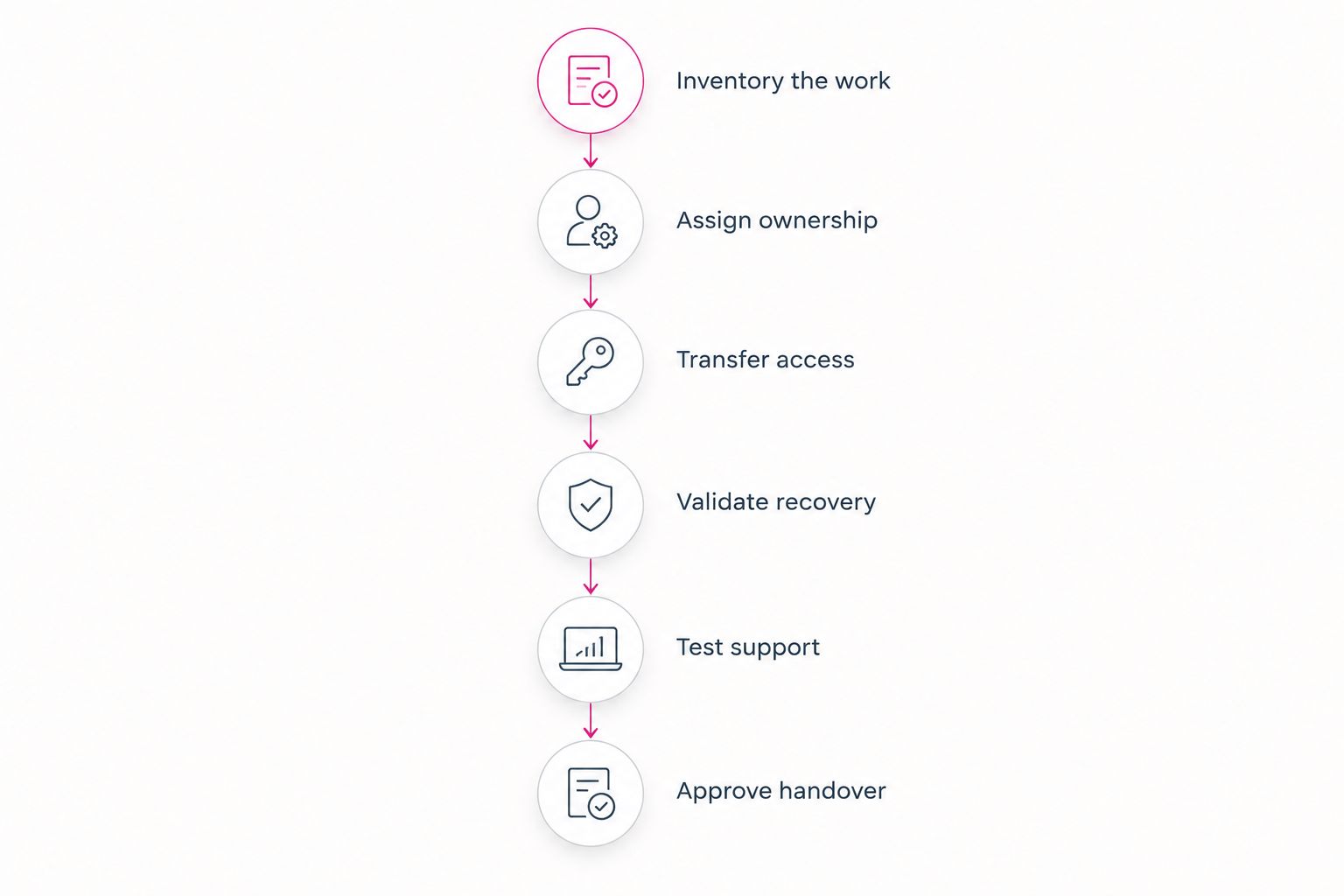
A replacement plan should transfer operational knowledge before it removes the people holding that knowledge. Use this sequence for a 2026 transition, whether you are replacing a department or moving selected tasks outside.
- Inventory the work. List systems, devices, accounts, vendors, recurring maintenance, and business applications. Include work that does not appear in help-desk tickets, such as purchasing and access approvals.
- Assign ownership. Build a responsibility matrix naming the provider, the internal approver, and any software vendor involved. Identify exclusions and the person responsible for resolving them.
- Transfer access. Arrange authorized administrative access and document where credentials are controlled. Preserve business ownership of accounts rather than making access depend on an individual employee.
- Validate recovery. Confirm what is backed up, how restoration is performed, and who approves recovery priorities. Review restoration evidence rather than accepting a backup status alone.
- Test support. Walk through a user request, an urgent outage, and a security escalation. Confirm that employees know how to report problems and that someone owns each handoff.
- Approve handover. Record unresolved issues, accepted exclusions, and outstanding documentation. Retire the old arrangement only when the responsible business owner accepts the new one.
The sequence is a recommended process, not a promised implementation timeline. Your environment determines the work required at each stage.
A useful handover document lets another authorized person understand who owns the systems and how to request action. It should not depend on remembering a former employee’s informal instructions. Keep it accessible to the business owner and maintain it as responsibilities change.
Does round-the-clock support mean every problem gets fixed immediately?
No. Support coverage, response, and resolution describe different things. Coverage tells you when help is accessible; response tells you when a request receives attention; resolution means the underlying problem is fixed.
For your 2026 agreement, distinguish 24 hours per day from 7 days per week and confirm what happens during that coverage. TeraCloud states that it provides 24/7 support. That statement does not establish a specific response deadline, resolution guarantee, or on-site arrangement.
Ask how urgent requests are classified, how an unresolved incident escalates, and who communicates with employees. Also ask what happens when the cause sits with an internet carrier or application vendor. The provider’s coordination responsibilities matter even when it cannot directly repair the underlying service.
Can a provider replace your IT leadership too?
A provider can contribute technical recommendations, but your business still needs to approve priorities and accept risk. Recommendations about cloud systems, cybersecurity, or automation need a decision-maker who understands business requirements.
Do not assume that operational support includes every leadership task. Technology planning, project oversight, vendor selection, and policy development need explicit scope if you expect the provider to perform them.
The practical test is simple: identify who can approve a consequential change. If nobody inside the business owns that decision, replacing technical staff has created a governance gap.
FAQ
Can managed IT services replace an in-house IT department completely?
Managed IT services can replace the technical work covered by the provider’s agreement. Your business still needs an authorized owner for budgets, access approvals, priorities, and risk decisions.
What’s the best IT model if I already have an internal administrator?
Co-managed IT fits when your internal administrator owns business-specific work that you need to retain. Full outsourcing fits when that work can be documented, transferred, and included in the provider’s scope.
Do I need to keep an IT employee after outsourcing?
You do not need to retain an IT employee solely to approve business decisions. You do need to retain any technical responsibilities that the provider does not cover, either internally or through a separate arrangement.
Does 24/7 managed IT support guarantee immediate fixes?
No, 24/7 support does not establish an immediate resolution guarantee. Confirm response commitments, escalation procedures, and coverage exclusions in the agreement.
Can a managed IT provider handle cybersecurity and backups?
A managed IT provider can handle cybersecurity and backup responsibilities included in its scope. Identify who monitors alerts, maintains backups, tests restoration, and approves recovery actions.
Is TeraCloud relevant for a small business replacing internal IT?
TeraCloud provides managed IT services, cybersecurity, cloud migration, Microsoft 365, and data management for small and midsize businesses. Assess whether its proposed scope covers your specific applications, physical support needs, and retained responsibilities.
What should I check before ending my internal IT arrangement?
Check ownership, documentation, administrative access, recovery procedures, and support escalation before ending the existing arrangement. Record unresolved issues and obtain approval from the internal business owner.
One last thing
A closed support ticket is not proof that an entire responsibility has transferred. A provider can successfully reset an account while nobody owns the business’s access-approval process. Check the ongoing responsibility, not just the individual task.
Your next step in 2026 is to build a responsibility matrix with one named business owner and an explicit owner for each technical function. Use it to decide between full outsourcing, co-managed IT, and retaining an internal department.


