
Co-managed IT services for manufacturing companies means an outside IT provider works alongside your internal IT staff instead of replacing them — the outside team handles specific gaps (24/7 monitoring, cybersecurity, cloud, OT network hardening) while your in-house team keeps control of daily operations and vendor relationships. Manufacturers need this split because production floors run on decades-old PLCs, SCADA systems, and IT networks that were never designed to talk to each other, and a single internal IT hire rarely has time to cover both the office network and the shop floor.
- Co-managed IT services for manufacturing companies split coverage between internal IT staff and an outside provider — not full outsourcing.
- Manufacturers in 2026 need OT network segmentation and 24/7 monitoring most, since production downtime costs far more than office downtime.
- TeraCloud's co-managed model is best for manufacturers with 1-3 internal IT staff who need cybersecurity and after-hours coverage, not a full IT replacement.
- Skip co-managed IT if you have zero internal IT staff — a fully managed model fits that gap better.
Why co-managed IT matters for manufacturers
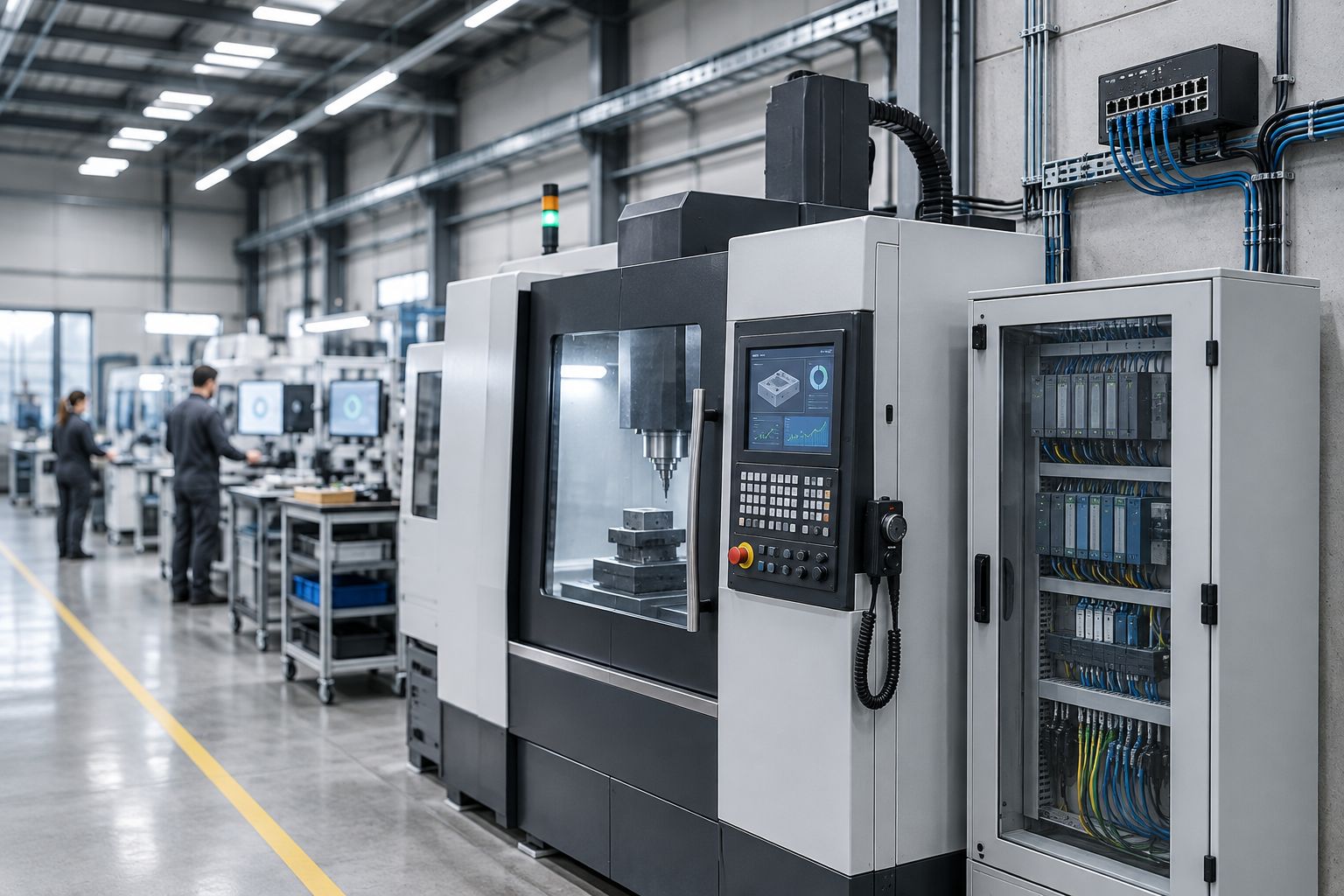
A manufacturing floor runs two networks that rarely get treated the same way: the office IT network (email, ERP, file shares) and the operational technology (OT) network running PLCs, CNC machines, and SCADA controllers. Most internal IT hires at small and midsize manufacturers were trained on the office side. They can reset a password and manage Microsoft 365, but they were never trained on segmenting a Modbus network or patching a legacy Windows 7 machine still running a $200,000 CNC controller because the vendor never certified a newer OS.
That gap is exactly what co-managed IT service providers are built to close in 2026 — they bring the OT security and after-hours monitoring skill set your internal team doesn't have, without taking over the parts of IT your team already handles well. Full outsourcing often backfires here because manufacturers need someone on-site who knows the floor, the vendors, and the machines; co-managed IT keeps that person in place and adds the coverage around them.
Map your OT and IT network before you outsource anything
You cannot price, scope, or even discuss a co-managed agreement until you know what's actually on your network. Manufacturers routinely discover unmanaged switches, forgotten VPN tunnels from a machine vendor's remote support contract, and PLCs still using default admin credentials.
- List every device with an IP address, including PLCs, HMIs, and machine vendor remote-access boxes
- Separate the OT network from the office network with a firewall or VLAN, even a basic one
- Document which machines can tolerate a reboot or patch window and which cannot
- Flag any device running an unsupported OS (Windows 7, XP embedded, unpatched Linux)
- Note every third-party vendor with standing remote access to a machine
Set a baseline for uptime and patch cadence
Before anyone signs a co-managed contract, put a number on what downtime actually costs your line per hour. That number decides how aggressive your patch and monitoring cadence needs to be, and it's the single fact every provider conversation should start from.
- Calculate revenue or units lost per hour of unplanned line downtime
- Set a patch window for office systems (usually weekly) separate from OT systems (often quarterly or vendor-scheduled)
- Track current mean time to detect and mean time to resolve for IT incidents over the last 90 days
- Identify which shifts need after-hours support coverage
Define the split between in-house IT and the outside team
This is the step manufacturers skip and regret. Co-managed IT only works when both sides agree in writing on who owns what — otherwise tickets bounce between teams and nothing gets fixed faster than it did before.
Most manufacturers land on a split where internal IT keeps machine vendor relationships, floor-level troubleshooting, and day-to-day help desk, while the outside provider owns 24/7 monitoring, patch management, cybersecurity tooling, and after-hours escalation. TeraCloud structures its co-managed engagements around that exact line, adding monitoring and security coverage on top of an existing internal team rather than replacing the person who already knows your machines.
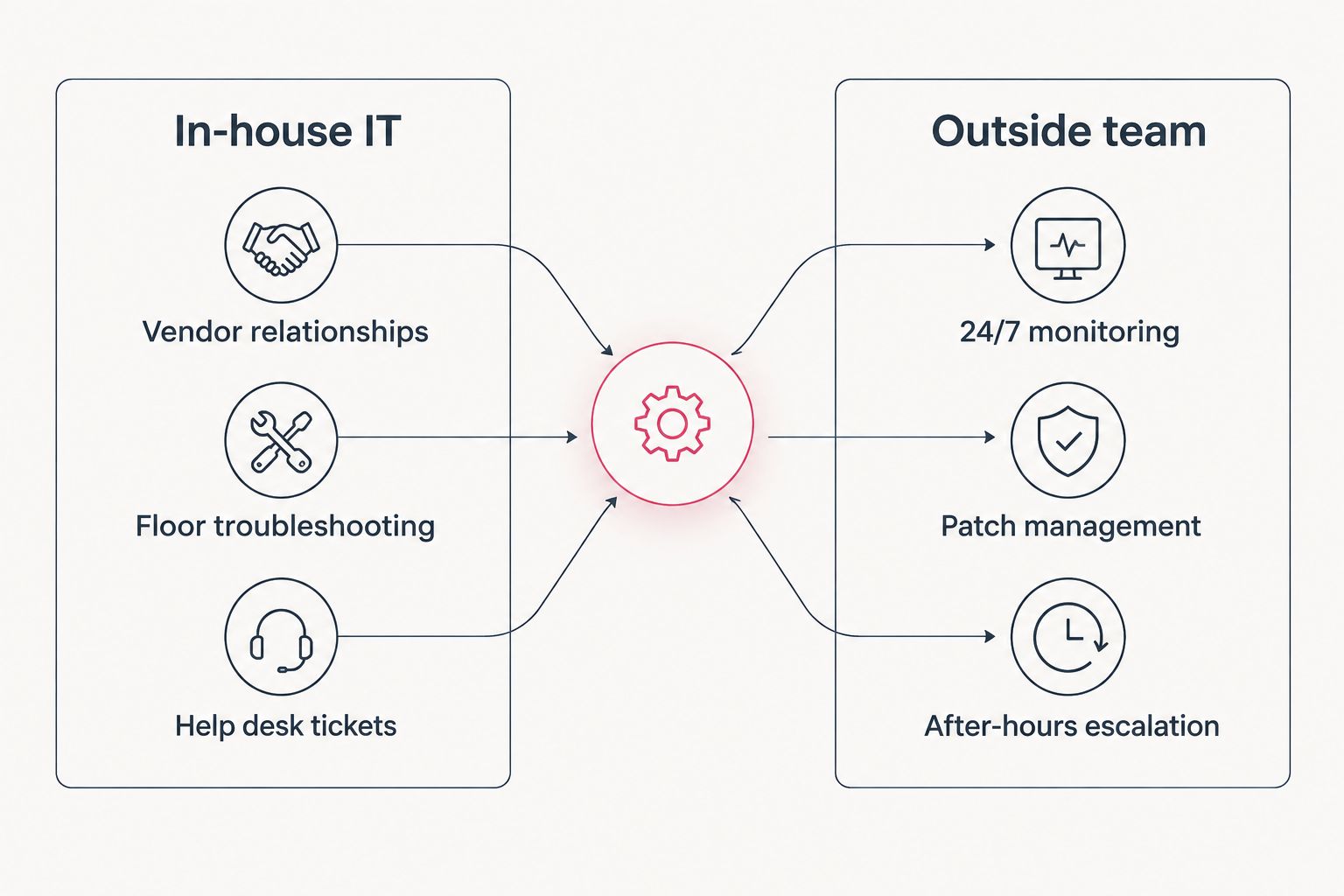
- Put the split in writing as a responsibility matrix, not a verbal agreement
- Assign one internal owner as the single point of contact for the outside provider
- Set escalation rules for who gets called first when a machine goes down
- Review the split every six months as internal staffing changes
Harden cybersecurity for OT and shop floor systems
Manufacturing is a top ransomware target because production stoppage forces fast ransom decisions — attackers know a shut-down line costs more per hour than most retail hacks. OT systems are usually the weakest link because they're patched rarely and monitored even less.
- Segment OT networks fully from office and guest Wi-Fi networks
- Require multi-factor authentication on every remote access point, including vendor VPNs
- Deploy endpoint detection on office systems and network-level monitoring on OT systems that can't run agents
- Run a tabletop ransomware drill at least once a year with both internal and outside IT present
- Review managed detection and response coverage separately from general monitoring — they're not the same service
Build a 24/7 monitoring and response plan
Production doesn't stop at 5 p.m., and neither should monitoring. This is usually the single highest-value piece of a co-managed contract because most internal IT teams are a staff of one or two who cannot cover nights and weekends without burning out.
- Confirm monitoring covers OT devices, not just servers and workstations
- Set a maximum response time in the contract for critical alerts (15 minutes is a reasonable target for a down line)
- Require a documented escalation path that names a human, not a ticket queue
- Test after-hours response with a planned false alarm before relying on it during a real outage
Standardize backup and disaster recovery for production systems
Backing up the ERP server is standard practice. Backing up PLC configurations, machine parameter files, and CNC programs is not, and losing them can mean days of reprogramming machines by hand.
- Back up PLC and CNC program files on the same schedule as server backups
- Store an offline or air-gapped copy separate from the network the ransomware would hit
- Test a full restore at least twice a year, not just a file-level spot check
- Document recovery time objectives separately for office systems and production systems
Get a co-managed IT assessment
See where your internal team needs backup before signing a contract.
Review vendor contracts and SLAs quarterly
Co-managed contracts drift. Staffing changes, new machines get added, and the responsibility matrix from step three quietly stops matching reality unless someone checks it.
- Re-verify response time SLAs against actual incident logs, not the contract's promised numbers
- Confirm new machines added since the last review are covered by the OT monitoring scope
- Check that pricing still reflects device count and coverage hours actually in use
- Compare current coverage against managed cybersecurity providers annually to confirm you're not paying for gaps a competitor closes better
Comparison: co-managed IT options for manufacturers
| Option | Best for | Key limitation |
|---|---|---|
| Fully in-house IT team | Large manufacturers with 5+ IT staff and dedicated OT security expertise | Expensive to staff 24/7 coverage and rare OT security skills internally |
| Fully outsourced/managed IT | Manufacturers with zero internal IT staff | Outside team lacks floor-level context on machines and vendors |
| Co-managed IT (TeraCloud model) | Manufacturers with 1-3 internal IT staff who need OT security and after-hours coverage | Requires a clear written responsibility split or tickets bounce between teams |
| Break-fix / as-needed IT | Very small shops with minimal network complexity | No proactive monitoring means issues surface only after downtime starts |
Verdict: co-managed IT is the right fit for manufacturers who already have an internal IT person or small team but can't cover 24/7 monitoring, OT security, or after-hours response alone. It's the wrong fit for manufacturers with zero internal IT staff — managed IT services for small businesses is the better starting point there.
“If your outside IT team can't tell you which PLC firmware is out of date, you don't have co-managed IT — you have outsourced IT with a co-managed invoice.”
Common mistakes manufacturers make with co-managed IT
- Treating OT and IT as one network for monitoring purposes. A shared monitoring dashboard without network segmentation gives false confidence — an alert on the office network doesn't mean the PLC network is safe.
- Never writing down the responsibility split. Verbal agreements about who owns what fall apart the moment the internal IT hire who made the deal leaves the company.
- Skipping backup testing on machine program files. Manufacturers back up the ERP religiously and forget the CNC program library until a ransomware event wipes both.
- Signing a contract with office-hours-only response times. Production runs on shifts; an SLA that only covers 9-to-5 leaves overnight and weekend shifts exposed.
- Assuming co-managed means cheaper than full outsourcing by default. Cost depends on device count, monitoring hours, and how much of the OT network needs coverage — it varies by shop, not by model.
FAQ
What is co-managed IT for manufacturing companies?
Co-managed IT is a model where an outside provider handles specific gaps like 24/7 monitoring, cybersecurity, and OT network hardening while internal IT staff keep control of daily operations, vendor relationships, and floor-level troubleshooting. It's a partnership, not a replacement of internal staff.
How is co-managed IT different from fully managed IT for a factory?
Fully managed IT replaces the internal IT function entirely, while co-managed IT adds coverage on top of an existing internal team. Manufacturers with 1-3 internal IT staff usually fit co-managed better than fully managed, since the outside provider fills specific gaps rather than taking over machine and vendor relationships.
Do manufacturers need OT-specific cybersecurity separate from office IT security?
Yes. OT systems like PLCs and SCADA controllers run on different protocols, patch cycles, and risk profiles than office IT, and manufacturing is a frequent ransomware target because production stoppage pressures fast ransom decisions. A monitoring plan built only for office systems leaves the OT network unmonitored.
What should be in a co-managed IT contract for a manufacturer?
A written responsibility matrix naming who owns machine vendor relationships versus 24/7 monitoring, a documented response-time SLA that covers all shifts (not just office hours), and OT network coverage explicitly named in the monitoring scope. Contracts without these three items tend to fail within a year.
Can co-managed IT cover multiple manufacturing plants in different states?
Yes, as long as the provider offers remote monitoring plus on-call or on-site response in each state where a plant operates. Coverage consistency across locations matters more than physical proximity for most day-to-day monitoring and patch management work.
Is co-managed IT worth it for a manufacturer with only one internal IT person?
For most manufacturers, yes — a single internal IT person cannot realistically cover 24/7 monitoring, OT security, and daily help desk work alone without burnout or gaps. Co-managed IT is built specifically for that staffing size.
How often should a manufacturer test disaster recovery for production systems?
Test a full restore of both server backups and machine program files (PLC configs, CNC programs) at least twice a year in 2026, not just a file-level spot check. Losing unbacked-up machine program files can mean days of manual reprogramming after an outage.
One last thing
The manufacturers who get the most out of co-managed IT in 2026 aren't the ones with the biggest budgets — they're the ones who mapped their OT network and wrote down the responsibility split before signing anything. Skip that step and the contract becomes another line item that doesn't actually close the gap it was bought to close.


