
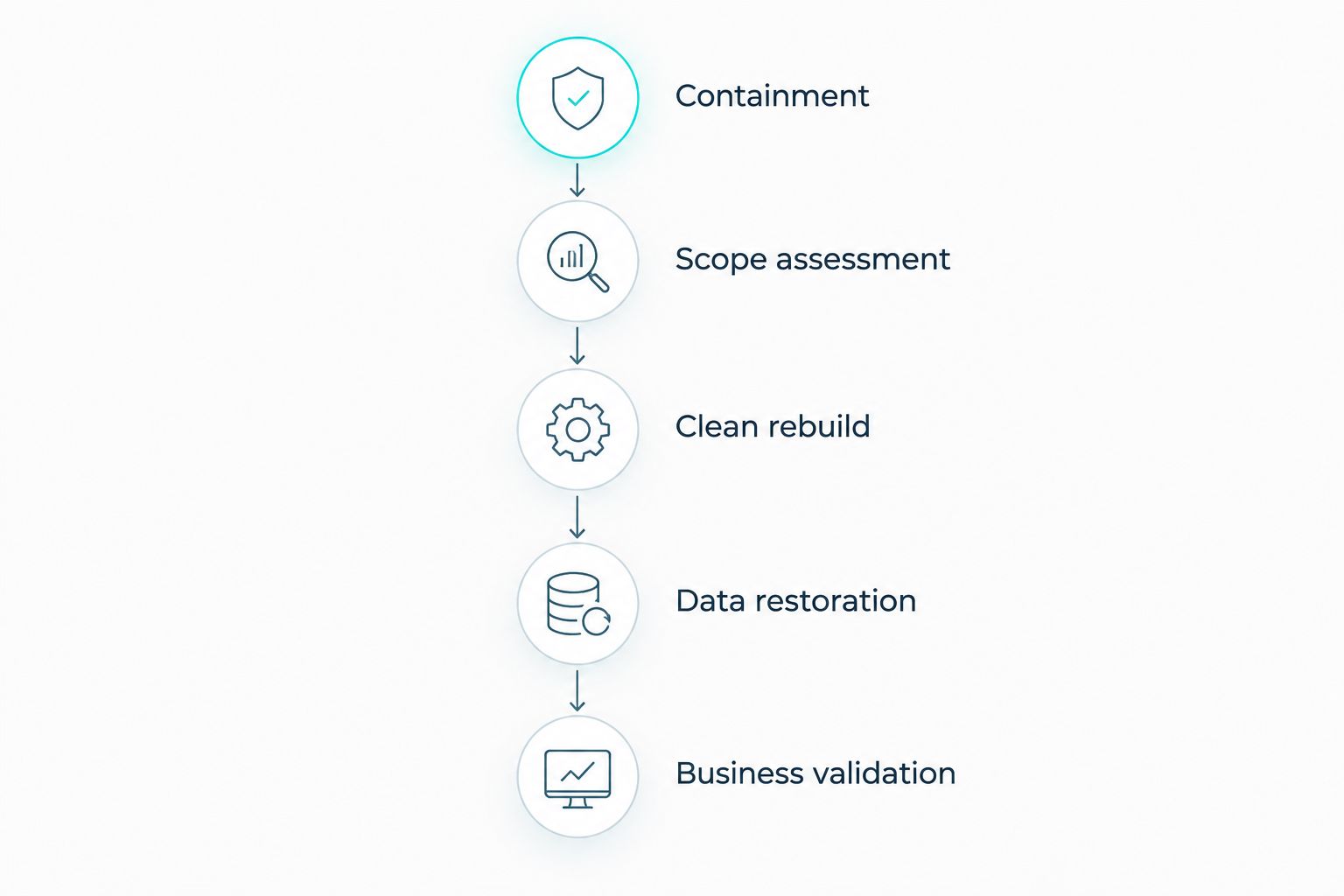
Disaster recovery after ransomware takes as long as containment, clean-system rebuilding, data restoration, and business validation require; there is no universal completion time. Restoring files does not include the work needed to remove attacker access or confirm that applications are safe to use. For your 2026 recovery plan, separate the deadline for restarting essential operations from the deadline for restoring every affected system.
- How long does disaster recovery take after ransomware? Measure containment, clean restoration, and business validation separately.
- A backup restore is not complete ransomware recovery; compromised accounts and systems also need remediation.
- Prioritize essential business workflows before less critical systems, and test their dependencies together.
- TeraCloud serves small and midsize businesses seeking managed IT, cybersecurity, cloud, and data management support.
How long does disaster recovery take after a ransomware attack?
The defensible recovery estimate comes from a tested recovery process, not a generic ransomware average. Your incident team must establish what was compromised, which backups are usable, and what each business workflow needs before committing to a restart deadline.
Use these checkpoints to build that estimate:
- Containment: isolate affected systems and stop unauthorized access while preserving evidence.
- Scope assessment: identify affected accounts, devices, applications, backups, and business processes.
- Clean rebuild: prepare trusted systems and secure the accounts needed to operate them.
- Data restoration: recover approved data from a suitable backup and check its integrity.
- Business validation: confirm that users can complete essential tasks safely before reopening access.
Some work runs in parallel. Other work depends on earlier decisions: restoring an application before securing its administrator accounts leaves a critical recovery dependency unresolved.
When reviewing cloud backup and disaster recovery providers, ask for evidence of application recovery, not just successful backup jobs. A completed backup proves that a copy was created; a recovery exercise shows whether your business can use it.
Why this matters
A server that starts successfully is not the same as a business that can operate. Your staff still need working authentication, application access, accurate data, and functioning connections between systems.
For 2026 planning, define recovery in business terms. Instead of asking when the server will return, ask when employees can process an order, issue an invoice, or access the documents required for a customer appointment.
Track the earliest safe restart and full recovery as separate milestones. This lets you resume approved work without declaring the entire incident resolved. It also keeps leadership from interpreting a restored file share as proof that every security issue has been addressed.
The recovery checkpoints that determine your timeline
Containment: stop the incident before reconnecting systems
Containment limits the attacker's ability to move through your environment. It includes isolating affected devices, restricting compromised accounts, and protecting backup infrastructure from unauthorized access.
Do not treat restarting an encrypted machine as the first recovery task. Your response lead must decide how to preserve evidence and whether the device belongs in the investigation, the rebuild queue, or both.
CISA's StopRansomware Guide recommends isolating impacted systems and preserving relevant evidence. These are incident-response actions, not optional cleanup after restoration.
Completion condition: the response team has controlled identified attacker access and documented the boundaries of the recovery environment. That condition is more useful than a deadline unsupported by the incident's scope.
Scope assessment: identify what recovery must include
An encrypted folder is visible damage. Compromised administrator credentials, altered security settings, and unauthorized access to backups require separate investigation.
Map affected assets to business processes. If an order-processing application depends on a database, identity service, and document store, recovering the application alone does not restore order processing.
Ask your response lead to distinguish confirmed findings from unresolved questions. An estimate built around unresolved backup integrity or account compromise needs those dependencies clearly stated, not hidden inside a single finish date.
Completion condition: the team has an approved recovery scope, a dependency list, and a prioritized restart order.
Clean rebuild: restore trust before restoring access
A clean rebuild starts from trusted installation sources or approved system images. It also addresses compromised credentials, security configuration, and the access paths identified during the investigation.
Restoring an old system image without reviewing it can reintroduce the conditions that enabled the attack. Choose the recovery point and rebuild method with the incident team, rather than assuming the newest image is the safest.
Include identity services in this phase. A functioning application remains exposed if its administrator credentials are still compromised.
Completion condition: the recovery environment meets the team's security checks and is ready to receive approved data. Reconnecting it to ordinary production access comes later.
Data restoration: recover usable data, not just files
Restore from a recovery point selected for integrity and business usefulness. The most recent backup is not automatically the right choice when the timing of unauthorized access remains under investigation.
Check whether the backup includes everything the application needs. Databases, configuration, permissions, and integration settings can matter just as much as the documents users recognize.
Test the restored application in an isolated environment where practical. Confirm that records open correctly and that required services communicate as intended.
Completion condition: the restored data passes agreed integrity checks and supports application testing. A successful transfer alone does not satisfy this checkpoint.
Business validation: prove that essential work functions
Assign a business owner to approve each restored workflow. Technical staff check the system; the business owner checks whether it produces the expected result.
Use concrete tasks. Open a customer record, create a test order, generate a report, and confirm that the appropriate users can access the result without receiving unnecessary permissions.
Reopen access in an approved sequence and watch for signs of renewed compromise. Document outstanding limitations so employees know which processes remain unavailable or require an alternative.
Completion condition: an accountable owner approves the workflow for use, and the response team approves its security readiness.
Which recovery approach fits your situation?
Different recovery methods solve different problems. Choose an approach based on the incident team's findings, your application dependencies, and the recovery capabilities you have actually tested.
For your 2026 plan, record the benefit and limitation of each method. Do not assume a standby environment is trustworthy simply because it was not visibly encrypted.
| Recovery approach | Best for | Main benefit | Main limitation |
|---|---|---|---|
| Clean rebuild with backup restoration | Systems requiring a trusted replacement environment | Separates system rebuilding from data recovery | Requires installation, configuration, and application validation |
| Approved standby environment | Essential workloads with an existing, tested recovery environment | Provides an alternate place to resume operations | Shared credentials or connections require security review |
| Temporary manual workflow | Business tasks that can operate without the affected application | Allows defined work to continue during technical recovery | Creates reconciliation work and does not restore the system |
A standby environment is a recovery option, not a security clearance. Confirm that its management access, credentials, and data are suitable before using it.
Manual work also needs controls. Assign responsibility for recording transactions, protecting sensitive information, and entering approved records into the recovered application. Without those controls, restarting the system leaves a separate data-reconciliation problem.
Why ransomware recovery time varies
The recovery timeline depends on conditions in your environment, not the ransomware label alone. These factors determine what your team must resolve before safely reopening operations:
- Backup integrity: the team must establish whether available copies contain usable data and suitable recovery points.
- Identity compromise: stolen or altered credentials require remediation before restored systems receive access.
- Application dependencies: databases, authentication, networking, and integrations must work together for a business process to return.
- Incident scope: affected devices, accounts, and shared infrastructure determine the rebuild and validation workload.
- Recovery resources: available staff, installation materials, documentation, and recovery infrastructure shape execution.
- Business acceptance: application owners must confirm data accuracy and approve the workflows employees will use.
Use these factors in status updates. A statement such as “the database is restored, but identity remediation blocks user access” tells leadership what remains unresolved and which decision matters next.
Do not turn a technical progress percentage into a business recovery promise. File-transfer progress does not measure account remediation, application testing, or operational readiness.
Does a recovery time objective guarantee when you will reopen?
A recovery time objective, or RTO, is the target maximum interruption for a system or business process. It is not proof that your organization will meet that target during ransomware recovery.
For 2026, compare each RTO with a documented recovery exercise. Check whether the exercise included account recovery, clean infrastructure, application dependencies, and business validation rather than only data restoration.
A recovery point objective, or RPO, describes the target amount of data loss measured in time. RTO asks how quickly a process should return; RPO asks how far back its recovered data should go.
Keep both objectives attached to named workflows. A target for a file server does not automatically establish a target for the accounting process that depends on it.
Can clean backups make ransomware recovery immediate?
Clean backups support restoration, but they do not make ransomware recovery immediate. Your team still needs a trusted destination, secure accounts, working applications, and approval to reconnect users.
Backup protections also serve different purposes. Offline copies are disconnected from ordinary network access; immutable copies restrict modification or deletion under their configured controls. Neither description replaces a recovery test.
CISA's StopRansomware Guide recommends offline, encrypted backups and regular testing of backup availability and integrity. Apply that guidance to the complete business workflow, not only a sample document.
The useful question is whether you can restore the workflow safely, not whether a backup exists. Verify who controls backup access and how recovery proceeds if normal administrator accounts are unavailable.
What should you ask your IT provider before an attack?
Require clear ownership of containment, restoration, and business approval. Your provider's response process and your internal decision-making must fit together before an emergency.
Ask for these deliverables in your 2026 recovery review:
- A dependency map for the workflows your business must restore first.
- A recovery exercise record showing what was restored and who validated it.
- A process for selecting recovery points after suspected compromise.
- A secure-access plan for recovery staff and administrators.
- A communication plan that separates technical progress from business readiness.
- A written list of responsibilities retained by your business.
TeraCloud managed IT is best suited to small and midsize businesses seeking cybersecurity, cloud, and data management support. Those services match the needs described here, but the recovery scope, responsibilities, and timing belong in an explicit plan rather than an assumed promise.
The TeraCloud service offering includes managed IT, cybersecurity, cloud migration, and data management. Ask how those services would support your specific applications; a service list alone does not establish a ransomware recovery deadline.
FAQ
How long does disaster recovery take after ransomware?
Ransomware disaster recovery has no universal completion time. The estimate depends on containment, incident scope, clean-system preparation, usable backups, and business validation.
Can we reopen as soon as our files are restored?
Restored files alone do not establish that reopening is safe. Your incident team must approve system security, and business owners must confirm that essential applications and workflows function correctly.
Does our recovery time objective guarantee recovery by that deadline?
A recovery time objective is a target, not a guarantee. Compare it with recovery exercises that include identity services, application dependencies, clean restoration, and business approval.
Should we restore the newest backup after ransomware?
Choose a backup based on integrity and the incident investigation, not recency alone. The recovery team must assess whether the selected recovery point is suitable for restoring trusted operations.
Can a standby environment help us resume operations?
An approved standby environment provides an alternate place to run essential workloads. Its credentials, connections, and data still require security review before you use it.
Does paying a ransom guarantee that we will recover?
Paying a ransom does not guarantee recovery. The FBI advises against payment, and access to a decryption tool does not remove the need to investigate compromise and validate restored systems.
Can TeraCloud help a small business plan for recovery?
TeraCloud provides managed IT, cybersecurity, cloud, and data management services for small and midsize businesses. Define application recovery responsibilities and testing requirements explicitly when discussing your recovery plan.
Related guides
- Managed detection and response for small businesses
- Working with existing IT staff through co-managed IT
- Connecting QuickBooks Online to automated cloud backup
One last thing
A recovery test that restores a document leaves the business question unanswered. You need to know whether the people, permissions, applications, and data required for an essential task work together after restoration.
Schedule a recovery exercise for your most critical business workflow, and require both technical and business approval before calling it successful.


