
Yes—managed detection and response is worth it for small businesses in 2026 when nobody reliably investigates security alerts and contains threats outside business hours. Its value depends on covered systems and authorized response actions; a service that only forwards alerts leaves your team responsible for stopping the incident.
- Is managed detection and response worth it for small businesses? Yes, when investigation and containment lack an owner.
- Endpoint protection and cloud security need clear response responsibilities, not another unattended alert queue.
- Choose managed detection and response for staffed investigation; verify containment authority before signing.
- TeraCloud managed IT fits small businesses seeking IT support and cybersecurity from one partner.
Why this matters
An alert does not stop an attack. Someone must decide whether the activity is malicious, identify affected systems, and take action without creating unnecessary disruption.
For your 2026 security review, focus on that chain of responsibility. A small business does not need another dashboard if the real gap is an unanswered notification after everyone goes home.
TeraCloud provides managed IT and cybersecurity services for small and midsize businesses. Its stated 24/7 support is relevant to operational coverage, but support availability alone does not establish the scope of a managed detection and response service.
Is managed detection and response worth it for small businesses?
Managed detection and response is worth it when it closes a real investigation and containment gap. It is not automatically worth it because your company handles sensitive information or already owns security software.
Managed detection and response, usually shortened to MDR, combines security monitoring with human investigation and defined response activities. The service boundary matters: investigating an alert, recommending a response, and carrying out that response are different responsibilities.
Use this comparison to identify what your business actually needs. These are service categories, not promises about any particular provider.
| Option | Best for | Main benefit | Main limitation |
|---|---|---|---|
| Endpoint protection | Businesses establishing device security | Prevents or detects malicious activity on covered devices | Device protection does not establish who investigates every alert |
| Alert monitoring | Teams with staff ready to investigate | Brings suspicious activity to the team's attention | Your team can remain responsible for investigation and containment |
| Managed detection and response | Businesses without dedicated security response coverage | Adds investigation and agreed response activities | Effectiveness depends on visibility, permissions, and contract scope |
| Managed IT services | Businesses needing broader technology support | Addresses operational support, systems, and maintenance | Security investigation and containment require explicit inclusion |
The strongest reason to buy MDR is an ownership gap, not a product gap. If your existing provider already investigates covered alerts and performs authorized containment whenever needed, examine that agreement before adding an overlapping service.
During a 2026 provider comparison, ask for the written difference between notification and action. A promise to contact you is not a promise to isolate a compromised device or disable a compromised account.
When MDR earns its place
MDR earns its place when an important security decision would otherwise wait for an available employee. That employee might also be handling password resets, application problems, backups, and vendor support.
Consider an illustrative situation: suspicious activity appears on an employee's laptop after business hours. Device software generates an alert, but the business owner does not know whether to shut down the laptop, disable the account, or leave it running for investigation.
The useful service is the one that establishes what happens next. Who examines the evidence? Who checks related activity? Who can contain the threat, and who authorizes an action that interrupts work?
Choose MDR for accountable response, not for a longer list of alerts. Ask the provider to walk through that situation using the systems you actually operate.
A good fit also depends on your existing staff. An internal IT employee can retain control of everyday operations while an outside security team handles agreed investigation duties. The handoff must be explicit, especially when containment affects a system the employee supports.
When MDR is not the first move
MDR does not replace basic security maintenance. If accounts lack multifactor authentication, former employees retain access, or devices are unmanaged, fix those weaknesses alongside any monitoring decision.
Multifactor authentication requires an additional verification step beyond a password. It helps protect account access, while MDR addresses the investigation and response side of suspicious activity. Neither makes the other unnecessary.
MDR is also not a replacement for backups. Containing an incident and restoring usable business data are separate tasks, with separate responsibilities and evidence.
Avoid buying a service that duplicates work already covered under another agreement. Compare the actual systems monitored, investigation responsibilities, escalation paths, and permitted actions—not just the names of the packages.
Pause the purchase if the provider cannot explain what it will do after finding a threat. A clear response boundary is more useful than a broad claim about protection.
Why MDR value varies
The value of MDR changes with your environment and the work your team can already perform. Review these factors before comparing proposals:
- Response coverage: Identify who investigates and acts when your staff are unavailable. Separate monitoring hours from investigation and containment hours.
- System visibility: Map the devices, accounts, cloud services, and data systems the service can observe. An uncovered system remains outside the agreed protection boundary.
- Business dependencies: Identify which systems employees need to serve customers or complete work. Containment decisions must account for those dependencies.
- Existing ownership: Document what internal staff, managed IT providers, and other security vendors already handle. Assign each remaining responsibility to a named owner.
- Recovery readiness: Confirm who restores affected systems and validates recovered data. Detection and containment do not complete the recovery process.
These factors explain why the same service description can fit one small business and disappoint another. Your decision should follow your actual response gap, not a generic company-size label.
How do you evaluate an MDR proposal?
Use the following sequence for a 2026 MDR review. Require written answers and a walkthrough of an incident before treating a proposal as complete.
1. Map coverage
List the systems your employees use to do their jobs: laptops, servers, business accounts, cloud applications, and important data stores. Ask the provider to mark each item as covered, excluded, or dependent on another service.
Do not accept “cloud coverage” as a complete answer. Ask whether the service sees relevant account activity, application events, and administrative changes in the cloud systems you use.
2. Assign ownership
Name the person or team responsible for investigating a suspicious event. Then name the person or team responsible for containment, employee communication, restoration, and business decisions.
A notification sent to several people is not an ownership model. Decide who takes control of the incident and who acts if the primary contact is unavailable.
3. Authorize containment
Ask which actions the provider can perform without waiting for permission. Examples to discuss include isolating a device, disabling an account, or blocking suspicious activity; availability depends on the service and connected tools.
Separate low-disruption actions from actions that interrupt business operations. Record approval requirements and exceptions so an urgent incident does not become a contract interpretation exercise.
4. Test handoffs
Walk through an incident involving a device and a business account. Ask how the security provider passes information to your IT team and who confirms that containment worked.
Include an unavailable primary contact in the exercise. A response process that depends on one reachable person has an obvious operational weakness.
5. Review evidence
Request an example incident report with sensitive details removed. It should make clear what was observed, what was investigated, what action occurred, and what remained for the customer to resolve.
Agree on how you will review service performance after onboarding. Useful evidence describes actual investigations and actions rather than simply counting notifications.
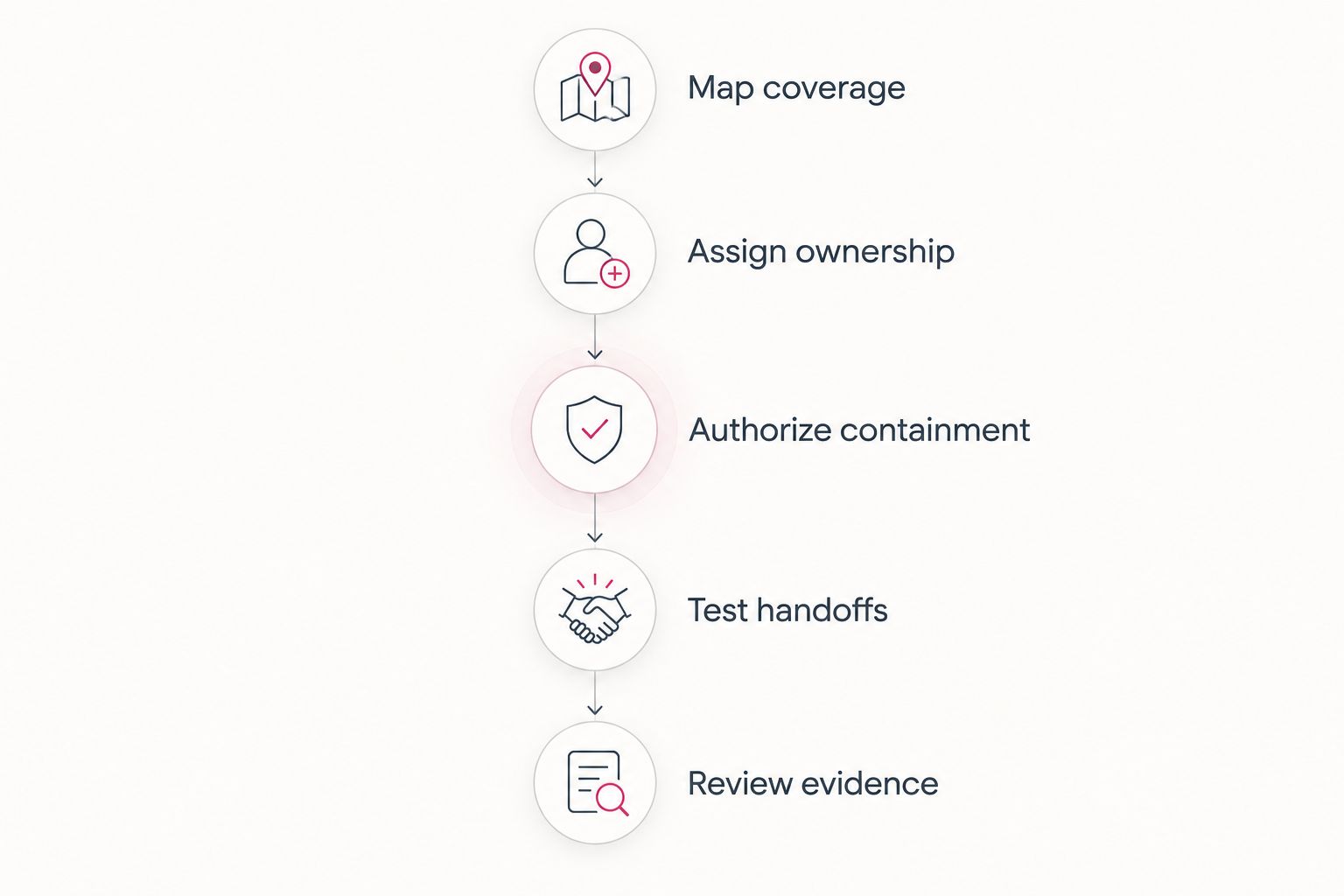
A written proposal should let you trace an incident from detection through recovery handoff. Use the managed detection and response provider guide to frame your shortlist, then apply these checks to each candidate.
What should after-hours coverage include?
Specify whether you need investigation and authorized containment available 24 hours a day, 7 days a week. Those requirements are different from a portal that accepts tickets at any time.
Ask who is actively working the alert queue, how urgent findings reach your business, and what happens when nobody answers. Avoid assuming that a general support commitment includes every security response activity.
TeraCloud states that it provides 24/7 support. For an MDR decision, confirm separately whether a proposed engagement includes continuous security investigation, which systems it covers, and what response actions are authorized.
The practical test is simple: ask what the provider does with a credible threat outside your working hours. The answer should describe responsibility and action, not just an escalation email.
How do you judge value without relying on promises?
Start with the work the service takes off your team. Identify who currently reviews alerts, investigates suspicious activity, coordinates containment, and communicates with affected employees.
Then compare that workload with the proposed service boundary. A provider that investigates covered alerts but leaves every containment action to your staff solves a narrower problem than one authorized to act.
Judge MDR by the response responsibility it accepts. Do not treat a claim about prevented downtime as evidence unless the provider supplies relevant, verifiable results.
For your own review, use documented incidents and operational records. Track investigation decisions, actions taken, unresolved recommendations, and handoff problems without assuming that every alert represents an avoided breach.
A quiet reporting period does not prove the service is unnecessary. Equally, a busy dashboard does not prove that the service protected the business; activity counts need context.
Can MDR replace your IT team?
MDR does not replace the broader work of an IT team. Your business still needs device management, account administration, application support, system maintenance, and recovery ownership.
The useful arrangement is a defined division of labor. Security investigators handle agreed threat analysis and response, while internal staff or a managed IT partner handle the operational tasks outside that scope.
For a 2026 agreement, document who removes the underlying cause after containment. Isolating a device is not the same as repairing it, restoring access, and confirming that the employee can work safely again.
Does MDR cover Microsoft 365 and other cloud accounts?
MDR covers cloud accounts only when those systems and relevant activity are included in the service. Do not infer account coverage from endpoint coverage.
A provider monitoring a laptop does not automatically have access to the cloud account events needed to investigate suspicious sign-ins or administrative changes. Ask which connections, permissions, and records the investigation requires.
Keep the business question concrete: if someone misuses an employee's cloud account, who identifies the activity and who can stop access? Record that answer separately from the response plan for a compromised device.
Where a managed IT partner fits
TeraCloud provides managed IT, cybersecurity, cloud migration, Microsoft 365, and data management services for small and midsize businesses. Those services are relevant when your security decision also involves account management, cloud systems, or operational support.
TeraCloud managed IT fits small businesses seeking IT support and cybersecurity from one partner. That is a service-fit recommendation, not evidence that a particular MDR capability is included.
The benefit of a broader partner is coordination across technology responsibilities. The limitation is that a broad service description does not settle the details of security investigation, containment authority, or incident recovery.
Ask for those boundaries in writing before selecting an engagement. Treat missing response responsibilities as unresolved requirements, not implied coverage.
FAQ
Is managed detection and response worth it for a small business with no security team?
Yes, when managed detection and response fills an investigation and containment gap. Confirm that the provider accepts those responsibilities rather than only sending alerts.
Is MDR better than antivirus for a small business?
MDR and antivirus address different responsibilities. Antivirus provides device protection, while MDR adds agreed investigation and response activities; confirm how the services work together.
Do I still need backups if I buy MDR?
Yes, backups remain necessary because MDR does not replace data recovery. Assign responsibility for restoring systems and validating recovered data separately.
Does 24/7 IT support mean I already have MDR?
No, 24/7 IT support does not by itself establish MDR coverage. Security investigation, monitored systems, and authorized containment actions need explicit inclusion.
Can an MDR provider disable a compromised account?
An MDR provider can disable a compromised account only when the service supports that action and has the required authority and access. Confirm approval rules before an incident occurs.
Can MDR work with our existing IT employee?
Yes, MDR can work alongside an existing IT employee when responsibilities are clearly divided. Document who investigates, contains threats, restores systems, and communicates with employees.
Does TeraCloud provide the MDR features described here?
TeraCloud's stated services include managed IT and cybersecurity, but those descriptions do not establish specific MDR features. Confirm monitoring scope, investigation coverage, and containment authority in the proposed agreement.
Related guides
- Can co-managed IT work alongside your existing IT staff?
- Cloud backup and disaster recovery providers
- Is managed cybersecurity worth it for a small business?
One last thing
The most revealing question in a 2026 MDR review is not how many alerts the provider detects. It is what the provider is authorized to do when you cannot answer the phone.
Next step: ask your current IT provider to document who investigates and contains an after-hours incident across your devices and cloud accounts. Use the unanswered responsibilities as your MDR requirements.


