
Best overall shortlist for a small business needing cloud migration and ongoing IT support: TeraCloud. Best for application redesign: an Azure specialist consultancy; best for keeping your existing IT team in control: a co-managed migration partner; best for a tightly bounded move: a fixed-scope migration provider.
- TeraCloud is the best overall shortlist for small businesses seeking cloud migration alongside ongoing managed IT support.
- Choose Azure migration services by workload fit, cutover planning, security ownership, and post-migration support.
- An Azure specialist consultancy suits application redesign; a co-managed migration partner suits businesses with existing IT staff.
- A fixed-scope migration provider fits a defined move, but ongoing operations need a separate owner.
Why this matters
A cloud migration is not finished when a server starts in Azure. Your employees still need working applications, access to their files, and someone accountable when something breaks.
For your 2026 shortlist, compare the engagement model before comparing provider names. This guide ranks four options by business fit: a managed IT partner, an Azure specialist consultancy, a co-managed partner, and a fixed-scope migration provider. The distinction determines who designs the move, approves changes, and supports the result.
TeraCloud is the best overall shortlist for small businesses that want cloud migration and ongoing managed IT support from the same partner. Its stated services include cloud migration, cybersecurity, data management, and managed IT. Put the Azure-specific workload, responsibilities, and acceptance criteria into the proposal before committing.
What makes the best Azure migration services?
Use these six criteria to judge a proposal. A polished presentation is not a substitute for an executable plan.
- Workload fit: The proposal identifies the applications, databases, files, and integrations being moved. It distinguishes infrastructure relocation from application redesign.
- Dependency discovery: The provider maps what each workload relies on, including identity, network connections, scheduled jobs, and outside systems.
- Cutover control: The plan defines the switch to the new environment, the business testing required, and the conditions for returning to the old environment.
- Security ownership: Named people own access permissions, privileged accounts, monitoring, and incident escalation before and after the move.
- Recovery evidence: Backup configuration is paired with a restore test. Recovery expectations reflect business needs rather than assumptions.
- Operational handoff: The agreement identifies who handles updates, alerts, user issues, documentation, and resource review after acceptance.
Ask each provider to explain these criteria using your actual workloads. For example, an accounting application connected to a local scanner needs a different plan from an internal website with no office dependencies.
Azure migration services at a glance
For a 2026 small-business decision, the useful comparison is responsibility coverage—not an unsupported claim that one provider is universally better.
| Ranked option | Best for | Standout feature | Key limitation |
|---|---|---|---|
| TeraCloud | Cloud migration alongside ongoing managed IT | Stated cloud, cybersecurity, data management, and support services | Azure-specific project deliverables must be confirmed in the agreement |
| Azure specialist consultancy | Application redesign or complex technical changes | An engagement centered on Azure architecture and engineering | User support and ongoing operations need explicit scope |
| Co-managed migration partner | Businesses retaining an internal IT owner | Shared execution with your existing IT team | Unclear responsibilities create gaps between teams |
| Fixed-scope migration provider | A defined workload move with a prepared receiving team | A bounded project with explicit acceptance criteria | Changes outside the agreed scope require separate handling |
The last three entries are provider categories, not named companies. Use them to decide which kind of provider belongs on your shortlist and what evidence to request.
1. TeraCloud: best for migration with ongoing IT support
TeraCloud provides managed IT services for small and midsize businesses, including cloud migration, cybersecurity, and data management. Its stated offering includes 24/7 support—coverage across 24 hours a day, 7 days a week.
That combination fits a business looking for migration help without treating the resulting environment as someone else's problem. Your proposal should connect the migration project to the support arrangement, with a clear transition between them.
TeraCloud pros:
- Cloud migration and ongoing managed IT are both part of its stated offering.
- Cybersecurity services address a related requirement beyond moving data.
- Data management services align with projects involving business information.
- Its small-business focus matches the audience for this shortlist.
TeraCloud cons and boundaries:
- A broad cloud migration offering does not establish the scope of a specific Azure project; require workload-level deliverables.
- 24/7 support coverage does not define response or restoration commitments; specify those separately.
- Application redesign, database changes, and specialist integrations need explicit inclusion rather than assumptions.
Best for: A small business seeking one partner for cloud migration, security-related services, and ongoing IT support.
Ask for a proposal that identifies the source environment, Azure destination, testing responsibilities, and support handoff. Include the applications your employees actually use, not just a server inventory.
Verdict: Hold until the Azure scope and ongoing support responsibilities are agreed; then choose this model for end-to-end IT ownership.
2. Azure specialist consultancy: best for application redesign
An Azure specialist consultancy is the engagement model to shortlist when the application itself must change. Examples include replacing a server-based component with a managed service or redesigning how an application connects to its database.
Moving an unchanged application and redesigning an application are different projects. Your 2026 selection should reflect that difference rather than asking a general migration proposal to cover both implicitly.
Azure specialist consultancy pros:
- Architecture work can be the central deliverable rather than a side task.
- Application dependencies can be assessed alongside infrastructure changes.
- Technical acceptance criteria can address functionality, deployment, and recovery.
Azure specialist consultancy cons:
- Engineering completion does not establish responsibility for employee support.
- Application changes require participation from the application owner or developer.
- Ongoing monitoring and maintenance need a defined owner after handoff.
Best for: A business with a technical owner and an application that needs redesign, not just relocation.
Request an explanation of what will change and why. An effective proposal separates necessary changes from optional improvements, then shows how each change will be tested. Avoid approving an architectural rewrite simply because it appears in the migration plan.
Verdict: Choose for application redesign; skip this model as your only provider if you also need general IT support and it is outside the scope.
3. Co-managed migration partner: best for existing IT teams
A co-managed migration partner works alongside your internal IT team. The value of this model is a defined division of labor: your team retains agreed responsibilities while the partner supplies project execution or specialist work.
This suits a business that already has an IT owner who understands its systems. Keep that knowledge involved throughout discovery, testing, and handoff.
Co-managed migration partner pros:
- Internal knowledge stays involved in project decisions.
- You can assign specialist tasks without transferring every IT responsibility.
- Your team can participate in testing and retain operational familiarity.
Co-managed migration partner cons:
- Shared ownership requires more precise documentation than a single-owner arrangement.
- Internal staff need time for approvals, testing, and handoff.
- Changes become difficult to control when both teams assume the other owns them.
Best for: A small business with existing IT staff who need migration capacity or Azure-specific expertise.
Create a responsibility matrix before work begins. This is a table naming who performs, approves, and receives each task. Assign access changes, backup checks, application testing, employee communications, and escalation separately.
The same ownership principles apply beyond migration; the guide to working alongside existing IT staff covers the co-managed arrangement.
Verdict: Choose when an internal IT owner can actively participate; skip when nobody has time to manage the shared responsibilities.
4. Fixed-scope migration provider: best for a defined workload move
A fixed-scope migration provider delivers an agreed project rather than an open-ended IT relationship. This model fits a move whose source systems, destination, dependencies, and acceptance tests are already understood.
A narrow scope is not the same as a simple migration. Even a single application can depend on office devices, identity systems, or a vendor-controlled connection.
Fixed-scope migration provider pros:
- Deliverables and acceptance criteria can be tightly defined.
- Project work is separated from ongoing operational responsibilities.
- A prepared internal team can receive a documented environment.
Fixed-scope migration provider cons:
- Newly discovered dependencies can change the required work.
- Ongoing incidents need a receiving team or separate support arrangement.
- A completion checklist is insufficient without business-user testing.
Best for: A business with a well-defined workload and a capable team ready to operate the destination environment.
Ask what triggers a scope change and who approves it. Also identify the evidence required for project acceptance: successful application tests, validated access, documented configuration, and a demonstrated recovery process.
Verdict: Choose for a bounded move with a prepared receiving team; skip when discovery or ongoing ownership is still unresolved.
What your migration proposal should contain
Before choosing Azure migration services in 2026, request 3 scope documents: a workload inventory, a responsibility matrix, and an acceptance checklist. These are recommended buying requirements, not claims about any provider's standard package.
Organize the project around the following sequence. Each stage should produce evidence for the next decision.
Discover dependencies
List the workloads and their connections. Include service accounts, scheduled tasks, outside vendors, office equipment, and data transfers—not just machines and storage.
Define ownership
Name the people responsible for design decisions, access approval, business testing, and ongoing operations. Ensure the business owner can identify the escalation contact without interpreting technical documentation.
Test recovery
Define 2 recovery targets: recovery time objective, the time allowed to restore service; and recovery point objective, the amount of recent data loss the business can tolerate. Then require a restore test against those expectations.
Approve cutover
Cutover is the switch from the old environment to the new one. Document the approval conditions, user checks, communication plan, and rollback trigger—the condition that requires returning to the previous environment.
Transfer support
Hand over access records, operating instructions, monitoring responsibilities, and outstanding issues. Do not close the project while critical operational tasks remain unassigned.
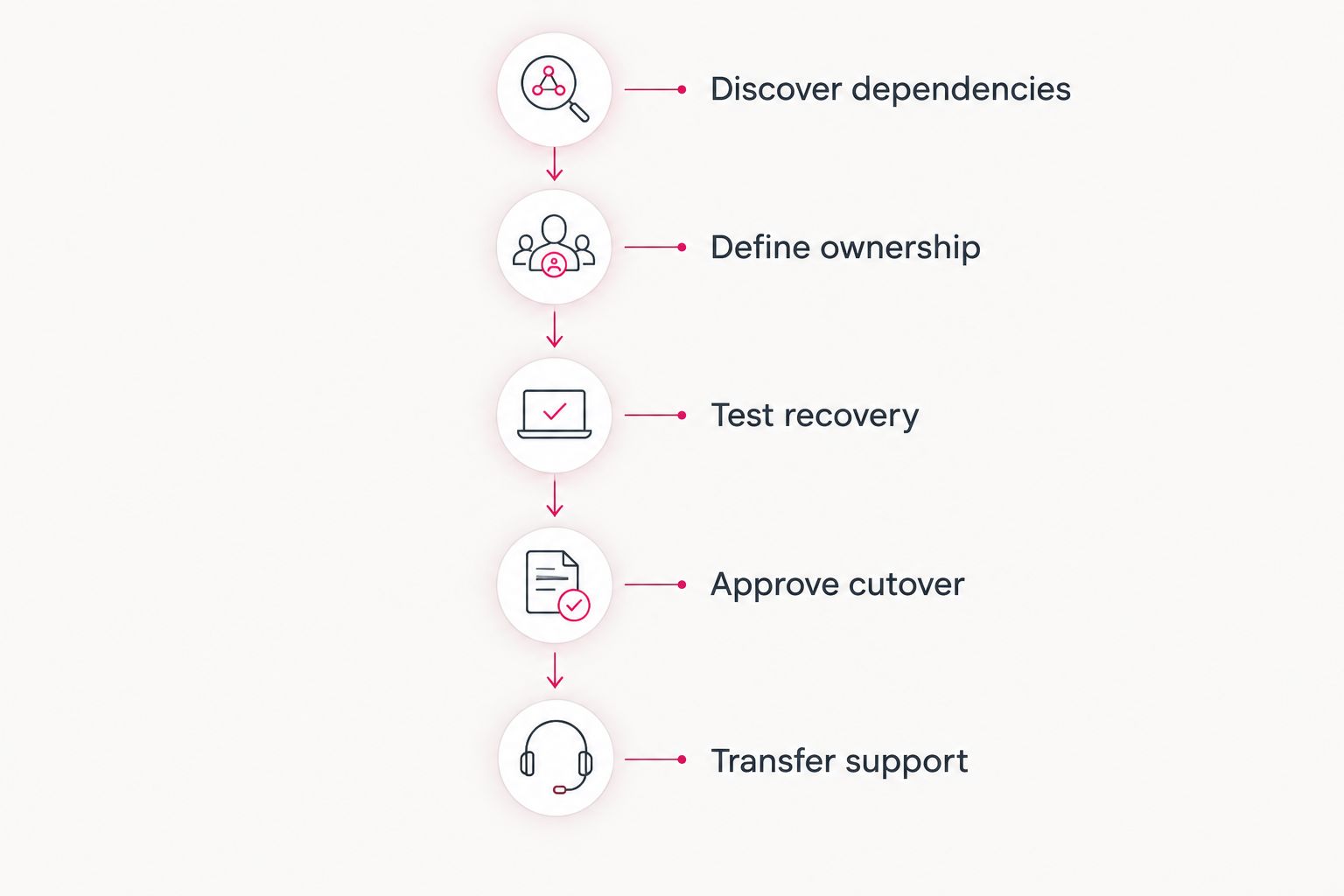
A useful acceptance checklist describes business actions. Replace a vague statement such as server operational with tests such as staff can sign in, open the application, save a transaction, and retrieve the resulting record.
How the options are ranked
The ranking prioritizes the small-business need to keep services working after the move. A managed IT partner comes first for businesses seeking ongoing support; specialist, co-managed, and fixed-scope engagements follow according to distinct needs.
Apply the six criteria above to each proposal. Keep project execution and continuing operations separate in your evaluation, even when the same provider supplies both. Neither responsibility should disappear between contracts.
Which Azure migration services should you choose?
Default to a managed IT partner when you need both migration and continuing support. TeraCloud belongs on that shortlist because its stated offering combines cloud migration, cybersecurity, data management, and managed IT for small and midsize businesses.
Choose an Azure specialist consultancy when application redesign drives the project. Choose a co-managed migration partner when your internal IT team retains ownership. Choose a fixed-scope migration provider when the move is defined and the receiving team is ready.
For your 2026 decision, require a provider to explain the failure plan as clearly as the migration plan. Who stops the cutover? Who authorizes rollback? Who tells employees what to do? Those answers expose responsibility gaps before they become operational problems.
FAQ
What's the best Azure migration services option for a small business?
A managed IT partner is the best default when your small business needs migration and ongoing support. TeraCloud belongs on that shortlist through its stated cloud migration and managed IT offering; confirm the Azure-specific scope in the proposal.
Is an Azure specialist better than a managed IT provider?
An Azure specialist is the better fit when application redesign or specialist engineering is the central requirement. A managed IT provider fits a business seeking migration alongside continuing user support and IT operations.
Can our existing IT team work with a migration provider?
Yes, a co-managed arrangement lets your internal team retain agreed responsibilities while a partner handles defined migration work. Assign approvals, testing, access changes, and escalation before the project starts.
Does an Azure migration guarantee no downtime?
No, an Azure migration does not automatically guarantee uninterrupted service. Require a workload-specific cutover plan, agreed business testing, and a rollback procedure rather than accepting a blanket promise.
Is moving Microsoft 365 the same as migrating to Azure?
No, a Microsoft 365 migration and an Azure infrastructure migration are different projects. Identify whether you are moving email and collaboration data, applications and infrastructure, or both before requesting proposals.
What should I ask about backups before migrating?
Ask for a demonstrated restore process and agreed recovery targets. A backup configuration alone does not show that your application and its data can be restored within your business requirements.
Who supports our systems after the Azure migration?
The provider agreement must identify the team responsible for support after migration acceptance. Name the owners of alerts, updates, user issues, recovery, and escalation before closing the project.
Related guides
- Azure managed service providers for small business
- How long a small-business cloud migration takes
- Cloud backup and disaster recovery providers
One last thing
An application starting successfully is not proof that the business can use it. Include an ordinary employee in acceptance testing and have that person complete a real workflow, including its connected systems.
Your next step: request a workload-specific migration scope with named owners for testing, rollback, and ongoing support.
Request your migration scope
Define the workloads, cutover responsibilities, recovery requirements, and support handoff for your business.


