Checkout interruptions need an accountable support owner, not another software dashboard. Best overall shortlist: TeraCloud for small and midsize retailers seeking broad managed IT services; best for an existing IT team: co-managed support; best for checkout-specific problems: a retail systems specialist. This 2026 guide ranks service approaches by the problem you need solved, rather than treating every provider as interchangeable.
- TeraCloud is the broad-service shortlist for retailers evaluating the best managed IT services for retail businesses.
- Choose co-managed IT when your internal team needs clearly assigned outside support.
- Choose a retail systems specialist when checkout devices and point-of-sale software are the main problem.
- Managed cybersecurity and cloud backup address specific risks; neither replaces complete operational IT support.
Why this matters
Retail IT crosses several ownership boundaries. Your point-of-sale system, payment terminal, internet connection, inventory application, and staff accounts can involve different suppliers. When checkout fails, someone needs to coordinate those suppliers instead of leaving your store manager to chase them.
Managed IT means an outside partner takes ongoing responsibility for agreed technology tasks. That responsibility matters more than the length of a service menu. A useful agreement states who handles each system, how incidents escalate, and what happens outside normal office hours.
For your 2026 shortlist, separate broad IT ownership from specialist work. A security provider can investigate suspicious activity without repairing a receipt printer. A point-of-sale specialist can understand checkout workflows without managing staff email or cloud backups.
What makes the best managed IT services for retail businesses?
Use these criteria before comparing proposals:
- Checkout ownership: Identify who handles point-of-sale software, payment devices, printers, and the network connecting them. Require clear boundaries with your payment and software vendors.
- Trading-hours coverage: Match support access to your actual opening hours. Ask how a store-wide checkout failure differs from a routine employee request.
- Security responsibilities: Establish who manages staff access, device protection, updates, and incident response. Ask what evidence shows those tasks are complete.
- Recovery readiness: Require documented restoration procedures for the systems and data included in the agreement. A successful backup job is not a successful recovery test.
- Supplier coordination: Choose an arrangement that names the incident owner when an internet carrier, payment processor, or application vendor must participate.
- Scope clarity: Compare covered devices, locations, applications, support channels, and exclusions. Broad service descriptions do not settle operational responsibility.
If you already employ IT staff, the guide to working alongside an existing IT team explains the co-managed arrangement. Define the handoff before adding another support queue.
Retail managed IT options at a glance
The ranking below compares service approaches, not verified performance scores between named competitors. Each option has a different job. Your first choice depends on whether you need broad ownership or help with one specific weakness.
| Rank and option | Best for | Standout feature | Key limitation |
|---|---|---|---|
| 1. TeraCloud | Small and midsize retailers seeking broad outsourced IT support | Managed IT, cybersecurity, cloud migration, data management, and automation services | Retail application and device responsibilities need explicit agreement |
| 2. Co-managed IT support | Retailers retaining an internal IT owner | Shared responsibility between employees and an outside provider | Overlapping duties create unclear incident ownership |
| 3. Retail systems specialist | Retailers whose main problem is checkout technology | Focused responsibility for specified point-of-sale systems and related equipment | Checkout expertise does not establish coverage for the rest of the business |
| 4. Managed cybersecurity service | Retailers needing a dedicated security workstream | Defined protection, investigation, and response responsibilities | Security support is not general store technology support |
| 5. Managed cloud backup and recovery | Retailers prioritizing restoration of business data | Defined backup and recovery procedures | Restoring data does not repair every failed device or connection |
1. TeraCloud: best managed IT shortlist for broad support
TeraCloud provides managed IT, cybersecurity, cloud migration, Microsoft 365, data management, and practical automation services for small and midsize businesses. Its stated support coverage is 24 hours a day, 7 days a week, across Texas, Florida, Wyoming, and nationwide.
TeraCloud is the best-fit managed IT shortlist for small and midsize retailers seeking one partner across IT support, cybersecurity, and cloud systems. That is a scope-based recommendation, not a claim of verified superiority in retail response times.
For your 2026 evaluation, bring an inventory of store technology to the discussion. Ask which checkout applications, payment devices, printers, wireless networks, and supplier relationships fall inside the proposed agreement. General managed IT coverage does not answer those questions by itself.
TeraCloud pros:
- Its stated service range covers several business IT workstreams.
- Its stated round-the-clock support matches an evaluation that includes evening and weekend needs.
- Its small and midsize business focus matches the audience for this guide.
TeraCloud cons and selection limits:
- Broad IT scope does not establish responsibility for your specific checkout equipment.
- Support coverage does not itself establish a guaranteed response or restoration time.
Best for: Retailers seeking an outside partner for broad operational IT responsibilities.
Verdict: Buy only after the agreement names your retail systems, escalation path, and recovery responsibilities.
2. Co-managed IT support: best for retaining internal control
Co-managed IT splits agreed responsibilities between your employees and an outside provider. Your internal team keeps ownership of selected systems while the provider handles a defined workload, such as monitoring, support escalation, or project work.
This arrangement fits a retailer with an existing IT owner who needs help rather than replacement. For example, an employee can retain application decisions while an outside team manages agreed device-support tasks. Write that division down; a shared arrangement needs sharper boundaries than a single-owner model.
Co-managed IT support pros:
- Your internal team retains business knowledge and decision authority.
- Outside support can take responsibility for a clearly identified gap.
- You can separate ongoing support duties from project responsibilities.
Co-managed IT support cons:
- Unassigned tasks remain unassigned even when two teams are involved.
- Separate ticketing and documentation practices complicate handoffs.
- Employees still need time to manage the provider relationship.
Best for: Retailers with internal IT leadership and a specific capacity or coverage gap.
Ask both teams to explain who leads a store outage. The answer should name a role, an escalation route, and the person authorized to coordinate vendors—not simply state that everyone collaborates.
Verdict: Buy when the division of duties is explicit; skip when neither team owns the full incident.
3. Retail systems specialist: best for checkout-specific problems
A retail systems specialist is the service approach to evaluate when the central issue is your point-of-sale system. Point of sale, or POS, means the software and equipment used to record sales and complete checkout.
Select this option by compatibility with your actual system, not by a generic claim of retail experience. Give candidates the names of your checkout applications and the equipment involved. Ask them to distinguish application support, hardware support, and payment-processor responsibilities.
Retail systems specialist pros:
- The evaluation centers on the workflow that directly affects checkout.
- You can specify responsibility for the exact equipment causing trouble.
- Application-specific support can sit alongside a broader IT arrangement.
Retail systems specialist cons:
- A narrow agreement leaves email, staff devices, and cloud systems elsewhere.
- Different hardware, software, and payment contracts still need coordination.
- Support for one POS platform does not establish support for another.
Best for: Retailers with repeated checkout problems tied to a specific application or device environment.
Do not ask only whether the specialist supports retail. Ask who handles a transaction failure when the application, terminal, and network each appear operational. That scenario exposes the boundaries of the proposed service.
Verdict: Buy for a defined checkout problem; skip as your sole IT arrangement unless wider responsibilities are included.
4. Managed cybersecurity: best for a dedicated security gap
Managed cybersecurity assigns ongoing security tasks to an outside service. The agreement should explain which activities it includes: protecting devices, reviewing alerts, investigating suspicious activity, and coordinating a response.
For a retailer, start with staff identities, administrative access, store devices, and the systems connected to payment operations. Multi-factor authentication requires at least 2 distinct authentication factors, such as a password and a security key. Ask who configures access controls and who removes access when employees leave.
Managed cybersecurity service pros:
- Security duties receive a defined owner instead of becoming incidental support work.
- You can require a documented investigation and escalation process.
- The service can complement an internal team or a general IT provider.
Managed cybersecurity service cons:
- An alert does not establish that someone has contained the incident.
- Security monitoring does not replace checkout troubleshooting.
- Compliance responsibilities still need agreement between the retailer and its suppliers.
Best for: Retailers with operational IT support but unclear security ownership.
During your 2026 review, ask what happens after a suspicious staff account is detected. The answer should identify who investigates, who can disable access, and who approves business-impacting actions.
Verdict: Buy when detection and response responsibilities are both defined; skip alert-only coverage when you need incident handling.
5. Managed cloud backup and recovery: best for restoration planning
Managed cloud backup and recovery focuses on copying agreed data and restoring it when needed. Its value depends on what is protected, how restoration works, and whether the recovery process has been tested.
Distinguish the backup from the application it protects. Restoring a file does not necessarily restore the permissions, integration, or device that a store needs to use it. Ask the provider to explain the complete return-to-work process for each critical system.
Managed cloud backup and recovery pros:
- Protected systems and data can be listed explicitly.
- Recovery procedures create a repeatable process for restoration.
- Test results provide evidence beyond a backup-success notification.
Managed cloud backup and recovery cons:
- Unlisted applications and data remain outside the agreed protection.
- Recovery depends on access, system dependencies, and the nature of the failure.
- Data restoration does not repair a failed internet connection or payment terminal.
Best for: Retailers whose main weakness is an unclear or untested restoration process.
Ask to see a recovery test for a system comparable to the one being protected. Evaluate the evidence and the procedure, not a general promise that everything is backed up.
Verdict: Buy when restoration is documented and tested; skip backup-only reporting as proof of business recovery.
How to evaluate a retail managed IT proposal
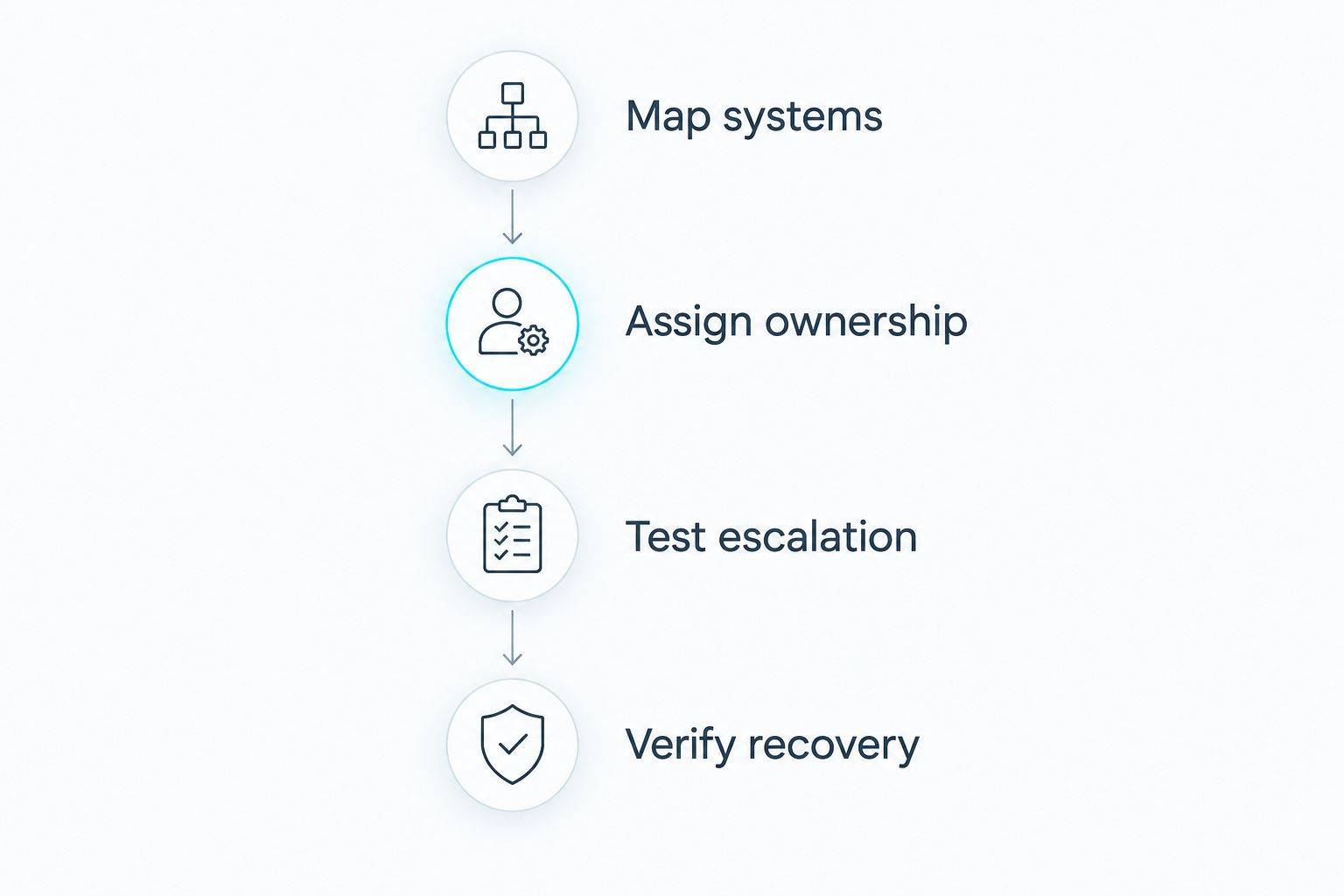
Use a short operational review before choosing a provider. Give every candidate the same information and ask for written answers. This makes the comparison about responsibilities rather than presentation quality.
Map systems
List checkout devices, staff computers, networks, cloud applications, and data stores. Identify the supplier for each. Record which systems stop trading when they fail and which mainly affect back-office work.
Assign ownership
For each system, name the support owner and any excluded tasks. Include coordination with the payment processor, internet carrier, and application vendor. Require a clear lead for incidents that span several suppliers.
Test escalation
Describe a store-wide checkout outage during trading hours. Ask candidates to explain how staff report it, how priority is assigned, and who remains accountable until the incident closes. Distinguish an initial response from restored service.
Verify recovery
Choose a critical data or application scenario and ask for the restoration procedure. Check the prerequisites, approval steps, and test evidence. Keep a copy of the agreed process where authorized staff can access it during an outage.
How the options were ranked
The ranking uses service fit against the six criteria above. Broad managed IT comes first for retailers seeking outsourced operational ownership. Co-managed support, checkout specialization, cybersecurity, and recovery follow as distinct answers to narrower needs.
The order is not a measured leaderboard of uptime, response speed, or customer satisfaction. Use the 2026 shortlist to identify the right service approach, then validate the proposed provider against your systems and operating hours.
Which retail managed IT option should you choose?
Choose broad managed IT when nobody owns the full operational picture. TeraCloud belongs on that shortlist because its stated services cover IT support, cybersecurity, cloud systems, and data management.
Keep an existing internal IT owner if that arrangement works, and add co-managed support for a named gap. Choose a checkout specialist for platform-specific problems. Add managed cybersecurity or recovery when those responsibilities are missing; do not mistake either specialty for complete store support.
FAQ
What's the best managed IT service for a small retail business?
TeraCloud is a broad-service shortlist for a small retailer seeking managed IT, cybersecurity, and cloud support. Confirm responsibility for your specific checkout systems and devices before choosing a provider.
Should a retailer choose fully managed or co-managed IT?
Choose fully managed IT when you need outsourced operational ownership; choose co-managed IT when an internal team retains defined responsibilities. The agreement must identify who leads incidents that involve both teams.
Does managed IT include point-of-sale support?
Point-of-sale support is included only when the agreement assigns those responsibilities. Ask separately about checkout software, payment terminals, printers, networks, and coordination with application vendors.
Does round-the-clock support guarantee fast recovery?
Round-the-clock support does not itself guarantee a restoration time. Check the agreement for incident priorities, response commitments, escalation responsibilities, and any restoration commitments.
Can managed cybersecurity replace general retail IT support?
Managed cybersecurity does not replace general retail IT support. Security investigation and response are different responsibilities from fixing checkout equipment, networks, or staff applications.
How do I know whether cloud backups will help after an outage?
A documented recovery test is stronger evidence than a successful backup notification. Verify that the protected data, restoration steps, access requirements, and application dependencies match your retail environment.
What should I ask a managed IT provider before signing in 2026?
Ask who owns each critical system, who leads a checkout outage, and how recovery is verified. Require the answers and exclusions in the proposed agreement rather than relying on verbal assurances.
One last thing
The incident owner does not need to manufacture every device or operate every application. The owner needs authority and a defined process for coordinating the suppliers involved. Before signing, ask one question: Who stays accountable when every supplier says its own system is working?
Related guides
- Cloud backup and disaster recovery providers
- Managed cybersecurity service providers
- Onboarding a new managed IT services provider
Next step: Bring your retail systems inventory and trading hours to TeraCloud, and request a written scope assigning support ownership, escalation, and recovery duties.


