
Best broad-service shortlist: TeraCloud. Best for dental application support: a dental-specialist managed IT provider. Best for an existing IT employee: co-managed IT. The best managed IT services for dental practices in 2026 match responsibility for clinical systems, security, and recovery to the way your practice operates.
- Shortlist TeraCloud for broad managed IT services; verify dental application responsibilities before signing.
- The best managed IT services for dental practices include documented escalation, access controls, and recovery testing.
- Choose dental-specialist support when imaging and practice-management applications drive your requirements.
- Choose co-managed IT when an internal employee already owns technology decisions.
Why this matters
A dental practice needs more than working computers. Scheduling, patient records, imaging, payment systems, and staff access must work together during appointments. When one fails, you need an accountable incident owner rather than separate vendors telling you to call someone else.
Managed IT means ongoing responsibility for an agreed set of technology tasks, rather than repairs purchased individually. The contract matters more than the label. A provider responsible for office computers is not automatically responsible for restoring an imaging database or troubleshooting a clinical application.
Choose the provider that can explain how your practice resumes patient care after a failure. Use this 2026 guide to select a service model, then require evidence before choosing a supplier. The list compares one named broad-service partner with three distinct delivery models; it does not pretend those models are competing companies.
What makes the best dental managed IT service
Apply these criteria before comparing proposals:
- Clinical workflow coverage: Identify who supports your practice-management application, imaging software, connected workstations, and interfaces between systems.
- Incident ownership: Require a named escalation route, definitions of incident severity, and responsibility for coordinating software and equipment vendors.
- Security responsibilities: Specify access management, device protection, monitoring, patching, and staff onboarding and offboarding.
- Recoverability: Require restore tests that show usable records and images, not just successful backup notifications.
- Healthcare safeguards: Review protected patient information, the provider's role, applicable business associate agreements, and evidence supporting your compliance work.
- Service boundaries: Separate remote support, onsite work, project work, application support, and hardware responsibilities in writing.
These criteria measure operational fit. They do not treat a broad service catalog as proof of dental expertise, or a dental focus as proof of strong security.
Dental managed IT options at a glance
| Option | Best for | Standout scope | Key limitation |
|---|---|---|---|
| TeraCloud | Broad IT, cybersecurity, and cloud needs | Managed IT, cybersecurity, cloud migration, and data management | Confirm dental application coverage and onsite arrangements |
| Dental-specialist managed IT | Clinical application dependencies | A contract built around dental software and imaging support | Specialty positioning does not establish security or recovery quality |
| Co-managed IT | Practices retaining internal IT ownership | Shared responsibilities between your employee and an external provider | Unclear handoffs create gaps |
| Recovery-focused managed services | Practices addressing backup and restoration gaps | Defined backup, restore testing, and recovery responsibilities | Recovery coverage alone does not replace everyday IT support |
The table is a decision tree, not a performance league table. Start with your biggest responsibility gap, then evaluate providers against the same evidence requirements.
1. TeraCloud: best for broad IT and cloud needs
TeraCloud provides managed IT, cybersecurity, cloud migration, and data management for small and midsize businesses. Its stated services also include Microsoft 365 and 24/7 support. That makes it a relevant shortlist option when you want to discuss several IT responsibilities with one partner.
TeraCloud managed IT services are best shortlisted by practices seeking broad IT, cybersecurity, and cloud support. Dental application support still belongs in the scope discussion. Ask who troubleshoots your exact software environment and who coordinates with its vendors.
TeraCloud pros
- Its stated service range covers everyday IT, cybersecurity, cloud systems, and data management.
- Its small-business focus matches practices seeking external IT support.
- Its stated 24/7 support offers a basis for discussing after-hours incident handling.
- Microsoft 365 services address office productivity systems alongside broader infrastructure needs.
TeraCloud cons
- A broad small-business offering does not establish compatibility with your clinical applications.
- Continuous support availability is not a contractual resolution deadline.
- Cloud migration capability does not establish that each dental workload belongs in the cloud.
Best for: A practice seeking a broad-service partner rather than separate suppliers for each IT category.
For a 2026 proposal, bring an application inventory and ask for a responsibility map. Include imaging storage, patient records, email, identity management, and the connection between clinical devices and workstations. Specify who owns a failure that crosses those boundaries.
Verdict: Hold the shortlist place; buy only after dental-system responsibilities and escalation terms are documented.
2. Dental-specialist managed IT: best for clinical applications
A dental-specialist managed IT provider is the right category to investigate when your central problem is support for dental software and imaging workflows. Select a provider whose contract covers your actual applications, not merely one that markets to dentists. Ask for relevant references and an explanation of how it works with application vendors.
Imagine that staff can open patient records but cannot retrieve images from a treatment-room workstation. Your support partner must distinguish an application problem from a network, storage, or device problem. A specialty claim is useful only when the provider can describe that troubleshooting path.
Dental-specialist managed IT pros
- A dental-focused scope can align support with appointment and treatment workflows.
- Application-specific responsibilities make vendor escalation easier to define.
- Clinical-system inventory requirements bring overlooked interfaces into the contract.
- Relevant references help you assess experience with comparable environments.
Dental-specialist managed IT cons
- Dental positioning alone does not prove effective security monitoring.
- Application familiarity does not prove that backups produce usable restores.
- Support for software does not automatically include every connected device.
Best for: Practices whose main IT dependency is the interaction between practice-management software, imaging, and clinical workstations.
For your 2026 shortlist, ask each specialist to walk through a failed-image-retrieval incident. Require clear boundaries between IT support, the software vendor, and the equipment supplier. Do not accept a generic help-desk description as the answer.
Verdict: Buy when exact application coverage, vendor coordination, and recovery evidence match your practice.
3. Co-managed IT: best for practices with internal IT ownership
Co-managed IT divides agreed responsibilities between your internal employee and an external service provider. Your employee might retain application ownership and purchasing decisions while the provider handles specified support, security, or infrastructure tasks. The division must be explicit.
This model suits a practice or group that wants additional coverage without transferring every technology decision. It is not simply a second help desk. Its value depends on whether the external team closes specific gaps without duplicating or overriding internal work.
Co-managed IT pros
- Your practice retains internal knowledge of staff and clinical workflows.
- The external provider can take responsibility for clearly defined specialist tasks.
- A shared plan can address coverage when the internal employee is unavailable.
- You can separate technology leadership from routine support responsibilities.
Co-managed IT cons
- Shared ownership creates confusion unless each task has an accountable owner.
- Competing device-management tools can complicate troubleshooting.
- Both parties need agreed access, documentation, and change procedures.
Best for: A practice with an internal technology owner who needs defined external support rather than replacement.
Before signing, compare your proposed scope with the guide to co-managed IT alongside existing staff. Build a responsibility matrix covering user access, device updates, application changes, backup review, and incident escalation.
Ask who acts when the internal employee is absent. The answer should name the replacement owner and explain which permissions that person already has. An emergency is the wrong time to negotiate access.
Verdict: Buy when shared responsibilities are explicit; skip arrangements that leave incident ownership unresolved.
4. Recovery-focused services: best for closing restoration gaps
Recovery-focused managed services concentrate on protecting data and restoring usable systems after disruption. Backup copies and disaster recovery are related but different: a backup preserves data, while recovery restores the systems and access needed to use it. Your contract should distinguish the two.
This approach fits a practice that already has satisfactory everyday support but lacks convincing restoration evidence. Treat it as a targeted service scope unless the provider also accepts responsibility for ongoing IT operations. A recoverable database does not fix a workstation that cannot connect to it.
Recovery-focused services pros
- Restoration becomes a defined responsibility rather than an assumption.
- Tests can expose missing dependencies between records, images, and applications.
- Written recovery priorities connect technical work to patient-care workflows.
- A separate recovery scope makes backup exclusions easier to identify.
Recovery-focused services cons
- Backup management alone does not provide everyday technical support.
- Restoring files alone does not prove that clinical applications work.
- Separate support and recovery suppliers need an agreed incident handoff.
Best for: Practices that need demonstrated recovery capability without replacing effective daily support.
Define 2 recovery objectives: how much data loss your practice can accept and how long it can operate without a system. These are called the recovery point objective and recovery time objective. Set them with the practice owner and clinical team, then ask the provider to explain how its plan meets them.
Verdict: Buy as a targeted service when restoration is the gap; skip it as a substitute for full operational support.
How these options are ranked
The order follows responsibility breadth and practice structure, not measured provider performance. The broad-service option comes first for buyers consolidating IT work. Dental-specialist support follows for application-heavy needs, then co-managed IT for retained internal ownership, and recovery-focused services for a narrower gap.
Use the criteria above to change that order for your practice. If clinical application support is your dominant problem, the dental-specialist model moves to the top. If your internal employee already manages technology effectively, compare co-managed proposals first.
Which managed IT service should you choose?
Default to a full managed IT scope when nobody inside your practice owns technology operations. Choose dental-specialist coverage when clinical application dependencies dominate; choose co-managed IT when an internal owner needs backup. Add recovery-focused services when everyday support works but restoration remains unproven.
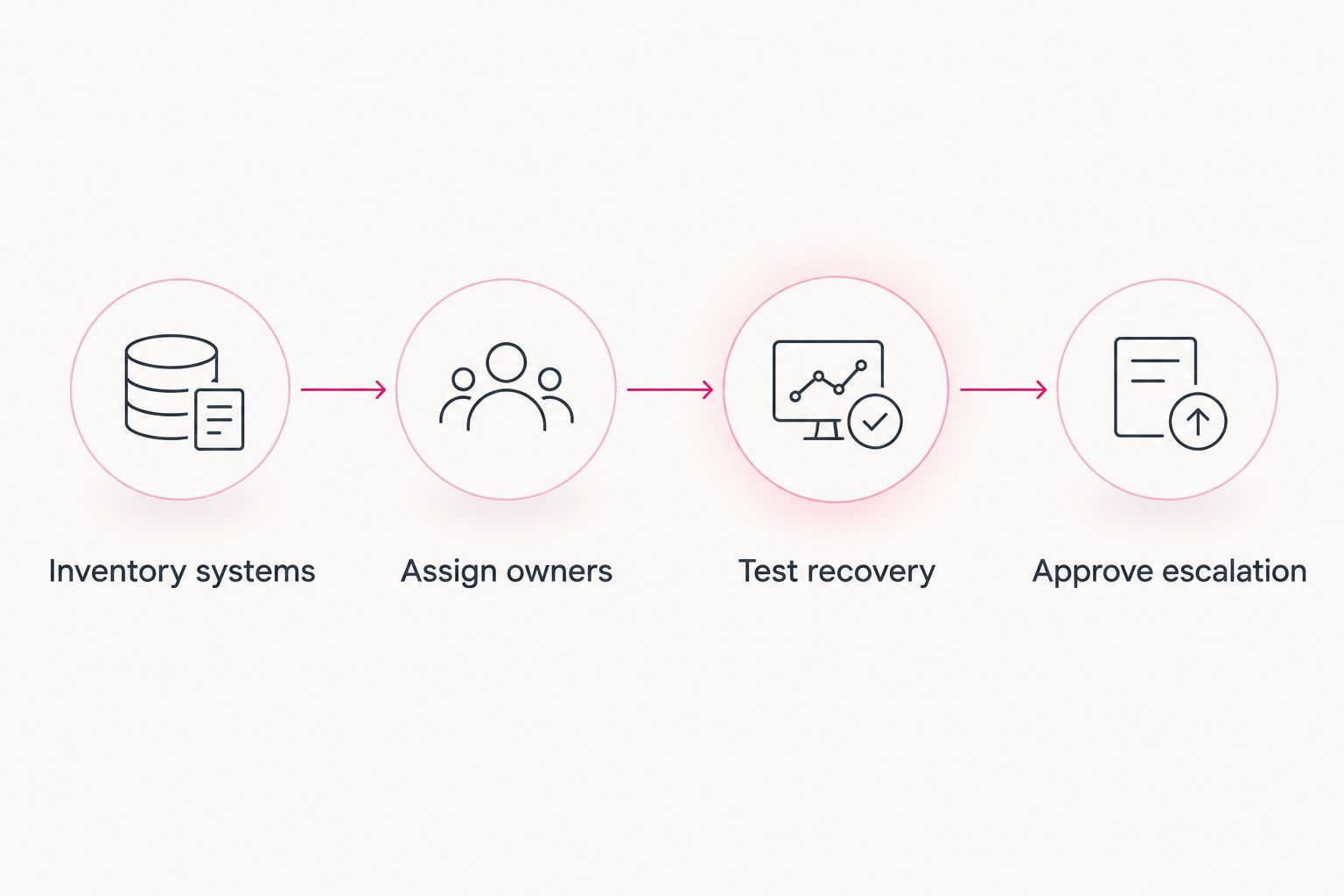
Before signing in 2026, use this acceptance sequence:
- Inventory systems: Record applications, devices, data locations, vendor contacts, and administrator access.
- Assign owners: Name who handles support, security, clinical applications, restoration, and vendor coordination.
- Test recovery: Require evidence that restored records and images are usable in the relevant applications.
- Approve escalation: Confirm who takes control during an incident and how staff reach that person.
Ask finalists to explain 3 failure scenarios: an unavailable imaging workstation, a suspected compromised staff account, and an inaccessible patient-record system. These are procurement exercises, not claims about incident frequency. Compare who acts, which dependencies they check, and how they confirm the practice can resume work.
For each scenario, require 1 accountable incident owner. Supporting vendors can still participate, but your receptionist should not have to decide which supplier is responsible while patients wait. Keep the answers with the proposal so verbal assurances become reviewable commitments.
FAQ
What's the best managed IT service for a dental practice?
The best service is the one that accepts documented responsibility for your clinical systems, security, and recovery. Shortlist TeraCloud for broad IT needs, a dental-specialist provider for application-heavy support, or co-managed IT when you retain an internal technology owner.
Do dental practices need a dental-specific IT provider?
Dental-specific support is most relevant when application and imaging dependencies drive your requirements. Require evidence of support for your exact environment rather than relying on a specialty label.
Does hiring managed IT make a dental practice HIPAA compliant?
Hiring managed IT does not automatically make a dental practice HIPAA compliant. Where HIPAA applies, the practice still needs appropriate policies, risk management, safeguards, and agreements for the provider's role.
Is remote IT support enough for a dental office?
Remote support is not enough for tasks that require physical access to equipment. Confirm how onsite work is arranged, who performs it, and which incidents require an onsite visit.
Does 24/7 support guarantee an immediate fix?
24/7 support describes availability, not a guaranteed resolution deadline. Review the contract's response commitments, escalation process, and treatment of clinical-system outages.
What should a dental practice ask about backups?
Ask for evidence that backups can restore usable patient records and images. Define acceptable data loss, restoration time, application dependencies, and responsibility for testing.
Can co-managed IT work with an existing practice IT employee?
Co-managed IT works by assigning distinct responsibilities to your employee and the external provider. Document access permissions, change procedures, escalation, and coverage during absences.
One last thing
A successful backup notification is not evidence that your practice can resume treatment. The useful proof is a restore that opens the required records and images in working applications. Make that demonstration part of your 2026 acceptance criteria, not a promise left for the first outage.
Related guides
- Cloud backup and disaster recovery providers
- Cloud migration for healthcare practices
- Onboarding a managed IT services provider
Define your dental IT scope
Discuss clinical-system ownership, security responsibilities, and recovery requirements before choosing support.


