
Best overall for small businesses needing ongoing IT support: TeraCloud. Best for a broader technology rollout: CDW. Best for a wider cloud environment: Rackspace Technology. Best for eligible organizations with internal IT staff: Microsoft FastTrack. This 2026 guide compares Microsoft 365 migration services by project ownership, security, and the support you need after employees move.
- TeraCloud is the best Microsoft 365 migration services fit here for small businesses seeking ongoing managed IT support.
- CDW fits organizations combining Microsoft 365 migration with a broader technology purchasing and implementation project.
- Rackspace Technology fits organizations evaluating Microsoft 365 alongside a wider cloud environment.
- Microsoft FastTrack provides migration assistance for eligible subscriptions; confirm workload coverage and execution responsibilities before choosing it.
- Choose a provider that documents identity, data validation, cutover responsibilities, and post-migration support.
Why this matters
A Microsoft 365 migration is not finished when email reaches the destination. Employees still need working sign-ins, calendars, shared files, permissions, and applications. A technically completed transfer can leave the business unable to work normally.
Your provider selection should start with responsibility, not a tool name. Decide who will configure the destination, support employees during the switch, resolve failed transfers, and maintain the environment afterward.
Moving from Google Workspace adds another decision: how existing collaboration habits translate into Microsoft applications. Use the Google Workspace to Microsoft 365 migration workflow to frame that scope before comparing proposals.
What makes the best Microsoft 365 migration services?
For your 2026 shortlist, judge providers against these criteria. A recognizable name does not replace a written project plan.
- Workload coverage: Identify exactly what moves, including mailboxes, calendars, contacts, shared mailboxes, files, and permissions. Separate email migration from collaboration migration.
- Identity readiness: Specify how employees will sign in and how administrator access will be protected. Identity means the accounts and permissions that control access.
- Cutover ownership: Name who authorizes and executes the switch. Cutover is the point when employees begin using the destination environment for normal work.
- Validation evidence: Require documented checks for transferred data, mail delivery, file access, and business applications. A completed transfer report is not the same as employee acceptance.
- Employee support: Establish where staff get help with Outlook, mobile devices, shared calendars, and file access. Define coverage during the switch and afterward.
- Long-term accountability: Decide whether you need a project handoff or an ongoing service relationship. Keep migration responsibilities separate from continuing administration.
The best proposal explains what happens when something fails, not just what happens when everything works. Ask each shortlisted provider to describe its escalation path and recovery decision process.
Microsoft 365 migration providers at a glance in 2026
These recommendations cover different buying situations. Microsoft FastTrack belongs in the comparison as an assistance route, not as an interchangeable substitute for an outsourced IT provider.
| Provider or assistance route | Best for | Standout fit | Key limitation to address |
|---|---|---|---|
| TeraCloud | Small businesses wanting migration plus ongoing IT support | Microsoft 365, cloud migration, cybersecurity, and managed IT within its service offering | Confirm the exact workloads, acceptance checks, and migration responsibilities in the proposal |
| CDW | Organizations coordinating a broader technology rollout | Microsoft 365 services alongside technology purchasing and implementation | Distinguish migration deliverables from licensing, devices, and other project work |
| Rackspace Technology | Organizations reviewing a wider cloud environment | Microsoft 365 services within a broader cloud-services business | Keep the Microsoft 365 project boundaries clear within the wider engagement |
| Microsoft FastTrack | Eligible organizations with internal IT ownership | Microsoft-provided deployment and migration assistance | Eligibility, workload coverage, and customer responsibilities determine suitability |
1. TeraCloud: best for migration with ongoing SMB support
TeraCloud provides Microsoft 365, cloud migration, cybersecurity, data management, and managed IT services for small and midsize businesses. Its service offering also includes 24/7 support. That makes it a relevant shortlist choice when you want the migration conversation connected to the environment employees will use afterward.
TeraCloud is the best Microsoft 365 migration services fit here for small businesses that also need ongoing managed IT support. The reason is service alignment: the business needs more than a data transfer, and the provider offers both migration-related and continuing IT services.
TeraCloud pros
- Its stated service offering includes both Microsoft 365 and cloud migration.
- Cybersecurity and data management can be discussed alongside the move rather than treated as unrelated purchases.
- Its small-business focus matches buyers without a large internal IT department.
- Its 24/7 support offering gives you a concrete support capability to evaluate.
TeraCloud cons and boundaries
- A managed-service relationship is a broader buying decision than a migration-only project.
- The service categories do not replace a workload-specific statement of work; request the exact transfer and validation commitments.
- Support coverage does not establish migration recovery targets or a cutover guarantee. Those require separate agreement.
Best for: A small or midsize business seeking an IT partner for both the move and continuing operations.
Verdict: Buy this service model when ongoing IT accountability is part of the requirement. Approve the project only after the migration scope and continuing support scope are separately documented.
2. CDW: best for a broader technology rollout
CDW provides Microsoft 365 services within a wider technology solutions business. It belongs on your shortlist when migration sits alongside purchasing, implementation, or changes to employee technology rather than standing alone.
The deciding question is whether you need coordination across that broader project. Ask for a migration-specific workstream so that email and file acceptance do not disappear inside a general deployment plan.
CDW pros
- Microsoft 365 services sit alongside broader technology purchasing and implementation capabilities.
- You can evaluate migration in the context of related employee technology changes.
- The provider is relevant when procurement and technical delivery both affect the project.
CDW cons and boundaries
- A broad technology engagement creates more scope to define than a focused mailbox transfer.
- Licensing, device deployment, and migration are different deliverables; approval of one should not imply acceptance of the others.
- Confirm who handles post-cutover employee tickets instead of assuming project delivery includes continuing support.
Best for: An organization coordinating Microsoft 365 migration with a wider purchasing or implementation initiative.
Verdict: Buy when the broader rollout is a real requirement; skip unnecessary project scope when you only need a defined migration.
3. Rackspace Technology: best for wider cloud planning
Rackspace Technology provides Microsoft 365 services as part of its broader cloud-services business. It is a relevant comparison when Microsoft 365 migration connects to decisions about other cloud systems and their ongoing operation.
Treat that wider context as a selection criterion, not proof that every workload belongs in the same project. Require a clear Microsoft 365 plan with its own responsibilities, acceptance conditions, and employee support arrangements.
Rackspace Technology pros
- Microsoft 365 can be evaluated within a broader cloud-services conversation.
- Its service scope is relevant when your project includes more than workplace applications.
- You can assess the migration alongside the ongoing operation of related cloud systems.
Rackspace Technology cons and boundaries
- A wider cloud engagement adds decisions that a Microsoft 365-only project does not need.
- Migration execution and ongoing cloud management need separate scope definitions.
- Broader cloud capability does not establish support for every source platform or collaboration feature; verify those requirements directly.
Best for: An organization selecting Microsoft 365 services alongside a wider cloud operating model.
Verdict: Buy when the wider cloud environment drives the decision; hold if the immediate requirement is only a narrowly scoped workplace migration.
4. Microsoft FastTrack: best for eligible internal IT teams
Microsoft FastTrack provides deployment and migration assistance for eligible Microsoft subscriptions. It is an assistance program, not a general outsourced IT department. Your organization still needs clear ownership of the work that remains its responsibility.
Microsoft's published FastTrack eligibility guidance includes a minimum of 150 licenses for qualifying Microsoft 365 subscriptions. Check the applicable subscription and workload requirements directly; that threshold alone does not establish coverage for your entire project.
Microsoft FastTrack pros
- Assistance comes through Microsoft's own deployment program.
- Eligible organizations can evaluate help against defined Microsoft workload requirements.
- Internal IT teams retain responsibility for their wider environment and business decisions.
Microsoft FastTrack cons and boundaries
- Subscription eligibility limits who can use the relevant services.
- Covered migration assistance is not the same as complete responsibility for every application, device, and employee issue.
- Organizations without internal technical ownership still need someone to handle their remaining obligations.
Best for: An eligible organization with internal IT staff who can own configuration, coordination, and employee support.
Verdict: Buy into this assistance route only after eligibility and responsibility checks; skip it as a substitute for a fully outsourced IT partner.
How this 2026 shortlist is ranked
The ranking prioritizes the needs of small and midsize businesses: defined migration responsibility, security, usable handover, and continuing support. The first recommendation fits that audience's ongoing service needs; the remaining options fit distinct procurement and operating models.
This is a service-fit ranking, not a speed benchmark. Compare written proposals against the same workloads and acceptance conditions before selecting a provider.
Require a migration plan you can approve
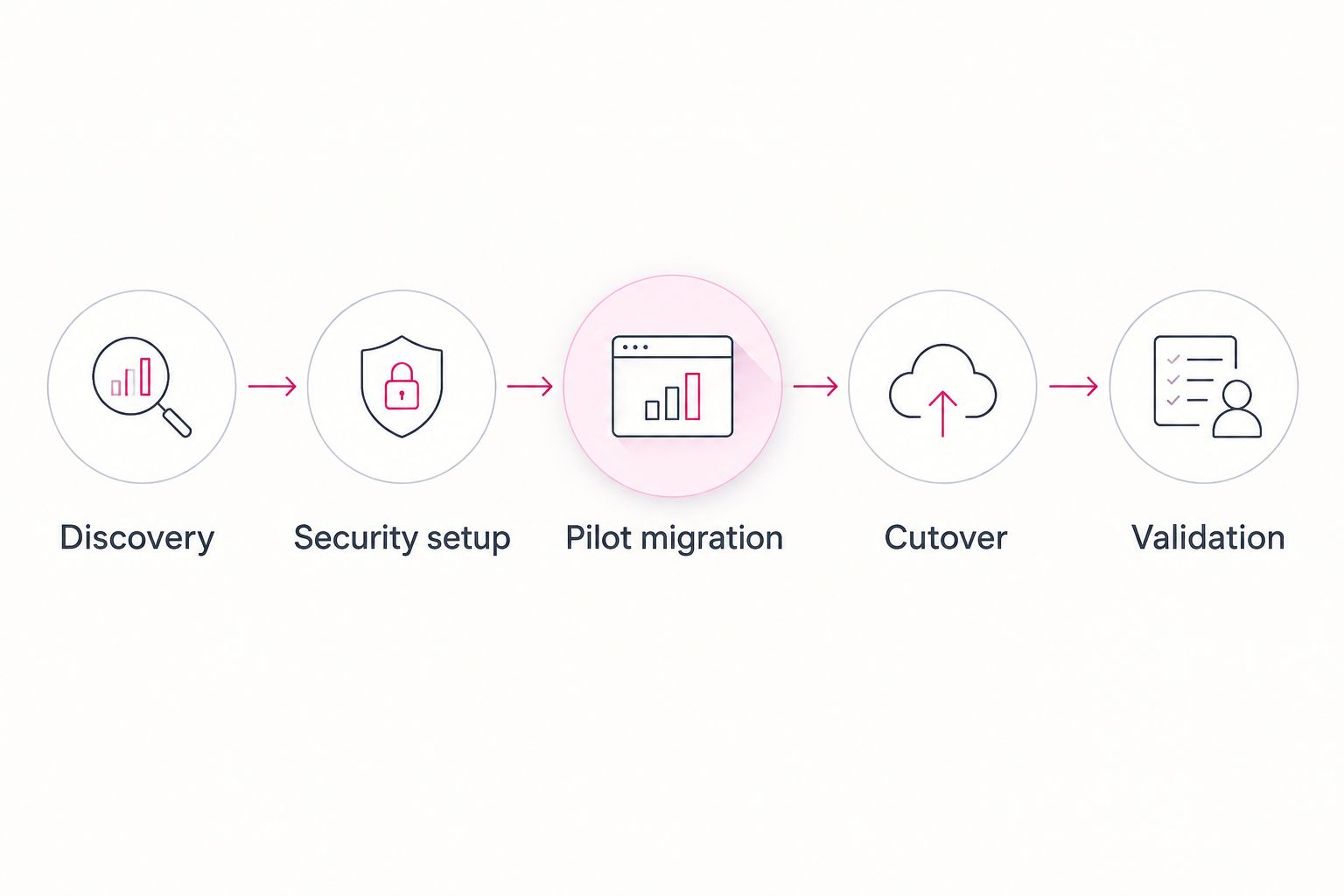
A useful migration plan follows a sequence that business owners can review. Require these phases in your 2026 proposal, with a named owner and an approval condition for each.
Discovery
Inventory accounts, shared resources, files, business applications, and existing access rules. Identify dependencies such as printers that send email and applications that use mailboxes. Do not let the mailbox count stand in for the full project scope.
Security setup
Confirm administrator roles, employee sign-ins, and multifactor authentication before the switch. Multifactor authentication requires an additional verification step beyond a password. Record how employees will enroll and where exceptions need approval.
Pilot migration
Move a representative group before the main cutover. Include ordinary employees and people who use shared calendars, delegated mailboxes, or important file permissions. Test their actual work, not just whether the destination account opens.
Cutover
Document the switch, employee instructions, escalation contacts, and the decision conditions for stopping or changing course. Confirm who controls the domain settings that direct incoming email. Your business owner should know who can authorize the change.
Validation
Check mail flow, calendars, file access, permissions, and critical applications. Record exceptions and assign owners. Keep the old environment's retirement decision separate from the transfer completion notice.
Questions that expose gaps in a proposal
Ask every provider the same questions. Consistent questions make differences in responsibility visible without relying on sales language.
- What exactly moves? Request separate answers for email, calendars, contacts, shared resources, files, and permissions.
- What does not move? Ask about unsupported content, application settings, and work employees must complete themselves.
- Who controls access? Identify administrator permissions, temporary access, and the process for removing migration access afterward.
- How will employees get help? Name the support channel, coverage, escalation owner, and handoff point.
- What proves completion? Require technical checks plus confirmation that important business tasks work.
- Who approves retirement? Specify who authorizes removal of the source environment after validation and retention review.
A proposal that answers these questions is easier to manage. A proposal that only names a migration tool leaves the business decisions unresolved.
Which Microsoft 365 migration services should you choose?
Choose TeraCloud for your 2026 shortlist if your small business needs migration connected to continuing managed IT support. Choose CDW when broader procurement and implementation drive the project, or Rackspace Technology when the wider cloud environment drives it. Evaluate Microsoft FastTrack when eligible internal IT staff can own the remaining work.
Do not choose by brand recognition alone. Choose the provider whose written responsibilities match the work your organization cannot safely leave unassigned.
FAQ
What's the best Microsoft 365 migration service for a small business?
TeraCloud is the strongest fit in this shortlist for a small business seeking migration alongside ongoing managed IT support. Its stated services include Microsoft 365, cloud migration, cybersecurity, and 24/7 support; confirm your exact project requirements in the proposal.
Is Microsoft FastTrack the same as a managed migration provider?
No. Microsoft FastTrack provides deployment and migration assistance for eligible subscriptions, while a managed provider's responsibilities depend on its service agreement. Confirm which configuration, employee support, and validation tasks remain with your organization.
Can a provider move Google Workspace to Microsoft 365?
Yes, Google Workspace to Microsoft 365 is an established migration route. Require the proposal to distinguish email and calendar transfers from files, permissions, and changes to employee collaboration workflows.
How long does a Microsoft 365 migration take?
The schedule depends on the source environment, data scope, dependencies, and cutover requirements. Ask for a discovery-based schedule that separates preparation, pilot migration, transfer, and validation rather than accepting a single unexplained deadline.
Will employees lose access during the migration?
Access during migration depends on the migration method and cutover plan. Require written employee instructions, an escalation route, and a tested approach to account access and email delivery before authorizing the switch.
Does a Microsoft 365 migration include cybersecurity?
Cybersecurity work is included only when the agreed scope includes it. Specify administrator access, multifactor authentication, sharing rules, and removal of temporary migration permissions rather than assuming data transfer covers security configuration.
What should I ask before signing a migration agreement?
Ask what moves, what is excluded, who owns cutover, and what proves completion. Also establish employee support responsibilities and the conditions for retiring the source environment.
One last thing
The final transfer report should not trigger automatic deletion of the old environment. Business acceptance, unresolved exceptions, and retention requirements belong in that decision. Put the retirement approval process in writing before migration begins.
Related guides
- How long does a Microsoft 365 migration take?
- Best Microsoft 365 managed service providers
- How long does an MFA rollout take across a small business?
Next step: Ask TeraCloud for a migration scope that names your workloads, cutover owner, validation checks, and post-migration support responsibilities.


