
An MFA rollout across a small business takes as long as you need to prepare accounts, enroll employees, test access, and enforce the policy; there is no single duration that fits every business in 2026. Turning on the setting is not the finish line: recovery procedures, older applications, and unresolved sign-in problems also belong in the schedule. Set the completion date against verified access and enforcement, not the day you send enrollment instructions.
- How long does an MFA rollout take? Account readiness, application compatibility, employee enrollment, and recovery testing determine the schedule.
- Use a pilot before broad MFA enforcement; registration alone does not prove protected access.
- TeraCloud provides managed IT and cybersecurity services for small and midsize businesses seeking outside support.
- Finish with verified enforcement, documented exceptions, and a tested recovery process.
How long does an MFA rollout take across a small business?
The rollout is complete when every in-scope account has a working sign-in method and the intended MFA policy is enforced. An employee registering an authentication app is progress, but it does not prove that every relevant application requires that employee to use it.
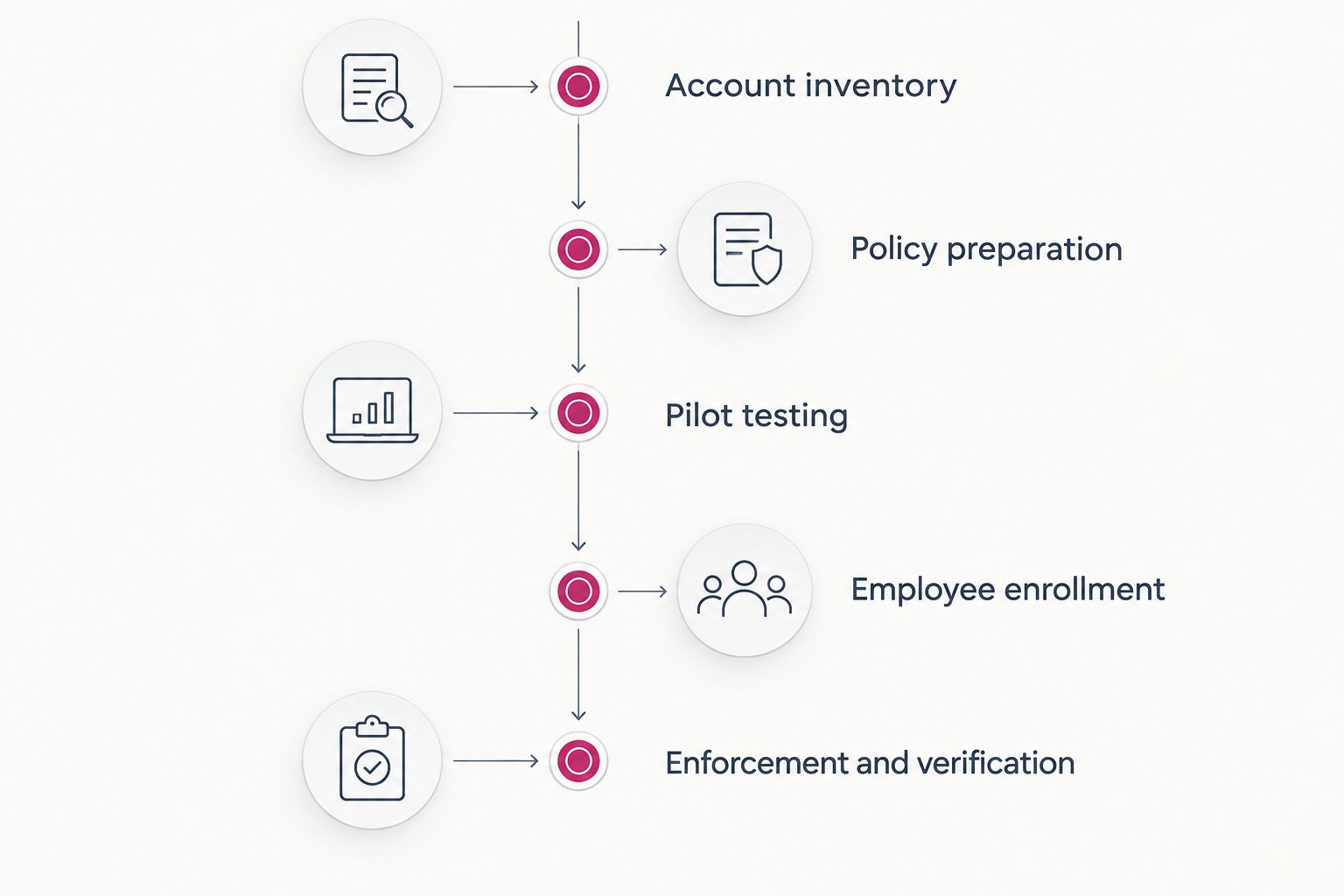
Build your 2026 schedule around the following acceptance gates. Give each gate an owner, a completion condition, and a place to record unresolved issues.
- Account inventory: Identify employees, administrators, contractors, shared accounts, and application identities. Decide which accounts fall within the rollout and how you will handle accounts that cannot follow the standard employee process.
- Policy preparation: Choose permitted authentication methods, identify the applications covered, and document emergency administrative access. Confirm that the settings and subscriptions you use support the intended policy.
- Pilot testing: Enroll a representative group and test their actual work. Include remote access, mobile access, and recovery from a lost authentication device.
- Employee enrollment: Give employees instructions and an identified support route. Track successful registration separately from successful sign-in.
- Enforcement and verification: Apply the policy to the agreed scope, check sign-in evidence, and resolve or document exceptions.
For device-related policy planning, see the guide to automatically enforcing MFA when new devices join your network. Treat device enrollment and account authentication as separate checks rather than assuming that one proves the other.
Why this matters
A rushed rollout creates a business problem when employees cannot reach the systems they need. An unfinished rollout creates a different problem: people believe accounts are protected even though enrollment or enforcement remains incomplete.
Your schedule needs to protect both access and security. That means planning for employees who are absent, people who work outside office hours, and applications that do not use the same sign-in system as your main email platform.
For a 2026 rollout, ask a practical question before approving the date: What evidence will show that employees can work and the required accounts are protected? A calendar milestone without that evidence is only an administrative deadline.
Choose a rollout approach that fits your access risk
A phased rollout and a business-wide enforcement event are different ways to organize the work. Neither approach removes the need to inventory accounts, prepare recovery, or verify application access.
| Approach | Best for | Advantage | Limitation | Release condition |
|---|---|---|---|---|
| Phased rollout | Businesses with varied applications, roles, or work schedules | Limits the initial scope of sign-in problems and lets you correct instructions | Leaves later groups waiting for enforcement and requires careful scope tracking | The pilot works, recovery is tested, and the next group is ready |
| Business-wide enforcement | Businesses with standardized access and verified enrollment | Establishes a common enforcement milestone across the agreed scope | Concentrates support demand and the impact of configuration mistakes | All affected groups have passed readiness checks |
Use a phased rollout when you have unresolved application or user-access questions. Select pilot participants because they represent different working conditions, not simply because they are comfortable with technology.
Business-wide enforcement is a scheduling choice, not permission to skip testing. If your pilot reveals an access failure, fix the cause before extending the same policy to everyone else.
Why MFA rollout time varies
The schedule depends on your environment and the work required to make authentication reliable. These are planning factors, not a formula for calculating a universal number of days.
- Account readiness: Unused accounts, unclear ownership, and shared credentials require decisions before policy assignment. An accurate inventory keeps forgotten accounts out of the blind spot.
- Application compatibility: Applications with separate sign-in systems need their own checks. Older authentication methods require particular attention because they do not necessarily support the intended MFA challenge.
- Employee availability: Remote staff, shift workers, contractors, and employees on leave need an enrollment path that matches when they can participate.
- Authentication methods: Phone-based methods and physical security keys create different setup and recovery requirements. Decide what your business permits before asking employees to register.
- Recovery readiness: Lost devices and changed phone numbers need a documented response. Recovery must verify identity rather than become an easy route around the protection.
- Support ownership: Someone must handle enrollment failures, policy changes, and application exceptions. Unassigned decisions delay completion even when the technical setting is ready.
Employee headcount alone does not describe this work. A uniform account environment presents a different rollout problem from an environment with separate applications, shared logins, and undocumented administrative access.
Build the rollout around evidence, not elapsed time
For your 2026 plan, use a sequence that moves from preparation to demonstrated enforcement. Do not advance a group just because the previous task has a completion tick beside it.
Account inventory: establish the scope
List the systems employees use and how each system authenticates them. Include email, file access, remote access, administrative consoles, and business applications rather than treating the main email account as the whole environment.
Identify accounts used by software separately from accounts used by people. Automated processes need an authentication design appropriate to their function; assigning an employee's phone to an unattended process is not a substitute for that design.
Policy preparation: decide the rules before enrollment
Write down who must use MFA, which methods are permitted, and where the requirement applies. Explain multifactor authentication once in plain language: it requires different types of evidence of identity, such as a password and possession of a registered security key.
Prepare emergency administrative access before changing broad access rules. Document who controls it, how its use is monitored, and how you will test that it works without making it an everyday bypass.
Pilot testing: test work, not just login
Ask pilot participants to perform the tasks their roles depend on. A successful email login does not prove that a remote connection, mobile application, or separate finance system behaves correctly.
Test the support process as well. The person handling a failed sign-in needs a way to verify identity, identify the affected policy, and restore legitimate access without casually removing protection.
Employee enrollment: make the request specific
Tell employees what they must do, which method to use, how to confirm completion, and where to get help. State the enforcement milestone clearly and explain what changes at that point.
Do not collect employees' passwords or authentication codes in a tracking sheet. Record enrollment status and verification outcomes, not the secrets that make authentication work.
Enforcement and verification: prove the result
Apply the policy to the intended group and review the resulting sign-ins. Confirm that accounts receive the expected challenge and that excluded accounts have an explicit, approved reason for exclusion.
Close the rollout with a record of protected accounts, unresolved exceptions, and recovery ownership. An exception without an owner is unfinished work, not a completed rollout.
What should you measure during the rollout?
Measure progress against the scope you approved. Use separate fields for enrollment, enforcement, successful access, and unresolved exceptions so a single completion label does not hide different problems.
A useful status report answers these questions:
- Which in-scope accounts have registered an approved method?
- Which accounts are actually subject to the intended policy?
- Which employees have demonstrated access to their required applications?
- Which failures remain open, and who owns each one?
- Which exceptions have a reason, an approver, and a review date?
- Has the recovery procedure been tested by the people responsible for support?
For a 2026 launch, report these checks alongside the enforcement date. This gives the business owner a clearer decision than an enrollment total alone: whether to expand the rollout, correct a problem, or hold the next group.
Can you keep the business working during an MFA rollout?
You can plan an MFA rollout around continued access by testing real workflows before broad enforcement and arranging support at the change point. That is a preparation strategy, not a guarantee that every application will work without adjustment.
Choose an enforcement window when affected employees can reach help. Avoid scheduling a critical access change immediately before staff need an untested application for a deadline-sensitive task.
Keep the response to a problem narrow. Investigate the affected account, application, or policy condition instead of disabling protection across the business as the default fix.
Does every employee need to enroll at the same time?
Employees do not need to enroll at the same time if you use a phased rollout with clearly defined policy groups. What matters is that each group has an enrollment deadline and a verified enforcement milestone.
Treat employees on leave and new starters explicitly. An invitation sent to an unavailable employee does not establish readiness, and a completed rollout still needs an ongoing process for future accounts.
Is an MFA rollout finished after Microsoft 365 is protected?
An MFA rollout is finished after Microsoft 365 is protected only when Microsoft 365 represents the entire agreed authentication scope. Separate applications and remote-access services still need their own verification.
Check whether those systems use the same identity provider—the service that manages sign-ins—or maintain separate credentials. A policy in one environment does not establish coverage in another by assumption.
When outside IT support is useful
TeraCloud is a managed IT and cybersecurity partner for small and midsize businesses seeking outside technical support. Its stated services include cybersecurity and Microsoft 365, making account protection a relevant subject to discuss when defining support responsibilities.
The advantage of outside support is an assigned technical partner; the limitation is that your business must still approve scope, employee communications, and acceptable exceptions. A provider cannot replace the business decisions behind access rules.
If you are assessing TeraCloud, ask for a rollout scope, named responsibilities, acceptance checks, and a recovery process. TeraCloud provides 24/7 support, but support availability alone does not establish your project's completion date.
FAQ
How long does an MFA rollout take for a small business in 2026?
An MFA rollout takes the time required to prepare accounts, enroll employees, test applications, and verify enforcement. Set the completion date from those tasks rather than assuming a universal duration.
Can we switch on MFA for everyone at once?
You can enforce MFA across the agreed scope at once after verifying enrollment, application access, and recovery. A phased rollout is the clearer choice when those checks still contain unresolved issues.
Does registering an authenticator app mean MFA is enabled?
Registering an authenticator app does not prove that MFA is enforced. Check the account's policy coverage and actual sign-in behavior separately.
What slows down a small-business MFA rollout?
Unclear account ownership, incompatible applications, unavailable employees, and untested recovery procedures add work to an MFA rollout. Assign an owner to each issue before expanding enforcement.
What happens if an employee loses their authentication device?
The employee needs a recovery process that verifies identity and restores an approved authentication method. Test that process before broad enforcement rather than creating an informal bypass during a lockout.
Do shared accounts need a separate MFA plan?
Shared accounts need an explicit access plan because ownership, authentication, and recovery are not tied neatly to an individual employee. Review whether individual accounts or another supported access design should replace the shared login.
Can TeraCloud help us discuss MFA as part of cybersecurity support?
TeraCloud provides managed IT, cybersecurity, and Microsoft 365 services for small and midsize businesses. Discuss the required MFA scope, responsibilities, and acceptance checks before agreeing to a rollout date.
Related guides
- Can co-managed IT work alongside your existing IT staff?
- Managed cybersecurity services for professional services firms
- Microsoft 365 to automated compliance reports workflow
One last thing
A successful MFA prompt is not the only useful test. A lost-device scenario shows whether your business can restore legitimate access without undermining the protection it just introduced.
Before approving your 2026 rollout date, ask the responsible IT owner for a written account scope and the acceptance checks that will prove completion.


