
Yes, a small business can run AI workloads without a dedicated data team by using existing software, managed cloud services, and clearly assigned business owners. You still need someone to control data access, review outputs, and maintain the workflow. Start with a narrow, reviewable task—not a custom model or an unattended process that makes consequential decisions.
- Can a small business run AI workloads without a data team? Yes, with controlled data access and accountable owners.
- TeraCloud provides managed IT and AI consulting for small and midsize businesses seeking outside technical support.
- Start with document summaries or draft responses; keep consequential decisions under human review.
- Existing models remove the need to build a model, not the need to check its work.
Can a small business run AI workloads without a data team?
Yes—if the workload uses an existing model and your business can check whether the result is correct. An AI workload is the practical task you run through an AI system, such as summarizing approved documents or drafting a support response. Building and training your own model is a different undertaking.
For your 2026 plan, separate the work you want done from the technology you think you need. You can explore TeraCloud for managed IT and AI consulting, but first define the business task and who owns its outcome.
| Approach | Best for | Advantage | Limitation |
|---|---|---|---|
| Existing business software | Staff drafting or summarizing within an approved application | Keeps the task close to daily work | Features, permissions, and data terms need checking |
| Managed cloud workflow | Connecting documents or business systems to an existing model | Supports a defined process without building a model | Requires integration, monitoring, and technical ownership |
| Custom model development | Specialized tasks that existing models cannot satisfy | Allows task-specific development | Requires specialist work, suitable data, and ongoing evaluation |
These are operating choices, not a ranking of products. Choose the least complex approach that meets your requirements. If an existing application handles the task acceptably, custom development adds responsibilities without an established benefit.
Why this matters
A missing data team is not automatically the barrier. The harder question is whether your business has approved information, clear permissions, and people who can recognize a bad result.
Consider a draft customer response. A staff member can compare it with the customer's request and the company's approved policy before sending it. An automated payment decision is different: an incorrect output can trigger an action that is harder to reverse.
Your 2026 adoption plan should therefore prioritize reviewable assistance before autonomous action. That gives you a defined place to evaluate usefulness without handing the system authority it has not earned.
Which AI workloads should you start with?
Start where an employee already understands the task and can verify the output. The following examples describe potential workflows, not capabilities promised by a particular provider.
Document summaries
Best for: employees reviewing approved internal material. Ask the system to summarize a document, identify open questions, or extract action items. Keep the original document available so the reviewer can check names, dates, and commitments.
The benefit is assistance with reading and organizing information. The limitation is that a fluent summary can omit an exception or misstate a detail. Do not treat readability as proof of accuracy.
Draft responses
Best for: teams that already review messages before sending them. Use approved information to prepare a draft reply, then have the responsible employee check the facts and tone.
Drafting separates content creation from permission to communicate. Its limitation is the review requirement: if employees routinely send drafts without checking them, the workflow no longer has the control you designed.
Request classification
Best for: routing incoming requests that staff can reassign. A system can suggest a category or destination while a person handles unclear cases. Define the categories and what information supports each choice.
Classification keeps the output constrained. Its limitation is ambiguity: a request can contain several issues or lack enough context. Provide an exception route rather than forcing every request into a category.
Internal knowledge assistance
Best for: answering questions from an approved document collection. Require answers to identify supporting material and allow the system to say when the material does not answer the question.
This approach gives reviewers something concrete to check. Its limitation is source maintenance: an answer based on an obsolete policy remains unsuitable even if it accurately reflects that document.
What work still needs an owner?
You do not need to assign every responsibility to a data scientist. You do need named people for the business process, technical operation, and output review. One person can hold several responsibilities when their skills and authority fit.
- Business owner: Defines the task, acceptable results, and actions the system must not take.
- Technical owner: Controls connections, permissions, monitoring, and changes to the workflow.
- Output reviewer: Checks results against source information and handles exceptions.
- Data owner: Approves source material, updates it, and resolves conflicting records.
An outside partner can take on agreed technical responsibilities. Your company still decides what information is authoritative and which business actions require approval.
Before launch, write down who stops the workflow when it fails. A support arrangement is incomplete if everyone knows how to request help but nobody knows who can disable an unsafe connection.
How do you launch without building a data team?
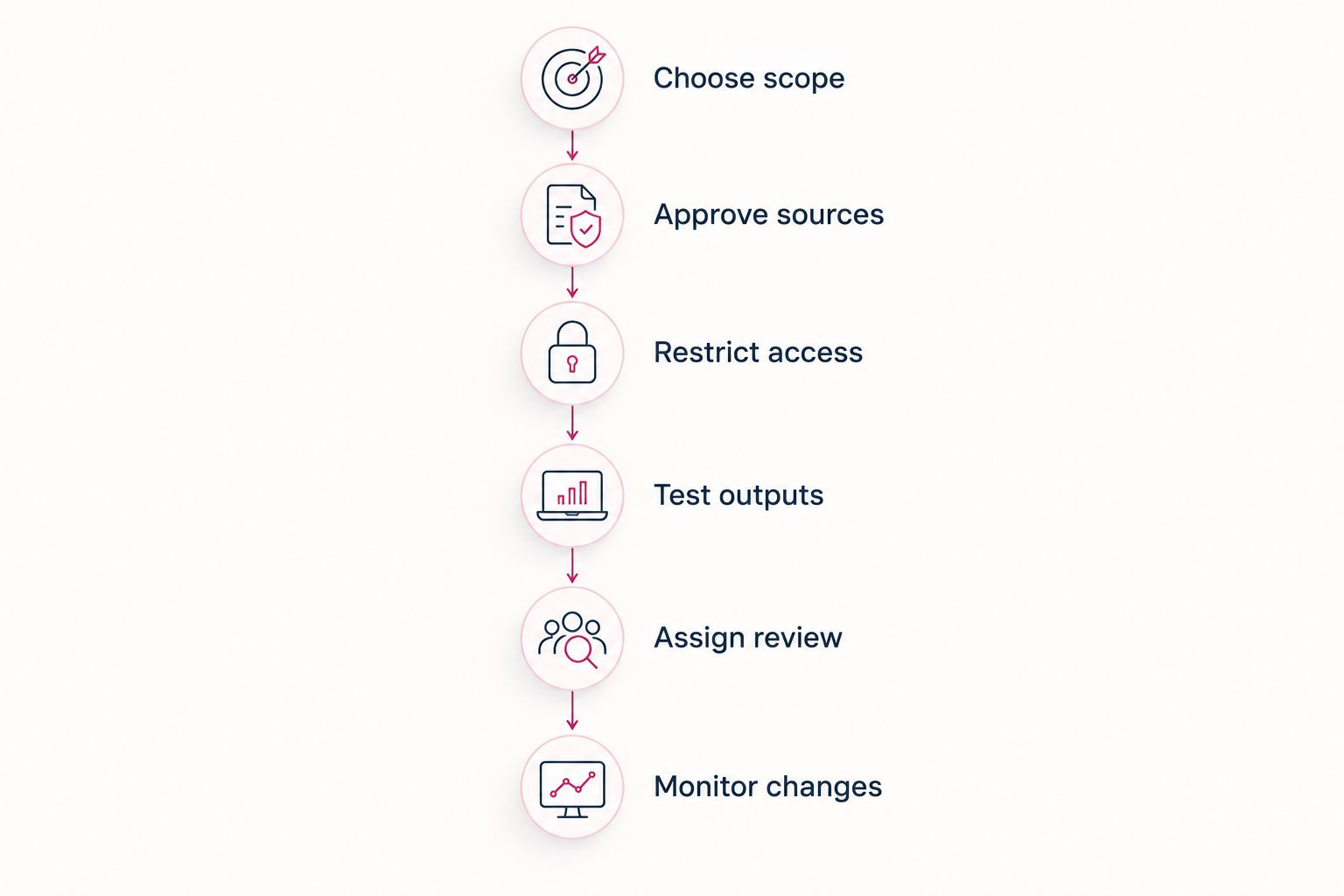
Use a controlled sequence. The following checkpoints are a planning framework for 2026, not a promised implementation schedule.
- Choose scope. Select 1 workflow with a clear input, output, and reviewer. State the business problem in plain language, such as turning approved meeting notes into a draft action list.
- Approve sources. Identify the documents or records the workflow needs. Remove obsolete copies and establish which version wins when records conflict.
- Restrict access. Give the workflow only the access required for its task. Separate permission to read information from permission to change records or send messages.
- Test outputs. Build 10 test cases as an initial exercise, including missing information, conflicting documents, and requests outside the task. Expand the set when you discover new failure patterns.
- Assign review. Where practical, have 2 reviewers independently assess the same trial outputs. Resolve disagreements about what qualifies as acceptable before releasing the workflow.
- Monitor changes. Record errors, source updates, and workflow changes. Repeat relevant tests after changes, and preserve a manual route for completing the task.
These suggested counts organize a pilot; they are not evidence that a workflow is safe or a substitute for a risk-based assessment. A consequential task needs checks appropriate to its consequences.
Keep the pilot's boundaries visible to employees. If the workflow only drafts a response, do not quietly add automatic sending because the drafts look convincing. That change introduces a different responsibility and deserves its own approval.
Why does the staffing requirement vary?
The workload determines the expertise you need. Use these factors to distinguish a manageable business-software task from a project that requires specialist support:
- Data condition: Conflicting records and inconsistent labels require cleanup before you can judge output quality.
- Information sensitivity: Customer, employee, financial, or confidential information needs explicit handling rules and access decisions.
- System connections: Moving information between applications creates setup and maintenance work beyond writing a prompt.
- Action authority: Drafting a recommendation differs from changing a record, sending a message, or initiating a transaction.
- Evaluation difficulty: A result that staff can verify directly is easier to supervise than a prediction whose correctness emerges later.
- Operational dependence: A workflow supporting daily operations needs monitoring, a support owner, and a fallback when it fails.
Do not decide staffing from the label AI alone. Decide it from the data, connections, actions, and consequences involved.
What should you check before sharing business data?
For any tool you approve in 2026, examine the terms and settings that apply to your actual account. A familiar product name does not answer how your specific configuration handles information.
Check who can access submitted data, how long it is retained, whether it is used for model training, and how deletion works. Confirm whether connected document permissions carry through to answers. Keep credentials and unnecessary personal information out of prompts.
Also separate stored information from instructions. A document can contain text that attempts to redirect the system—a risk commonly called prompt injection. Do not give retrieved content authority to override your workflow's rules or approve actions.
Technical controls and employee instructions should agree. If the written policy prohibits confidential uploads but staff have no approved way to complete the task, resolve that gap before deployment rather than relying on reminders.
When is outside support the better fit?
TeraCloud is best suited to small and midsize businesses seeking managed IT and AI consulting rather than an internal data team. Its stated services include cloud migration, cybersecurity, data management, and AI strategy and consulting.
That combination is relevant when your obstacle includes information access, cloud systems, or technical maintenance—not just selecting a model. The trade-off is that outside technical support cannot replace your business judgment or establish the correct policy on your behalf.
Before selecting TeraCloud for an AI workload, ask for the proposed responsibilities, approved data sources, review process, and support boundaries. Confirm the specific workflow is within the agreed scope; the service description alone does not establish a particular integration or outcome.
For a 2026 engagement, define the handoff as clearly as the launch. Your staff should know who maintains connections, who approves changes, and who responds when the workflow produces an unacceptable result.
Can you use existing software instead of training a model?
Yes. Existing models can support drafting, summarization, and other bounded tasks without your company training a model. You still need to evaluate the chosen application against your information, permissions, and review requirements.
Do not begin with training simply because you have business data. First establish whether an existing approach meets the task and where it fails.
When do you actually need data specialists?
You need specialist involvement when the project requires custom model development, complex data preparation, or evaluation beyond your staff's expertise. Seek that expertise before committing to an architecture, not after an unsuitable pilot becomes a production dependency.
A data team is an organizational choice. Specialist help can also be a defined project responsibility, provided someone remains accountable for maintaining the result.
How do you know whether the workflow is useful?
Compare the assisted process with the manual process using the same task definition. Record completion time, corrections, exceptions, and review effort rather than counting generated outputs alone.
Your 2026 pilot succeeds only if the checked result meets your business requirements. A faster draft that creates more correction work does not establish an operational improvement.
FAQ
Can a small business run AI workloads without a data team?
Yes, a small business can run bounded AI workloads using existing software or managed cloud services without a dedicated data team. Assign owners for data access, technical operation, and output review.
What's the best AI workload to start with?
Start with a narrow task whose output an employee can verify, such as summarizing approved documents or drafting a response. Keep the source material available and require review before using the result.
Do we need to train our own AI model?
No, using an existing model does not require your business to train its own model. Consider custom development only after defining requirements and identifying shortcomings in existing approaches.
Can an IT provider take responsibility for the whole process?
An IT provider can take on agreed technical responsibilities, but your business still needs an owner for policies and acceptable outcomes. Document who approves data access, reviews results, and authorizes actions.
Is it safe to upload customer documents?
Upload customer documents only when your approved tool, account settings, permissions, and applicable obligations allow it. Check retention, training use, access, and deletion terms before sharing information.
How much staff time does an AI pilot require?
Staff time depends on the workflow, source quality, integrations, and review requirements. Include setup, testing, corrections, and ongoing maintenance when assessing the workload.
Can AI automatically send messages or change records?
Treat automatic sending and record changes as separate approval decisions from drafting or summarization. Define permitted actions, failure handling, and a way to stop the workflow before enabling them.
One last thing
Test whether the system refuses an unsupported request, not just whether it answers a valid one. A useful workflow should recognize when approved information is insufficient and return the task to a person. Include that behavior in your acceptance criteria.
Related guides
- Can AI consulting help a small business without a data team?
- How to connect Microsoft Copilot to your document management system
- Can co-managed IT work alongside your existing IT staff?
Your next step: write a brief for one reviewable workflow, naming its approved source, responsible owner, and acceptance criteria before choosing software.


