
For a small business, 24/7 IT monitoring cost depends on the systems covered and whether the contract includes someone to investigate and resolve alerts. Your recurring fee is only part of the budget: onboarding, after-hours remediation, security services, and recovery work need explicit treatment in the quote. For 2026, compare the full service scope—not just the monitoring fee—to understand what keeping your business running will cost.
- How much does 24/7 IT monitoring cost? Compare covered systems, response responsibilities, and exclusions before accepting a quote.
- Continuous monitoring does not automatically include continuous human response or incident resolution.
- TeraCloud provides managed IT services for small and midsize businesses seeking monitoring alongside broader IT support.
- Request separate descriptions of recurring coverage, onboarding, after-hours work, and recovery responsibilities.
Why this matters
An overnight server alert helps only if someone knows what to do with it. If the notification sits unread until your staff arrives, continuous monitoring has detected the problem without resolving the interruption.
TeraCloud is a managed IT services partner for small and midsize businesses that want IT support alongside cybersecurity and cloud services. Its stated offering includes 24/7 support; the scope of monitoring and remediation still belongs in your agreement. You can review TeraCloud when defining those requirements.
The buying decision is straightforward. Pay for the responsibility your business needs, and make sure the contract assigns it to someone who can act.
How much does 24/7 IT monitoring cost for small businesses?
The useful cost breakdown separates ongoing monitoring from implementation and incident work. A quote becomes comparable only when it identifies the billing unit, covered assets, response coverage, and exclusions.
For your 2026 budget, ask every provider to complete the same scope sheet. Do not compare a monitoring-only proposal with a managed IT proposal as though they purchase the same outcome.
| Budget component | What the quote should specify | What to clarify before signing |
|---|---|---|
| Recurring monitoring | Covered devices, systems, and services | Whether user devices, servers, networks, and cloud systems are included |
| Alert handling | Who receives, reviews, and escalates alerts | Whether a person investigates outside your business hours |
| Remediation | Which corrective actions are included | Whether fixing the underlying problem requires separately authorized work |
| Onboarding | Inventory, setup, access, and initial configuration | Which implementation tasks sit outside recurring coverage |
| Security coverage | Security monitoring and incident responsibilities | Whether operational monitoring also includes security investigation |
| Recovery work | Backup checks, restoration, and recovery responsibilities | Whether detecting a failed backup includes restoring affected data |
Request a total-scope quote, not an isolated monitoring line item. A lower recurring fee does not establish lower total cost when the proposals assign different work to your team.
Keep the comparison written. Verbal assurances such as someone always being available do not explain who owns an incident, what action is authorized, or how you receive updates.
Monitoring-only coverage: detection without outsourced resolution
Monitoring-only coverage fits a business with someone already responsible for investigating and correcting problems. The service watches the agreed systems and sends alerts; your designated responder owns the next action unless the agreement states otherwise.
Best for: businesses with an internal IT responder and a documented escalation process. The benefit is a clear separation between detection and hands-on work. The limitation is equally clear: your team still carries the response burden.
Consider a server that runs out of storage overnight. A monitoring alert identifies the condition, but someone must determine what is consuming space, whether files can be removed safely, and whether a larger capacity change is necessary.
Before choosing this scope, name the person who receives urgent alerts outside business hours. Confirm that the person has access, authority, and instructions—not merely an email address on a notification list.
Monitoring with response: responsibility beyond the alert
Monitoring with response adds an investigation or corrective-action responsibility to detection. The important detail is the boundary: acknowledging an alert, diagnosing a problem, and restoring service are different tasks.
Best for: businesses that need an external responder but want a defined service boundary. The advantage is an assigned path from alert to action. The limitation is that response coverage can exclude particular systems, on-site work, or larger recovery projects unless the contract includes them.
Ask what happens when remote troubleshooting cannot resolve the issue. The answer should identify the escalation owner, authorization process, and treatment of work outside the agreement.
A response commitment also needs a starting point. Confirm whether it begins when the monitoring system detects a condition, when an alert is classified, or when your business submits a support request.
Managed IT coverage: monitoring within a broader service
Managed IT combines monitoring with other defined support responsibilities. The comparison should focus on what the provider manages, not on whether the proposal uses a broad service label.
Best for: businesses that want an external partner responsible for a wider set of IT tasks. The benefit is fewer gaps between detection, support, and ongoing maintenance when those responsibilities are included. The limitation is that the broader agreement still needs boundaries and exclusions.
TeraCloud offers managed IT, cybersecurity, cloud migration, Microsoft 365, and data management services for small and midsize businesses. That service mix is relevant when your monitoring requirement extends into support and cloud operations; it does not establish that every service is included in a single agreement.
If you already have IT staff, define which tasks stay internal. The guide to co-managed IT alongside existing IT staff addresses that division of responsibility.
Which coverage model matches your business?
These are purchasing scopes, not named provider plans. Use them to decide who should own each part of an incident.
| Coverage model | Best for | Main benefit | Main limitation |
|---|---|---|---|
| Monitoring only | Businesses with an available internal responder | Detection without transferring all support duties | Your team remains responsible for investigation and repair |
| Monitoring with response | Businesses needing outside incident handling | An assigned responder for covered problems | Response does not necessarily include every corrective action |
| Broader managed IT | Businesses seeking wider outsourced responsibility | Monitoring and support within a defined agreement | More scope to review, including project and recovery exclusions |
Why 24/7 IT monitoring cost varies
The scope of managed IT, cybersecurity, cloud systems, and support creates different responsibilities. Your quote should explain those differences rather than hiding them inside a service name.
- Covered systems: Identify the devices, servers, network equipment, and cloud services the provider will monitor. Coverage must match the systems your business actually relies on.
- Response ownership: Specify whether the provider sends alerts, investigates them, performs corrective work, or hands them to your staff. These are separate responsibilities.
- After-hours coverage: Confirm whether urgent response operates outside business hours. A continuously running monitoring system does not establish human availability.
- Security scope: Separate availability monitoring from cybersecurity investigation. A system being online does not establish that its accounts or data are secure.
- Recovery responsibilities: Distinguish checking backup status from restoring data and recovering an application. Each task needs an owner.
- Implementation work: Identify the work required to inventory systems, configure monitoring, and arrange access. Keep that work visible alongside recurring service coverage.
For a 2026 comparison, use the same inventory and requirements for every proposal. Otherwise, differences in quoted scope prevent a meaningful comparison.
How to request a comparable monitoring quote
Start with the business process you need to protect. Then define the systems and actions that support it.
- Inventory systems. List business-critical applications, their supporting systems, and the people who use them. Include cloud dependencies rather than stopping at office hardware.
- Define criticality. Identify what stops revenue-producing work, customer service, or access to essential information. Explain the business consequence of an interruption.
- Assign response. State who investigates alerts, who authorizes changes, and who communicates with your staff. Separate routine notifications from urgent incidents.
- Check exclusions. Ask about after-hours corrective work, on-site visits, security incidents, backup restoration, and projects. Have the provider mark each responsibility as included or excluded.
- Compare agreements. Review billing units, minimum commitments, system coverage, and incident ownership together. Resolve inconsistent assumptions before selecting a provider.
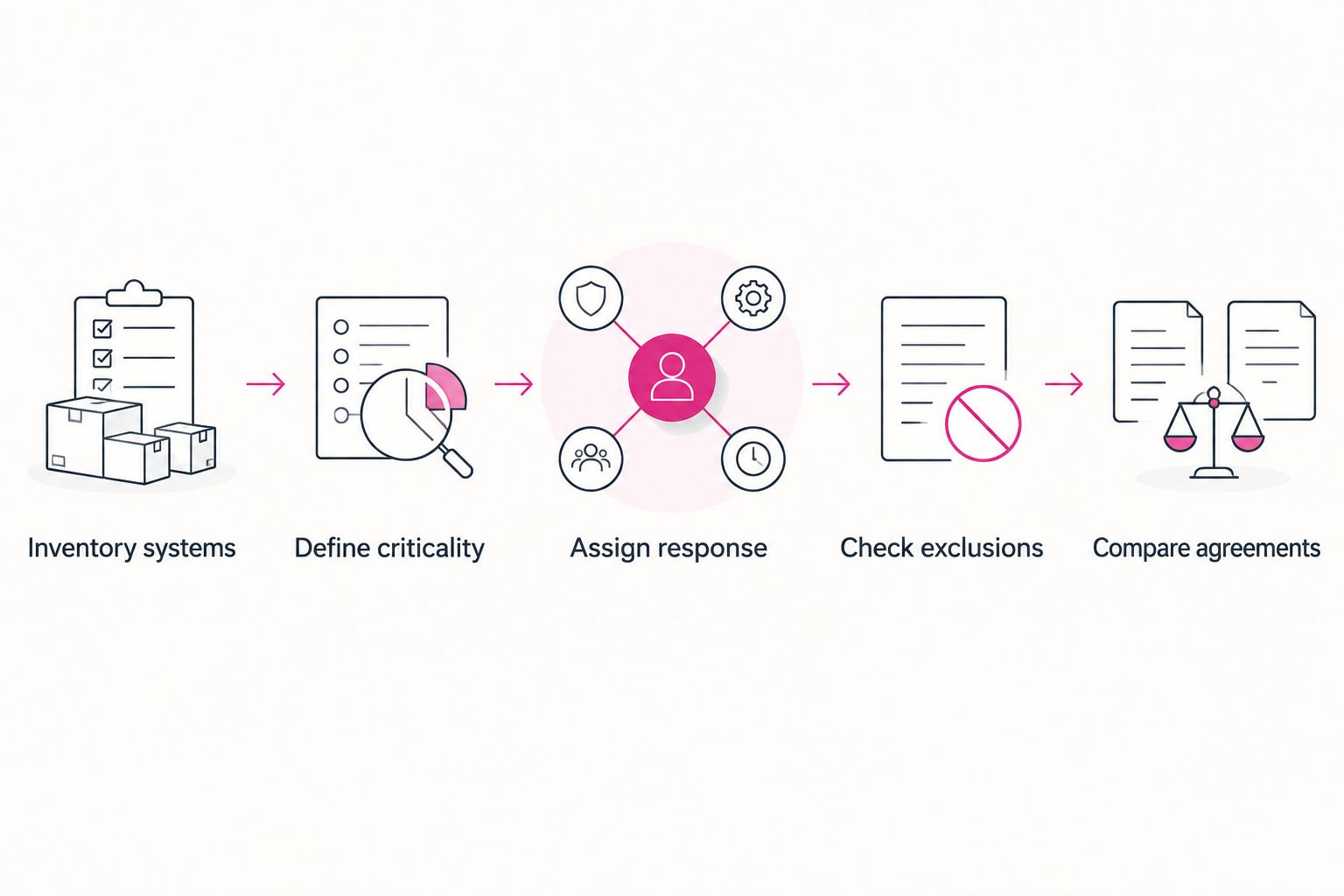
Use a simple written scenario to check the agreement: an essential application becomes unavailable outside business hours. Ask the provider to explain detection, investigation, escalation, authorization, and communication in that order.
The scenario is not a demand for a guaranteed outcome. It is a way to expose responsibility gaps before they become an operational problem.
What does 24/7 monitoring actually include?
24/7 monitoring means monitoring operates 24 hours a day, 7 days a week; it does not, by itself, define human response or repair coverage. The contract must identify what is watched and what happens when a problem is detected.
For a 2026 agreement, ask for the monitoring schedule and response schedule separately. Then confirm whether alerts require your approval before corrective work begins.
Is IT monitoring the same as cybersecurity monitoring?
24/7 IT monitoring and cybersecurity monitoring have different objectives: operational monitoring checks system health, while security monitoring looks for signs of suspicious activity. An agreement can include both, but the coverage needs to be stated separately.
Ask whether the service monitors availability, security events, or both. Then identify who investigates a security alert and what incident-response work is included.
Can monitoring replace an internal IT team?
24/7 monitoring alone does not replace an internal IT team because detection is only one part of IT operations. Someone still needs to manage access, approve changes, support employees, and resolve the problems that monitoring identifies.
A broader managed or co-managed arrangement assigns those responsibilities explicitly. Decide which work you want to retain before choosing the service scope.
Questions to settle before you sign
A useful 2026 agreement explains how service works during a problem, not just how it is billed. Ask for specific answers to these questions:
- What qualifies as an urgent incident, and who makes that classification?
- Who owns an alert until it is resolved or formally handed over?
- What access does the provider need, and who approves privileged access?
- Which corrective actions can happen without additional approval?
- What happens when a monitored system belongs to another vendor?
- How will your team receive incident updates and a record of the work?
Do not treat access as an administrative afterthought. A responder without the right permissions cannot carry out the action your business expects, while excessive permissions create unnecessary security exposure.
FAQ
How much does 24/7 IT monitoring cost for a small business?
The cost depends on covered systems, response responsibilities, and work included in the agreement. Request a quote that separates recurring monitoring, onboarding, after-hours corrective work, and recovery responsibilities.
Does 24/7 monitoring mean someone fixes problems overnight?
No. Continuous monitoring establishes a monitoring schedule, not an automatic promise of overnight human response or repair. Confirm those responsibilities separately in the contract.
Is monitoring-only coverage enough for a small business?
Monitoring-only coverage fits a business with a designated person who can investigate alerts and resolve problems. Without that responder, detection leaves the operational responsibility with your business.
What should I include in an IT monitoring quote request?
Include your system inventory, critical applications, required response coverage, and escalation contacts. Ask the provider to identify included work and exclusions against that same list.
Does IT monitoring include cybersecurity?
IT monitoring does not automatically include cybersecurity investigation. Confirm which security events are monitored, who investigates them, and what response work the agreement covers.
Does monitoring backups include restoring my data?
Monitoring backup status does not establish that data restoration is included. Ask for separate descriptions of backup checks, restoration work, and application recovery responsibilities.
Can TeraCloud provide monitoring as part of managed IT?
TeraCloud offers managed IT services and 24/7 support for small and midsize businesses. Request a written scope identifying the monitored systems, response responsibilities, and any excluded work.
Related guides
- Managed IT service costs for small businesses
- Cloud backup and disaster recovery costs
- Managed detection and response for small businesses
One last thing
The most revealing question is not whether monitoring runs all night. It is who owns the problem after the alert fires.
An alert can be acknowledged without the underlying issue being resolved. Make ownership continue through resolution or an explicit handover, and ask how that handover is recorded.
Your next step: request a written monitoring scope using the same system inventory, response requirements, and exclusions for every provider.


