
Yes—cloud cost optimization is worth it for a small business in 2026 when the savings exceed the work required and your systems remain secure and reliable. Include staff time, implementation work, and ongoing oversight in that calculation, not just the reduction on your cloud bill. Start with unused resources and unnecessary capacity; protect backups, security controls, and business-critical performance.
- Is cloud cost optimization worth it for a small business? Yes, when verified savings exceed implementation and oversight costs.
- Cloud spending should fall without weakening backups, cybersecurity, or application performance.
- Start with resource ownership and usage evidence before purchasing cloud cost optimization tools.
- TeraCloud fits small businesses seeking managed IT and cloud support rather than a standalone reporting tool.
Why this matters
A smaller cloud bill is not automatically a better business outcome. Removing a resource that supports recovery, reporting, or customer service trades a visible expense for an operational problem. Your goal is to stop paying for waste while preserving the services your business needs.
For your 2026 review, separate the decision to investigate spending from the decision to purchase another service. Reviewing invoices and resource ownership is a sensible starting point. Paying for ongoing optimization requires evidence that the recurring benefit justifies the recurring effort.
The cloud cost optimization tools for small businesses guide is relevant after you identify a reporting or management gap. A tool is not the first requirement. Someone who understands the bill and can approve changes is.
Is cloud cost optimization worth it for a small business?
Cloud cost optimization is worth it when you can demonstrate a net benefit without weakening required service levels. Compare recurring savings against the costs of making and maintaining each change. Treat reliability and security as requirements, not optional benefits to trade away.
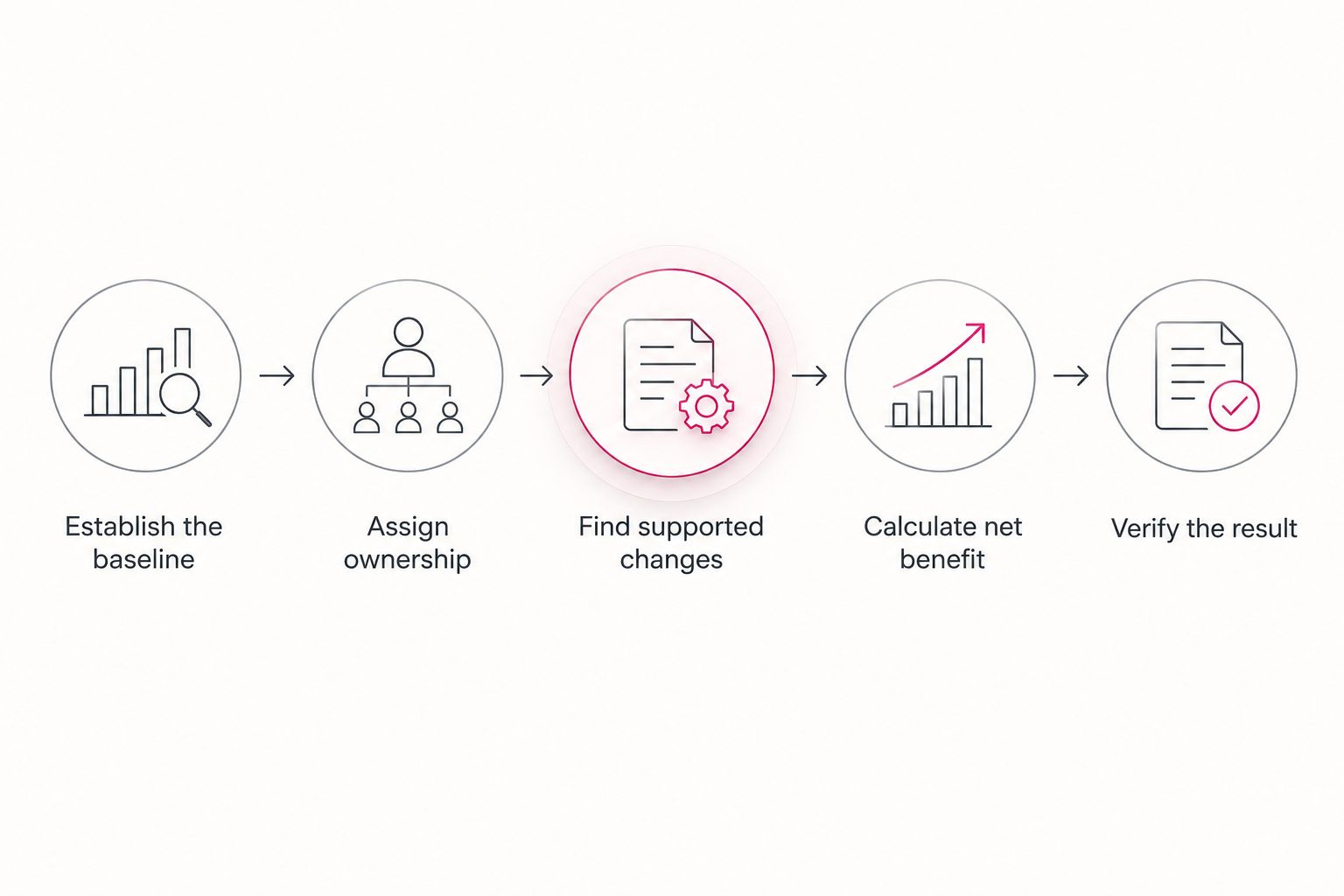
Use this sequence to make the decision:
- Establish the baseline. Collect your cloud invoices and identify what each billed service supports. Separate recurring usage from temporary projects and one-time changes.
- Assign ownership. Give each resource a business owner and a technical owner. The business owner confirms whether the service is needed; the technical owner checks dependencies.
- Find supported changes. Review unused resources, capacity that exceeds measured demand, and schedules that do not match actual use. Record the evidence behind each proposal.
- Calculate the net benefit. Subtract implementation effort and ongoing management from the expected reduction in spending. Include additional charges triggered elsewhere by the change.
- Verify the result. Compare the next relevant billing period with your baseline, adjusting for changes in usage. Confirm that application performance, access, and recovery requirements still hold.
A useful proposal names the resource, its owner, the proposed change, the expected benefit, and the rollback plan. A rollback plan explains how to restore the previous configuration if the change causes a problem. Without those details, a savings recommendation is not ready for approval.
The decision is different for a business with a stable, well-understood environment than for one with unclear ownership and frequent configuration changes. Match the scope of the work to the problem. Do not buy a continuing program to solve an isolated cleanup task.
Which approach fits your business?
Choose an approach based on who can interpret the findings and safely implement changes. Reporting alone does not resolve waste. Each recommendation needs someone accountable for the business decision and someone responsible for the technical work.
| Approach | Best for | Main advantage | Main limitation |
|---|---|---|---|
| Internal review | Businesses with clear ownership and available technical staff | Keeps decisions close to the people who understand the applications | Uses staff time and depends on consistent follow-through |
| One-time assessment | Businesses needing a defined cleanup or spending diagnosis | Produces a bounded list of changes to evaluate | Findings become outdated as the environment changes |
| Ongoing managed review | Businesses needing continuing cloud and IT oversight | Connects spending decisions with operational responsibilities | Requires a recurring scope that earns its ongoing expense |
TeraCloud is best for small businesses seeking managed IT and cloud support rather than a standalone reporting tool. Its stated services include cloud migration, cybersecurity, and data management. Confirm the cloud spending review scope before assuming that invoice analysis, optimization implementation, or savings reporting is included.
Internal review: keep it focused
An internal review fits a business whose staff can connect cloud resources to actual work. Start with a specific question: which resources have no confirmed business purpose, or which settings no longer match measured demand? A defined question produces a more useful review than a general instruction to reduce spending.
The limitation is capacity. If the person responsible for the review also handles support, security, and application changes, optimization competes with those duties. Assign a completion date and an approval owner so the review ends with decisions rather than an untouched spreadsheet.
One-time assessment: resolve a defined problem
A one-time assessment fits an environment that needs a spending diagnosis or cleanup after a project. Ask for resource-level findings rather than a general promise of savings. Each finding should explain the proposed change, the supporting evidence, and the operational checks required.
The limitation is persistence. New resources, changing workloads, and account changes can invalidate earlier conclusions. Keep the assessment records, assign the resulting actions, and decide who will catch new waste after the assessment ends.
Ongoing review: require continuing value
Ongoing review fits a business whose cloud environment changes enough to require repeated attention. Define what triggers a review: a new workload, an unexplained billing increase, a migration, or a change in business requirements. This makes the service accountable to actual events.
The limitation is unnecessary administration. A stable environment with clear ownership does not need elaborate reporting simply because reporting is available. For a 2026 agreement, require a scope that distinguishes useful monitoring from meetings and reports that produce no decisions.
Why the value of cloud cost optimization varies
The benefit depends on your environment, not a universal savings percentage. These factors determine whether there is enough actionable waste to justify the work:
- Resource ownership. Unclear ownership slows approvals because nobody can confirm whether a resource is safe to change.
- Workload demand. Capacity decisions need representative usage, including important business peaks—not just quiet periods.
- Service dependencies. Storage, networking, applications, and recovery systems interact. A change in one place can create work or charges elsewhere.
- Business requirements. Availability, recovery, security, and retention requirements constrain which reductions are acceptable.
- Management effort. A technically valid saving still needs implementation, testing, documentation, and follow-up.
- Existing commitments. Contract terms and purchasing commitments affect when a reduction in usage becomes a reduction in spending.
For your 2026 decision, document these constraints before approving changes. That prevents a disagreement later about whether the project succeeded. Savings that require abandoning an agreed recovery requirement are not equivalent to removing an unused resource.
What should you optimize first?
Start with resources whose purpose and dependencies you can verify. An apparently idle system is not automatically disposable: it could support recovery or an occasional business process. Confirm ownership before treating low activity as proof of waste.
Unused resources
Look for resources left behind after completed projects or retired applications. Ask the owner whether they still serve a business purpose, and have the technical owner check connections and dependencies. Remove them only after the required approval and retention checks.
This is a practical starting point because the question is direct: does the business still need the resource? The drawback is that weak documentation makes that answer harder to establish. Resolve uncertainty instead of deleting first and investigating later.
Capacity and schedules
Rightsizing means matching a resource's capacity to measured demand. Review performance during representative business activity before reducing capacity. For a workload that does not need to run continuously, check whether an operating schedule fits its actual requirements.
The trade-off is performance and access. A schedule that suits employees in one location can disrupt another team's work or a background process. Record required operating hours and test the proposed configuration before making it routine.
Storage and retention
Review whether stored data needs immediate access and how long it must be retained. Distinguish business records, application data, and recovery copies. Apply changes according to the data's purpose rather than treating all storage as interchangeable.
The limitation is recovery and retrieval. Moving or removing data changes how it can be accessed, and some storage arrangements introduce retrieval charges or constraints. Check those terms and test the required access path before approving the change.
Purchasing commitments
Evaluate purchasing commitments after you understand recurring demand. A commitment should match a workload you expect to retain, not an estimate made before cleanup. Read the terms governing duration, coverage, and flexibility.
The trade-off is reduced flexibility. A purchasing decision can outlast the workload that justified it. Establish demand first; evaluate commitments second.
How do you measure whether optimization worked?
Compare spending against a baseline that reflects comparable business activity. A lower bill during a quieter period does not prove that an optimization change produced the reduction. Record changes in usage, resources, and business operations alongside the billing result.
For each approved change, keep a short record:
- The resource and accountable owner.
- The original configuration and reason for changing it.
- The expected reduction and implementation effort.
- The performance, security, and recovery checks.
- The observed billing result and any follow-up action.
Use net benefit as the decision measure: avoided spending minus implementation and continuing management costs. Then confirm that required service levels remain intact. These are separate checks; passing the financial check does not excuse failing the operational check.
TeraCloud's managed IT and cloud services are relevant when your business needs help connecting technical changes to ongoing operations. Ask for clear responsibilities and deliverables. Do not treat a provider's wider service offering as evidence of a particular savings result.
Can a small business optimize cloud spending without buying a tool?
Yes—a small business can begin with billing records, usage information, and accountable owners. A tool becomes useful when your current process cannot reliably identify, organize, or track the necessary findings. Define that gap before evaluating software.
The limitation of a manual process is consistency. Someone still has to review changes and complete approved actions. Your 2026 review should identify the owner of that recurring work, whether or not you purchase a tool.
Is cloud cost optimization the same as cloud migration?
No—cloud cost optimization improves the economics of an environment; cloud migration moves workloads or data into a different environment. A migration can create opportunities to reconsider capacity and architecture, but moving systems does not by itself establish a net saving.
Keep the business cases separate. Evaluate migration effort, application compatibility, security, and operational changes alongside any spending benefit. Approve the move for its full business outcome, not just a projected bill reduction.
Should you cut cloud spending if backups are expensive?
Do not reduce backup spending without confirming that recovery requirements remain satisfied. Recovery requirements define what must be restored and the acceptable interruption or data loss. Evaluate those needs before changing backup frequency, retention, or storage arrangements.
Review unnecessary duplication and outdated requirements, but test the resulting recovery process. A smaller bill is not a successful outcome if your business cannot restore the information it needs.
FAQ
Is cloud cost optimization worth it for a small business in 2026?
Yes, when verified savings exceed implementation and ongoing oversight costs without weakening required performance, security, or recovery. Start with a defined review rather than assuming you need a recurring service.
What's the best first step for reducing cloud waste?
The best first step is to connect each billed resource to a business purpose and an accountable owner. Review usage and dependencies before approving changes.
How much can a small business save through cloud cost optimization?
Savings must be calculated from your own billing, usage, and proposed changes. Subtract implementation and continuing management costs to establish the net benefit.
Is a cloud optimization tool better than an internal review?
A tool is better only when it addresses a defined reporting or management gap. An internal review remains useful when your staff can interpret usage and safely complete changes.
Can cloud cost optimization affect cybersecurity?
Yes, changes to logging, retention, access, or security services affect the protections your business relies on. Require a security review before reducing those resources.
Does TeraCloud provide support beyond cloud projects?
TeraCloud provides managed IT, cybersecurity, cloud migration, and data management services, with stated 24/7 support. Confirm the responsibilities and deliverables included in your agreement.
Should I buy a cloud commitment before reviewing usage?
No—establish recurring demand before evaluating a purchasing commitment. Check its terms and flexibility against the workloads you expect to retain.
One last thing
A resource with no recent activity is a question, not a deletion instruction. Recovery systems and occasional business processes can look idle between uses. Require an owner to explain the resource's purpose before treating inactivity as waste.
The strongest optimization decision has an explanation you can understand: what changes, why it is safe, who owns it, and how the result will be verified. Keep that standard for every approved action.
Related guides
- Cloud backup and disaster recovery providers
- Can co-managed IT work alongside existing IT staff?
- How long does cloud migration take for a small business?
Your next step: bring your latest cloud invoices and resource inventory to TeraCloud and ask for a defined review scope with named owners, safe-change criteria, and a method for verifying net benefit.


