
Yes—switching managed IT providers is worth the disruption when recurring support failures, unclear security responsibilities, or poor system management remain unresolved and the replacement has a documented handover plan. The trade-off is the work of transferring access, support ownership, and system knowledge; switching without clear acceptance criteria replaces one problem with another.
- Is switching managed IT providers worth the disruption? Yes, when unresolved service problems justify a controlled handover.
- Keep business systems stable during the provider transition; separate support changes from optional cloud migration.
- Require verified administrative access, recoverable backups, and named support ownership before ending the handover.
- TeraCloud managed IT services fit small and midsize businesses seeking outsourced support, cybersecurity, and cloud management.
Is switching managed IT providers worth the disruption?
Switch when the business problem is documented and the replacement plan addresses it. Stay when the current provider can correct the problem under clear, verifiable commitments. A disappointing interaction alone is not a transition plan.
Use the following comparison to choose your next move. For the handover itself, review the guide to onboarding a new managed IT services provider.
| Option | Best for | Main advantage | Main drawback | Decision requirement |
|---|---|---|---|---|
| Stay and correct | Businesses with a specific, fixable service issue | Keeps existing system knowledge and support arrangements | Leaves the underlying problem unresolved if commitments are not met | Agree on corrective actions and evidence of completion |
| Switch providers | Businesses with unresolved support or management gaps | Changes accountability and gives you a new service agreement | Requires access transfer, documentation, and staff coordination | Approve the handover plan before cutover |
| Add specialist support | Businesses with a defined gap in otherwise satisfactory IT support | Addresses a limited problem without replacing every service | Splits responsibility between teams | Assign ownership for tickets, alerts, and changes |
For your 2026 decision, compare the service you actually receive with the service your business needs. Review unresolved tickets, incident communications, backup recovery evidence, and responsibility for important systems. Ask the prospective provider to explain how its proposed service addresses each documented gap.
Why this matters
Your employees need working systems, not a change of supplier for its own sake. A transition succeeds when support ownership changes without leaving staff unsure where to get help or leaving administrators unsure who controls an account.
The decision also concerns business control. You should know who administers your email, who receives security alerts, who can restore business data, and who approves changes. A provider relationship is difficult to manage when those answers exist only in someone's memory.
Separate dissatisfaction from evidence. A missed update needs a communication fix; repeated unresolved outages need a review of incident handling and technical ownership. Different problems require different remedies.
When staying is the better choice
Best for: a business with a narrow service problem and a credible correction plan. Staying avoids the handover work, but it only makes sense when the provider accepts responsibility for the issue and shows how it will resolve it.
Ask for a written corrective plan that names the problem, the owner, the action, and the completion evidence. For a recurring printer issue, that evidence might be a documented configuration change and successful employee testing. For unclear incident communication, it should specify who sends updates and through which channel.
Do not accept a promise to communicate better as the entire remedy. Agree on what you will observe when the problem is fixed. Staying has a real advantage when existing system knowledge supports the correction; it has no advantage when that knowledge never produces a usable resolution.
When switching is the better choice
Best for: a business whose documented service gaps remain unresolved. Switching gives you an opportunity to reset responsibilities, escalation procedures, and access control. It also requires your own staff to approve decisions and validate essential workflows.
Build the case around business consequences. Record which process failed, who was affected, how the provider responded, and whether the issue returned. Use your own incident history rather than a generic claim that another provider is faster or more secure.
For a 2026 provider evaluation, require the proposed agreement to address those specific problems. If incident updates are the issue, examine escalation ownership. If recoverability is the issue, examine restore testing and responsibility for failed backup jobs.
A change of provider is not proof of an improvement. The improvement must appear in the service scope, handover requirements, and ongoing reporting.
When specialist support is enough
Best for: a business with satisfactory general support and a clearly bounded technical gap. Specialist support can address a particular need while preserving the current provider's role. The drawback is divided accountability.
For example, you might retain general support while assigning a defined security review or cloud project to another team. Specify who approves changes and who handles an incident involving both teams. Otherwise, employees become the messengers between suppliers.
Use this option only when responsibilities can be separated clearly. If the underlying problem is that nobody owns the whole service, adding another provider does not resolve it.
How to switch without turning the handover into a rebuild
Keep the provider transition separate from optional technology changes. Changing support ownership, replacing business applications, and moving cloud systems are different projects, even when the same team can perform them.
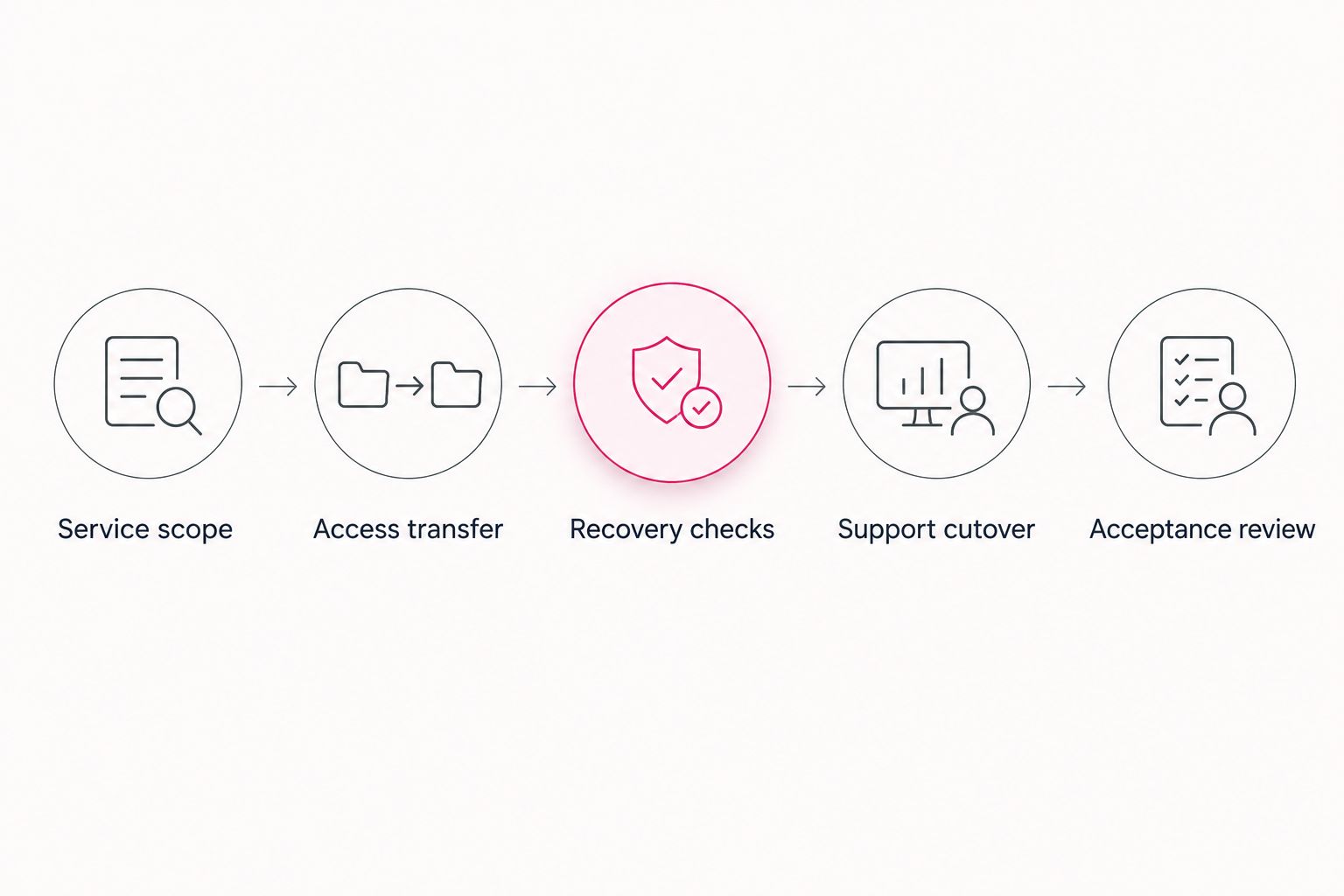
Use the following sequence for a 2026 handover. Each phase needs an owner and evidence that it is complete before the next dependency moves.
1. Service scope
List the systems the incoming provider will support and the work excluded from the agreement. Include email, employee devices, network equipment, business applications, backups, and any existing internal IT responsibilities that apply to your business.
Define what success looks like for essential workflows. An employee must be able to sign in, reach required applications, access approved files, and obtain support. Make the incoming provider's responsibilities explicit rather than assuming every connected system is included.
2. Access transfer
Confirm that your business controls its administrative accounts and recovery methods. Administrative access means permission to manage a system, not merely permission to use it. Include domain registration, email administration, cloud accounts, network management, and backup administration where applicable.
Transfer credentials through an approved secure method. Use individually assigned accounts where supported, and document which departing-provider accounts must be removed. Do not revoke access before the incoming team has verified the access it needs.
3. Recovery checks
Review which business data is backed up, who receives failure notifications, and how a restore is performed. A restore test checks whether selected backed-up data can actually be recovered. A successful backup notification alone does not answer that question.
Agree on a representative recovery check and record the result. Confirm that the incoming provider can access the recovery tools and instructions. Keep responsibility for backup monitoring explicit throughout the transfer.
4. Support cutover
Cutover is the point at which responsibility moves to the incoming provider. Before that point, tell employees where to submit requests, which issues require escalation, and whom to contact if the normal support route fails.
Avoid changing unrelated systems during the cutover. Carry open tickets into the new support process with their history and current owner. For critical unresolved issues, agree on who remains responsible until closure.
5. Acceptance review
Test the workflows agreed during scoping and record any unresolved exceptions. Confirm that alerts reach the right team, support requests reach the right queue, and your business retains the administrative access it needs.
Close the handover only after the agreed checks pass or exceptions have named owners and approved remedies. Then remove unnecessary departing-provider access and update your documentation. Acceptance is a business decision supported by tests, not simply a calendar date.
Why switching disruption varies
The work depends on your current environment and the responsibilities being transferred. Use these factors to examine a proposed plan rather than accepting an unsupported promise about transition speed.
- Documentation: Ask whether the outgoing provider has current system records, configuration details, and open-ticket histories. Identify what must be discovered rather than transferred.
- Account control: Check whether business administrators can access essential accounts and recovery methods. Resolve ownership questions before scheduling the cutover.
- Service dependencies: Identify connections between applications, identity systems, networks, and backup tools. Assign an owner to validate each business-critical connection.
- Change scope: Distinguish provider replacement from application replacement or cloud migration. Include optional changes only when they have their own approval and recovery plan.
- Contract obligations: Review termination requirements, notice provisions, licensing arrangements, and handover responsibilities in your actual agreements. Do not assume they match another business's contract.
- Internal availability: Assign someone who can approve access, answer workflow questions, and coordinate employee testing. The incoming provider cannot make every business decision for you.
For your 2026 transition, turn each factor into a question with an accountable owner. That makes uncertainty actionable without pretending every business has the same handover requirements.
Can we switch without changing our business software?
Yes—changing providers does not inherently require changing your business applications. Ask the incoming provider to identify what can remain in place and explain the reason for every proposed replacement.
Keep optional modernization outside the initial handover unless it is necessary to deliver the agreed service. A separate project gives you a clearer scope and makes troubleshooting less ambiguous.
Should we cancel the current provider before onboarding the next one?
Do not make cancellation your first technical step. Review the existing agreement and establish who will support each system while access and responsibility transfer.
Coordinate notice, handover, and access removal against the approved plan. Ending support before confirming replacement ownership leaves a responsibility gap, regardless of which provider you choose.
What should we ask the new provider to prove?
Ask for evidence of readiness to support your actual environment. Require a clear scope, verified access, a recovery check, an escalation process, and workflow acceptance results.
Use these requirements during selection, not after signing. A provider's presentation does not substitute for agreed responsibilities and acceptance evidence.
Where TeraCloud fits
TeraCloud managed IT services fit small and midsize businesses seeking outsourced support, cybersecurity, and cloud management. Its stated services include managed IT, cloud migration, cybersecurity, and data management, with 24/7 support described in its business information.
The fit still depends on your requirements. TeraCloud belongs on your shortlist when those services match the gaps you need to address; a business seeking only a narrowly defined project should assess that scope separately.
The advantage is a relevant combination of support and system-management services. The qualification is equally important: the service description does not establish your application's support terms, a transition schedule, or a contractual resolution commitment. Request those details in the proposed agreement.
FAQ
Is switching managed IT providers worth the disruption in 2026?
Switching managed IT providers is worth the disruption in 2026 when unresolved service gaps justify the handover and the incoming provider has a documented transition plan. Compare corrective action from the current provider with the replacement's responsibilities and acceptance requirements.
Will switching IT providers cause downtime?
Switching IT providers does not inherently require an outage, but uninterrupted service must not be treated as a guarantee. Identify changes that affect access or applications and agree on testing, scheduling, and recovery before cutover.
How long does switching managed IT providers take?
A transition schedule must come from the scoped handover plan. Ask the incoming provider to account for access transfer, documentation, recovery checks, employee testing, and contractual dependencies.
Do we need to replace Microsoft 365 when switching providers?
Changing managed IT providers does not inherently require replacing Microsoft 365. Verify administrative access, licensing responsibilities, support scope, and any proposed configuration changes before the handover.
Can our internal IT team stay involved during the switch?
Your internal IT team can remain involved with explicitly assigned responsibilities. Document who handles employee support, approves changes, administers systems, and leads incident escalation.
Is TeraCloud suitable for a small business changing IT providers?
TeraCloud provides managed IT, cybersecurity, cloud migration, and data management services for small and midsize businesses. Assess suitability against your documented service gaps and require a proposed scope, transition plan, and acceptance criteria.
What should we collect from the outgoing IT provider?
Collect the system documentation, administrative access, open-ticket history, backup information, and configuration records covered by your handover requirements. Also establish responsibility for licenses, pending changes, and removal of departing-provider access.
One last thing
Your acceptance checklist should describe business tasks, not just installed tools. A management agent appearing on a device proves that the agent is present; it does not prove that an employee can reach the application needed to finish work.
Ask department owners to identify essential workflows and validate them during the handover. Keep failed checks visible until they have an owner and an agreed resolution.
Related guides
- How co-managed IT works alongside existing IT staff
- Cloud backup and disaster recovery providers
- Google Workspace to Microsoft 365 migration workflow
Next step: Write a handover brief listing unresolved service problems, business-critical workflows, and acceptance checks; ask each shortlisted provider to respond to that same brief.


