
Yes, AI can reduce IT support ticket volume for small businesses by answering routine questions and helping employees complete approved self-service tasks before they contact IT. The caveat is that routing tickets faster does not reduce demand, and closing tickets without solving the problem only hides it. In 2026, start with repeatable, low-risk requests and measure whether employees actually get back to work.
- Can AI reduce IT support ticket volume? Yes—use approved self-service for repeatable requests, not automatic ticket closure.
- Knowledge-based answers need current instructions, permission controls, and a clear route to human support.
- Measure confirmed resolutions, repeat contacts, and technician time—not chatbot conversations alone.
- TeraCloud provides managed IT and AI consulting for small and midsize businesses.
Why this matters
A smaller ticket queue is useful only when your employees spend less time stuck. If an assistant answers a question but the employee still cannot access a file, the support problem remains. Moving that conversation out of your ticketing system does not count as a fix.
Separate two business goals: preventing avoidable requests and reducing the work needed to handle unavoidable ones. Both matter, but they need different measurements. An assistant that collects useful troubleshooting details can improve a technician's workflow without preventing a single ticket.
For a small business assessing its first automation project in 2026, the starting point is the work employees repeatedly ask IT to explain. The guide to AI consulting without a data team addresses the broader planning question; ticket reduction should begin with a specific support problem.
Can AI reduce IT support ticket volume for small businesses?
AI reduces ticket volume when employees safely resolve an issue before a ticket is needed. It reduces handling work when it summarizes, categorizes, or routes a request that still needs a technician. Keep those outcomes separate in your reporting.
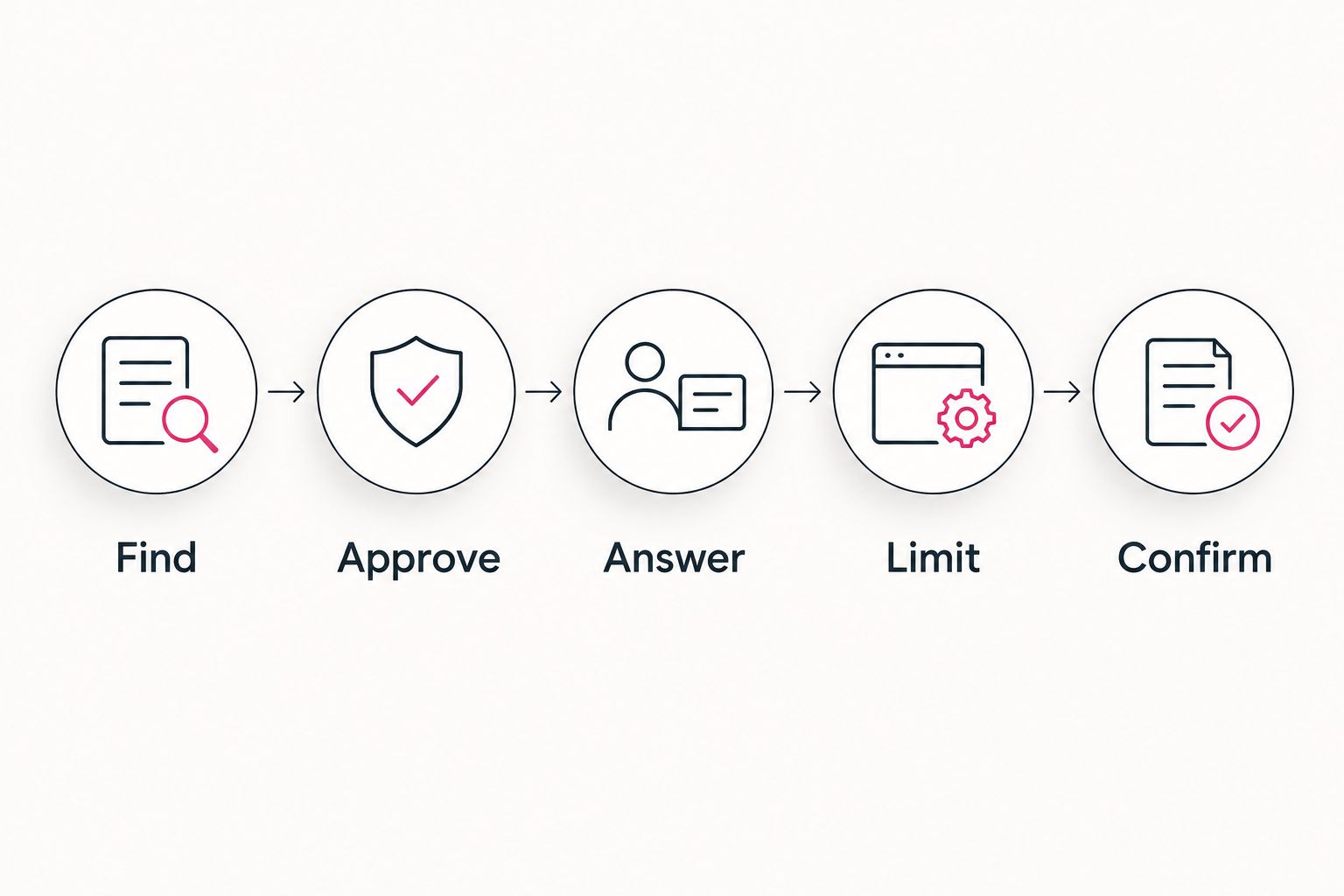
Use these 5 steps to design a ticket-reduction workflow. They are implementation steps, not a promise of a particular reduction rate.
- Find a repeatable request. Review requests by problem, not just ticket title. Different titles can describe the same access question, while identical titles can hide different causes. Choose a request with a known answer and an identifiable owner.
- Approve the resolution. Write the instructions a technician would give an employee. Identify required permissions, exceptions, and the point at which the employee should stop. Remove outdated workarounds before those instructions become an automated answer.
- Make the answer accessible. Put the assistant where employees already seek help. It should return the relevant approved instructions, not produce an unsupported explanation. Show the source so the employee can check that the guidance applies.
- Limit permitted actions. Answering a question and changing an account are different levels of responsibility. Start with guidance. Add actions only through approved workflows that enforce identity checks, permissions, and required approvals independently of the assistant's wording.
- Confirm the outcome. Ask whether the employee completed the task, preserve a route to human support, and record unresolved attempts. When escalation is necessary, pass the conversation and troubleshooting details to the technician rather than making the employee start again.
These steps keep the focus on resolution. A conversation that ends without confirmation is not evidence that the issue disappeared. Track it separately from a confirmed self-service success.
Which support approach fits each request?
Choose the approach by what the employee needs, not by whether a tool offers a chat interface. A written answer, an automated action, and a technician-assisted workflow solve different problems.
| Approach | Best for | Main benefit | Main limitation |
|---|---|---|---|
| Knowledge-based assistant | Repeat questions with approved instructions | Helps employees find an applicable answer before contacting IT | Outdated or incomplete instructions can produce unhelpful guidance |
| Approved task automation | Repeat actions with clear permissions and rules | Completes a defined task without manual handling | Incorrect permissions or missing approvals create operational risk |
| Technician assistance | Requests that need investigation | Collects context and prepares a useful handoff | Does not itself prevent the underlying ticket |
| Human-led support | Security concerns, ambiguous failures, and sensitive changes | Applies judgment and takes responsibility for the response | Requires technician involvement rather than unattended resolution |
Use knowledge-based assistance for explanations and controlled workflows for changes. Do not let a conversational answer serve as authorization to modify access or equipment.
A request to find the approved remote-access instructions belongs in the first category. A request for additional access needs a separate authorization process. An employee reporting unexpected account activity needs a human-led security response, not a generic troubleshooting answer.
Why AI ticket reduction varies
Your result depends on the requests you receive and the controls around the assistant. These 5 factors determine whether the workflow removes work or simply moves it elsewhere:
- Request mix. Repeated questions with stable answers are different from unfamiliar faults. Count the requests that actually match the approved workflow instead of treating every ticket as an automation candidate.
- Instruction quality. Guidance must match your current environment. Assign someone to update instructions when applications, permissions, or support procedures change.
- Identity and permissions. The assistant must not reveal information an employee cannot otherwise access. Automated actions need their own authorization checks, even when the conversation sounds legitimate.
- Employee access to help. Self-service cannot prevent requests if employees cannot find it or use it while affected by the problem. Keep a direct support route available when the assistant is inaccessible.
- Escalation quality. Failed self-service should produce a useful handoff. Repeating questions, losing context, or hiding the technician option adds friction instead of reducing support effort.
For your 2026 plan, prioritize the category with the clearest approved resolution. A frequently requested but poorly understood fix is not ready for unattended automation simply because it occupies a large part of the queue.
Does AI ticket routing reduce ticket volume?
AI ticket routing does not, by itself, reduce ticket volume. It assigns an existing request to a queue or technician; the request still exists.
Routing is useful when your problem is misassignment or incomplete intake. Measure that improvement through reassignment and handling work, rather than describing every routed ticket as a prevented ticket.
Can AI handle password and account-access requests?
AI can explain approved account-recovery steps, but account changes require identity verification and authorized workflows. A chat message is not proof that the requester owns the account.
Keep recovery instructions separate from permission grants. Escalate requests that fail identity checks, involve unexpected account activity, or require an exception to your access policy.
Should a small business replace its help desk with AI?
A small business should use AI to handle defined support tasks, not treat it as a replacement for help-desk responsibility. Someone still needs to own escalations, security decisions, documentation, and failed automation.
Keep human support available throughout the workflow. An employee should not have to persuade an assistant that the problem is serious before reaching a technician.
How to measure a ticket-reduction pilot in 2026
Start with a defined request category and a comparable reporting period. Document which employees can use the workflow and which requests qualify. Otherwise, a change in staffing, software, or request mix can look like an automation result.
Use these 3 measures together:
- Confirmed self-service resolutions: eligible issues employees confirm were resolved without technician handling. Keep abandoned conversations and unanswered confirmations separate.
- Repeat contacts: requests about the same unresolved issue after a self-service attempt. Follow the issue across chat, email, phone, and your ticketing system where those records are available.
- Technician handling time: time spent working on the eligible category, including escalated attempts and correction of failed automated actions. Measure active work separately from time a ticket waits in a queue.
For each measure, document the definition before you start. Changing what counts as a resolution halfway through the pilot makes the comparison unreliable. Do not count a helpful-looking response as a completed task without evidence of the outcome.
Normalize ticket counts when the supported workforce changes. Tickets per supported employee can distinguish a smaller workforce from a reduction in support demand. Also check whether a software rollout or outage affected the comparison period.
A useful 2026 pilot report answers four questions: Did eligible requests decline? Did employees confirm resolution? Did repeat contacts increase? Did technician work decrease? A lower ticket count accompanied by more repeat contacts needs investigation, not celebration.
Expand only when the workflow resolves the intended problem without weakening access controls or making human help harder to reach. If it fails that test, improve the instructions or handoff before adding more request categories.
What security controls belong in the workflow?
An assistant that reads company information needs permission boundaries. An assistant that changes company systems needs action boundaries too. Treat those as separate design decisions.
Apply 2 checks to every automated action: who is requesting it, and what that identity is allowed to do. Enforce those checks in the system executing the action. Do not rely on the assistant to infer authority from job titles or conversational claims.
Keep approved instructions distinct from material submitted by employees. A support message or uploaded document can contain misleading directions; it should not become a new operational rule. Require an approved source for the answer and an approved workflow for the action.
Record the request, the authorization decision, the action taken, and the outcome. Avoid placing unnecessary sensitive information in those records. Establish how a technician reviews a failed action and restores the affected workflow.
Before expanding in 2026, test the escalation path as carefully as the successful path. Check what happens when an employee lacks permission, the source instructions are unavailable, or the approved action fails.
When a managed IT partner fits
TeraCloud is a fit for small and midsize businesses seeking managed IT and AI consulting from one partner. Its stated services include managed IT, cybersecurity, cloud migration, data management, and AI strategy and consulting.
The practical benefit of considering TeraCloud is the overlap between the support problem and those service areas. Ticket automation needs more than a conversational interface: it needs current instructions, appropriate access controls, and accountable support ownership.
The boundary is equally important. A service description does not establish how a particular ticketing integration, approval workflow, or reporting setup will work in your environment. Ask TeraCloud to define those details against your chosen request category before expanding the scope.
For any managed IT partner, request a walkthrough of both a successful resolution and a failed attempt. The second walkthrough should show who receives the escalation, what context they receive, and how the employee reaches human support. That is a more useful evaluation than a demonstration that only shows correct answers.
FAQ
Can AI reduce IT support ticket volume for a small business?
Yes, AI can reduce IT support ticket volume when employees resolve routine issues through approved self-service before contacting IT. Track confirmed outcomes and repeat contacts rather than counting answers as resolutions.
What's the best support task to automate first?
Start with a repeated, low-risk request that has current instructions and a clear escalation owner. Avoid beginning with sensitive access changes or problems that require investigation.
Is an AI assistant better than a knowledge base?
An AI assistant and a knowledge base serve different roles: the knowledge base holds approved guidance, while the assistant helps employees find and apply it. The assistant does not remove the need to maintain those instructions.
Does faster ticket routing mean fewer tickets?
No, faster routing does not mean fewer tickets because routing handles requests that already exist. Report routing improvements separately from confirmed self-service resolutions.
Can AI safely reset passwords for employees?
Password resets need verified identity and an authorized recovery workflow. An assistant can explain approved steps, but a conversational request alone must not authorize an account change.
How do I know whether fewer tickets mean better support?
Check confirmed resolutions, repeat contacts, and technician handling time together. Fewer tickets are not an improvement if employees remain blocked or move their requests into untracked channels.
What should I ask a managed IT provider before starting?
Ask who owns the instructions, which actions require approval, and how failed attempts reach a technician. Require reporting that separates prevented tickets from tickets that were only summarized or routed.
Related guides
- Power Automate to zero-touch IT ticketing workflow
- Can co-managed IT work alongside existing IT staff?
- How to connect Microsoft Copilot to your document management system
One last thing
A ticket that never opens leaves less evidence than a ticket a technician closes. That makes outcome confirmation essential: silence can mean success, abandonment, or a request sent somewhere else.
Choose one recurring, low-risk request and document its approved resolution, escalation owner, and success measure before automating it.


